
brunolca@brunolca
brunolca/claude-plugins/tree/main/plugins/worktree-terminal
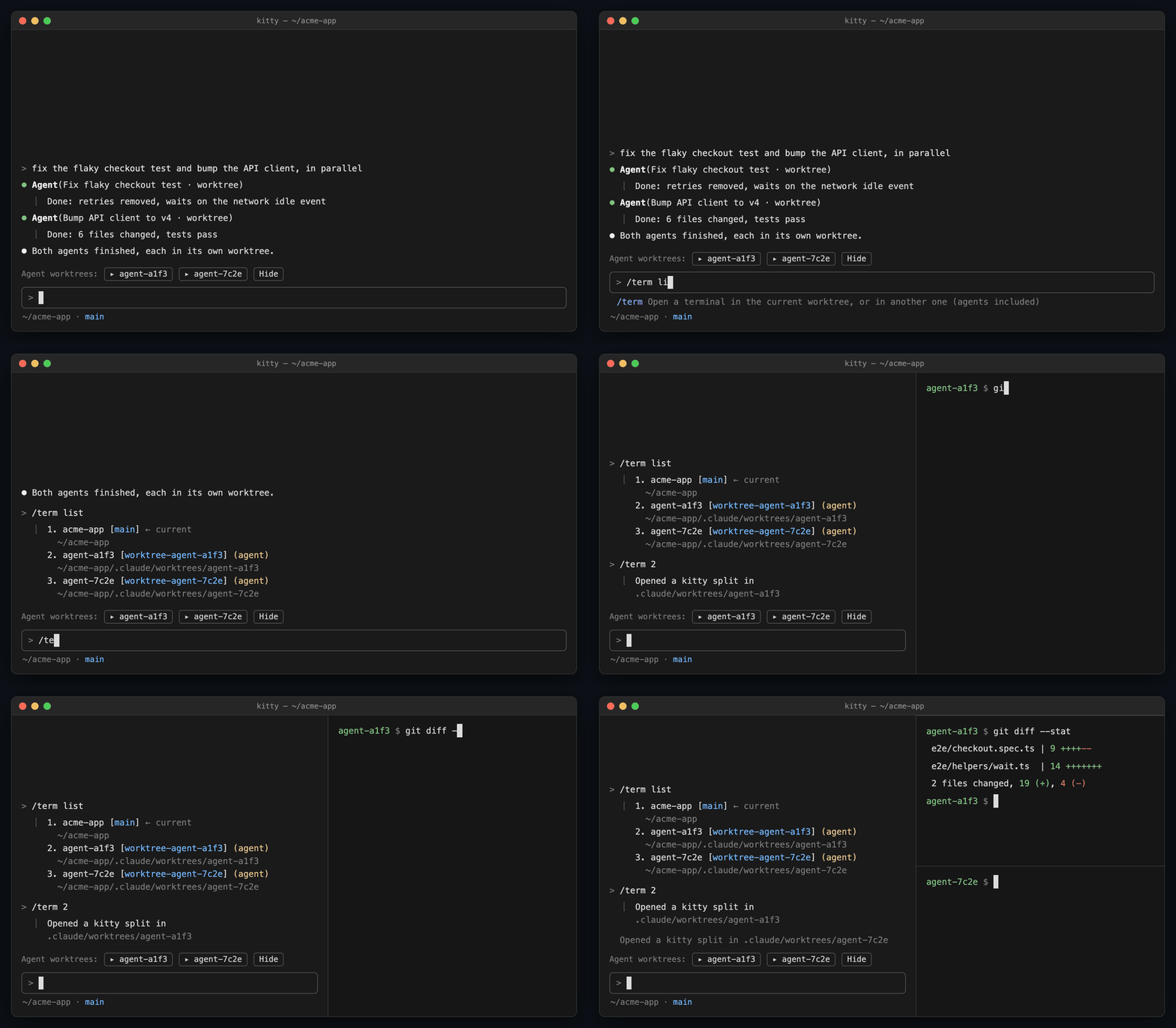
自分またはエージェントが作業している worktree でターミナルを開く Claude Code mod です。
brunolca/claude-plugins/tree/main/plugins/worktree-terminal
Claude が自分の git worktree でエージェントを実行すると(Agent の isolation: "worktree"、または EnterWorktree)、変更は .claude/worktrees/<name> に置かれます。/term はそこにシェルを直接開き、Claude の横の分割ペイン、タブ、ウィンドウとして配置できます。/term、/term list、/term <n>、/term main、/term <name> と、配置を上書きする --split/--tab/--window をサポートし、プロンプトの上には worktree ごとのボタンも表示します。/config の設定で、ターミナルアプリ(auto、tmux、zellij、kitty、wezterm、iterm、ghostty、warp、alacritty、gnome-terminal、konsole、terminal、system、custom)、配置、カスタムコマンドを選択できます。
まず作者の README で marketplace とプラグイン名を確認してください。コマンドはリポジトリの構成によって変わる場合があります。
claude plugin marketplace add brunolca/claude-plugins
claude plugin install worktree-terminal
A Claude Code mod that opens a terminal in the worktree you or your agents are working in.
When Claude runs agents in their own git worktrees (Agent with isolation: "worktree", EnterWorktree), their changes live in .claude/worktrees/<name>. /term opens a shell right there: as a split next to Claude, a tab, or a window.
| Command | Opens |
| --- | --- |
| /term | the session's current directory (the worktree, once Claude entered one) |
| /term list | lists every worktree of the repo, agents' marked |
| /term <n> / /term main / /term <name> | a worktree by its number, the main one, or part of its folder or branch name |
| … --split / --tab / --window | overrides the placement for this call |
While agent worktrees exist, a row above the prompt has one button per worktree.
/term runs at once, even mid-turn.
In /config, under worktree-terminal:
| Setting | Values |
| --- | --- |
| Terminal app | auto (default), tmux, zellij, kitty, wezterm, iterm, ghostty, warp, alacritty, gnome-terminal, konsole, terminal, system, custom |
| Placement | split (default, right of Claude), tab, window |
| Custom command | used with custom: argv split on spaces, {dir} replaced by the path, e.g. foot -D {dir} |
auto reads the environment of the window Claude runs in; a multiplexer (tmux, Zellij) wins over the terminal hosting it.
| Terminal | split | tab | window | Needs |
| --- | --- | --- | --- | --- |
| tmux | ✓ | ✓ | → tab | |
| Zellij | ✓ | ✓ | → tab | |
| kitty | ✓ | ✓ | ✓ | allow_remote_control yes; listen_on unix:/tmp/kitty recommended; splits layout for a right split |
| WezTerm | ✓ | ✓ | ✓ | wezterm on PATH |
| iTerm2 | ✓ | ✓ | ✓ | Automation permission for iTerm2 (asked once) |
| Warp | → tab | ✓ | ✓ | |
| GNOME Terminal | → tab | ✓ | ✓ | |
| Konsole | → tab | ✓ | ✓ | |
| Ghostty | → window | → window | ✓ | |
| Alacritty | → window | → window | ✓ | |
| Terminal.app | → window | → window | ✓ | |
| anything else | → window | → window | ✓ | open -a Terminal (macOS), x-terminal-emulator (Linux) |
→ is the fallback used when the terminal has no way to open that placement from outside; /term says when it fell back.
claude plugin validate plugins/worktree-terminal
claude plugin test plugins/worktree-terminal
claude --plugin-dir plugins/worktree-terminal   # load from the working copy, hot-reloaded
Adding a terminal: one entry in TERMINALS (hooks/terminals.ts) and one in CASES (tests/terminals.test.ts); a test fails while they disagree.

セッションを skill として扱うブラウザー自動化。Playwright + RVF cognitive containers + ruvector 軌跡 + AgentDB セレクターメモリー + AIDefence PII/インジェクションゲートを組み合わせます。mod(ADR-445 パターン)として、締め付け専用のツールガード、ローカルのスラッシュコマンド、コンソールが表示するステータスファイルを提供します。

Claude に register_assumption ツールを与え、現在のターンの仮定、判断、検討したが実行しなかった項目をプロンプト上部に表示します。

hermitd 用の test wrapper mod です。hermitd は chat channel、routine、heartbeat、learning loop を備えた常時稼働の Claude Code agent plugin です。