---
title: "vibeship"
url: "https://claudemods.dev/ja/builds/vibeship-ff4e85"
source: "https://github.com/wag-me/vibeship"
source_type: "github"
repo: "https://github.com/wag-me/vibeship"
author: "wag-me"
author_handle: "wag-me"
stars: 1
category: "テーマ・外観"
categories: ["themes"]
tags: ["3d", "agents", "claude-code", "hooks", "mod", "plugin", "three.js", "ui"]
permission_level: 3
scan_complete: true
install: "claude plugin marketplace add wag-me/vibeship\nclaude plugin install vibeship"
added: "2026-10-09T05:20:03.884Z"
updated: "2026-10-09T05:20:03.884Z"
locale: "ja"
content_locale: "en"
---
# vibeship
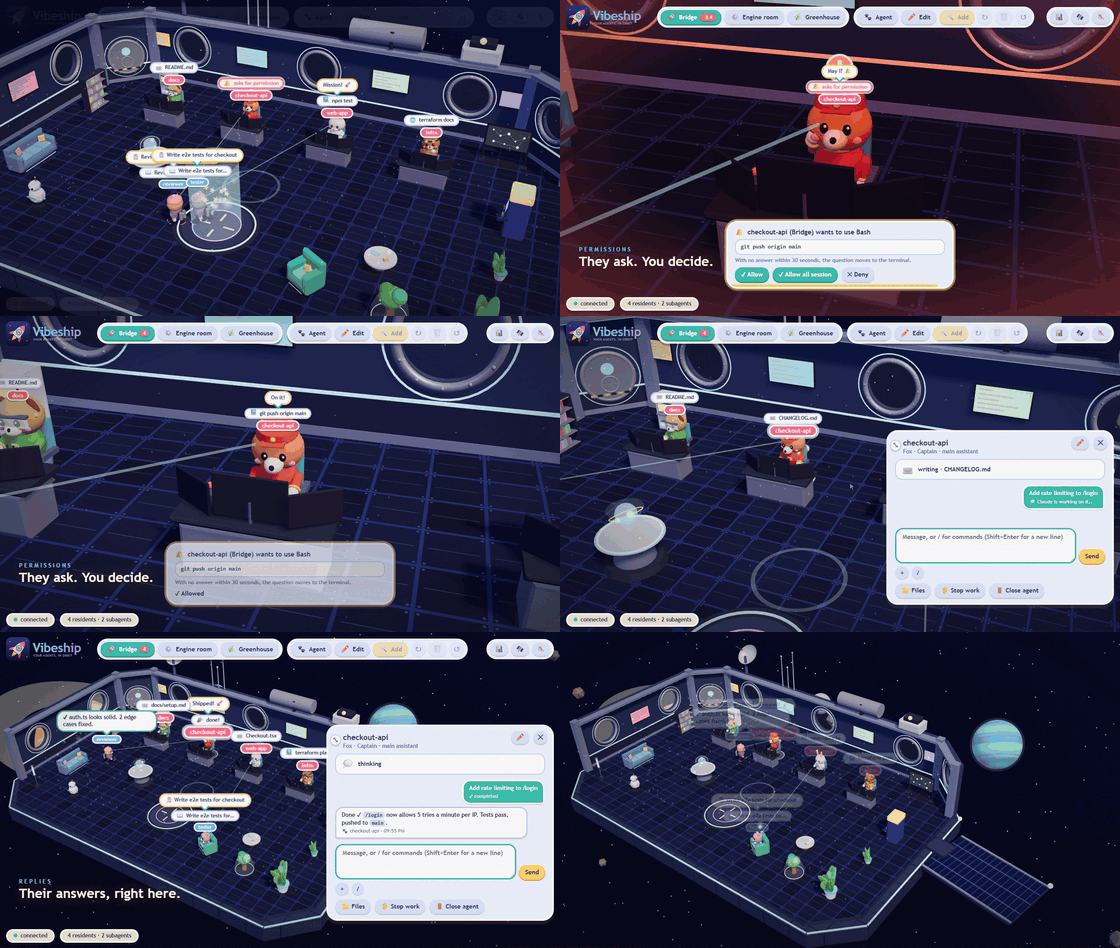
Vibeship: a 3D spaceship where your Claude Code agents work in crew uniforms. Pick the deck, furnish the stations, chat with the agents and approve permissions. Command: /vibeship
## Description
Vibeship turns Claude Code sessions into a 3D spaceship crew: every session becomes a little animal that walks, sits at consoles, thinks and cheers while it works. Each agent has a species (fox, cat, dog, raccoon, rabbit, bear, bird) and a uniform (captain, engineer, pilot, scientist, medic, explorer, cadet), spread across three locations (Bridge, Engine room, Greenhouse). From the window you can chat with agents, run slash commands, browse the files they touched, see listening servers, approve or deny permission prompts, watch subagents roam as drones, spawn new agents in new or existing projects, and view token/session statistics. Requires Claude Code 2.1.287 or later, Node.js and a WebGL browser (Windows tested). Install via /plugin marketplace add wag-me/vibeship and /plugin install vibeship@vibeship, then /vibeship. Runs a localhost-only server (127.0.0.1:47890 by default) with a token for window actions; the only outbound request is an optional update check against GitHub, disabled with VIBESHIP_NO_UPDATE_CHECK=1. Not sandboxed: same access as Claude Code. MIT licensed; Three.js bundled.
## Install
```
claude plugin marketplace add wag-me/vibeship
claude plugin install vibeship
```
## Original README

A **3D spaceship** where your [Claude Code](https://claude.com/claude-code) agents work in crew uniforms.
It is a Claude Code *mod* (plugin): every session becomes a little animal that walks, sits at the console, thinks, sleeps and cheers while it really works.
## What it does
- **See what your agents are doing**: they read, write, run commands, search the web. Each agent has a species (fox, cat, dog, raccoon, rabbit, bear, bird) and a uniform (captain, engineer, pilot, scientist, medic, explorer, cadet).
- **Three locations** (Bridge, Engine room, Greenhouse), each with its own agents. Move an agent from its card or by dragging it onto a location's tab (in edit mode).
- **Chat with your agents** from the window: see the conversation, the state of each message and the reply. You can stop or close an agent. When the window is opened again (even from another folder) or a session is resumed, the latest messages and actions are read back from Claude Code's transcript.
- Type **`/`** to run slash commands and skills, with suggestions as you type (`/compact`, `/cost`, `/model sonnet`, ...). They run in that session as if typed in the terminal and their output comes back in the chat. A bare `/model` shows a model chooser in the window.
- **See what was done**: the agent card has a **Recent activity** feed (files written with `+/−` lines, commands run, failures in red) and a **📁 Files** button. Files browses the agent's working folder and previews text files; the ones Claude touched are highlighted, and clicking an activity row opens that file. It is read-only, limited to the working folder, and hides `node_modules`, `.git` and files that usually hold secrets (`.env`, keys).
- **Servers**: when an agent starts something that listens on a port (`npm run dev`, a Flask app, a database), its card lists it under **🔌 Servers**, with the page title and an **Open ↗** button for web pages. A server still running after its agent's session has ended shows up in the footer as *left running*, with the agent it came from, so it does not keep the port busy unnoticed. Ports are read only while the window is open.
- **Permissions**: when Claude asks for confirmation, the ship goes on alert and you approve or deny from the window (if you don't answer within ~30 s the question falls back to the terminal, and the agent stays marked *🖥️ waiting in the terminal* until you answer it there). For tools that cannot run commands or change files there is also **Allow all session**, so the same question stops coming back.
- **Subagents**: a drone leaves the main agent and lands on the launch pad, where the subagent materializes. While its task runs it roams the room: it sits on free sofas and armchairs, goes to look at objects, or takes a stroll. When the task is done it returns with the result.
- **New agents**: from the *Agent* button pick location, character, uniform and folder (even a **new project**, with optional `git init`) and a terminal with Claude Code opens. Select a work station and press *Add an agent at this station* to have the new agent sit there.
- **Statistics**: the 📊 button shows tokens in/out, sessions, replies, tool usage and the busiest projects and models, over 7, 14 or 30 days (read from Claude Code's own transcripts).
- **Edit mode** (✏️): furniture can be moved, rotated, added and removed only while it is on, so nothing moves by accident when you just want to look around. Furniture catalog with 3D previews, ship lights (normal, red alert, dimmed).
## Controls
| Input | Does |
| :- | :- |
| Click | select an agent or furniture |
| Drag on empty space (or on anything, outside edit mode) | move the view |
| Right click + drag | rotate the view |
| Wheel | zoom |
| `W` `A` `S` `D` / arrows | move the view |
| ✏️ Edit, then drag | move furniture and agents |
| `R` / `Del` (edit mode) | rotate / remove the selected furniture |
## Requirements
- Claude Code **2.1.287 or later** (mods do not exist in earlier versions)
- Node.js
- A browser with WebGL (Edge, Chrome, Firefox). Windows is the tested platform; macOS is written but untested.
## Install
Inside Claude Code (any terminal, any project):
```
/plugin marketplace add wag-me/vibeship
/plugin install vibeship@vibeship
```
Restart Claude Code, then type `/vibeship` in any session.
### Updates
When a new version is out, Vibeship tells you: a notice in the window and a message in each Claude Code session. To update, in a terminal:
```bash
claude plugin marketplace update vibeship
claude plugin update vibeship@vibeship
```
then restart Claude Code. The check downloads the public `plugin.json` from GitHub every 6 hours and sends nothing; set `VIBESHIP_NO_UPDATE_CHECK=1` to turn it off.
Prefer not to install? Load it for one session from a clone of this repo:
```bash
claude --plugin-dir /path/to/vibeship
```
## Usage
| Command | What it does |
| :- | :- |
| `/vibeship` | starts the local server and opens the 3D window |
Sessions started after the window is open appear in it by themselves; for one that was already running, type `/vibeship` in it.
## Environment variables
| Variable | Effect |
| :- | :- |
| `VIBESHIP_PORT` | local server port (default 47890) |
| `VIBESHIP_DIR` | data folder (token, layout, recent folders, uploads); default `~/.claude-vibeship` |
| `VIBESHIP_NAME` | resident's name (default: folder name) |
| `VIBESHIP_LOOK` | look, `species:uniform` (e.g. `fox:3`) |
| `VIBESHIP_LOC` | location: `bridge`, `engine` or `habitat` |
| `VIBESHIP_NO_UPDATE_CHECK` | set to `1` to stop checking GitHub for new versions |
## Privacy and security: what Vibeship runs, reads and sends
Vibeship has no telemetry, no analytics and no account. Everything stays on your machine, except the update check below.
**Network**
- A local server (`node server/server.js`, started by `/vibeship`) listens **only on `127.0.0.1`** (port 47890 by default). The window is served by it and loads nothing from the internet.
- The only request that leaves your machine is the **update check**: when it starts and every 6 hours, the server downloads the public `https://raw.githubusercontent.com/wag-me/vibeship/main/.claude-plugin/plugin.json` to compare versions. It sends no data of yours. Set `VIBESHIP_NO_UPDATE_CHECK=1` to turn it off.
- For the **🔌 Servers** list, the server requests the home page of ports that your agents' processes open on this machine, to read the page title. Only while the window is open.
**Reads**
- Claude Code's transcripts in `~/.claude/projects` (or `CLAUDE_CONFIG_DIR`): chat history and activity of each session, recent sessions to resume, statistics.
- An agent's working folder, when you browse it in **📁 Files** (read-only, without `node_modules`, `.git` and files that usually hold secrets).
- Folder names, when you pick a folder for a new agent.
- The list of listening ports and running processes (PowerShell `Get-NetTCPConnection` and `Win32_Process` on Windows, `lsof` and `ps` elsewhere), to match servers to agents. Only while the window is open.
**Writes**
- `~/.claude-vibeship` (or `VIBESHIP_DIR`): the access token, the ship layout, recent folders and files you attach in the chat.
- A new project folder (and `git init`) only when you create one from the *Agent* button.
**Runs**
- Opens the window in Edge or Chrome app mode, or in your default browser.
- From the window, only when you ask: sends your messages and slash commands to the session as if typed in the terminal, stops a turn, switches the model, opens a terminal running `claude` in a folder you choose (a new agent or a resumed session), and closes an agent by stopping its Claude Code process and what it started (Vibeship's server is spared).
**Access control**
- Every action from the window requires a random **token**, saved in a file in your user folder and passed only to the window opened by `/vibeship`.
- The mod is **not sandboxed**: it has the same access as Claude Code. Only install mods from sources you trust.
## Structure
```
.claude-plugin/plugin.json plugin manifest
.claude-plugin/marketplace.json makes this repo installable with /plugin marketplace add
hooks/register.js the mod (events, /vibeship, chat commands, permissions)
server/server.js local server (SSE, commands, permissions, agent launch, stats), no dependencies
web/ the 3D window (Three.js, no build step)
js/ scene, characters, furniture, effects, audio
js/trailer/ the 30-second launch trailer, played by the window itself (/?trailer)
vendor/three/ Three.js (MIT)
tools/launch-trailer.js plays the launch trailer live, for screen capture (`npm run launch-trailer`)
tools/record-launch.js records it frame by frame to 1080p30 + soundtrack (`npm run record-launch`, MP4 with ffmpeg);
`--gif` and `--web` cut the animation above and the website's film (docs/demo.gif,
docs/demo.mp4), published on the `media` branch, not in the plugin
tests/ mod tests, server tests, live window check
website/ the project site (wag-me.github.io/vibeship), built into _site/ by website/build.sh
```
## Development
```bash
claude plugin validate .
claude plugin test . # mod tests
node --test tests/server.test.js # server tests
node tests/ui-smoke.js # opens the window in headless Edge/Chrome and checks it
```
Reload the window with Ctrl+R: files are served from disk, so changes in `web/` do not need a server restart.
To release a new version, raise `version` in `.claude-plugin/plugin.json` and push to `main`: that is what installed copies compare against.
## Contributing
Contributions are welcome, from a typo to a new feature.
- **Found a bug?** Open an [issue](https://github.com/wag-me/vibeship/issues) with your Claude Code version (`claude --version`), your OS and browser, what you did and what happened. A screenshot helps a lot.
- **Have an idea?** Open an issue first to talk about it, so nobody works on something that will not fit.
- **Want to code?** Fork the repo, make a branch, and open a pull request:
1. Run the mod from your fork with `claude --plugin-dir /path/to/your/fork`.
2. Keep the project simple: no build step and no npm dependencies. The window is plain JavaScript modules with Three.js, the server is plain Node.
3. Write UI text and code comments in English, and follow the style of the surrounding code.
4. Before opening the pull request, run the checks from [Development](#development) and add a test for what you changed when you can.
5. Keep each pull request focused on one thing and describe what it does and why.
Things that would help right now:
- **Testing on macOS and Linux.** The code is written for them but only Windows is tested.
- **Notifications** when an agent finishes or asks for a permission while the window is in the background.
- **Cost estimates** next to the token statistics.
- New characters, furniture, rooms and sounds.
- Saving the chat history to disk.
By contributing you agree that your work is released under the [MIT License](LICENSE).
## Licenses
Vibeship is released under the [MIT License](LICENSE). Three.js is included in `web/vendor/three/` under its own MIT license.