
ccdwyer@ccdwyer
ccdwyer/transit-map
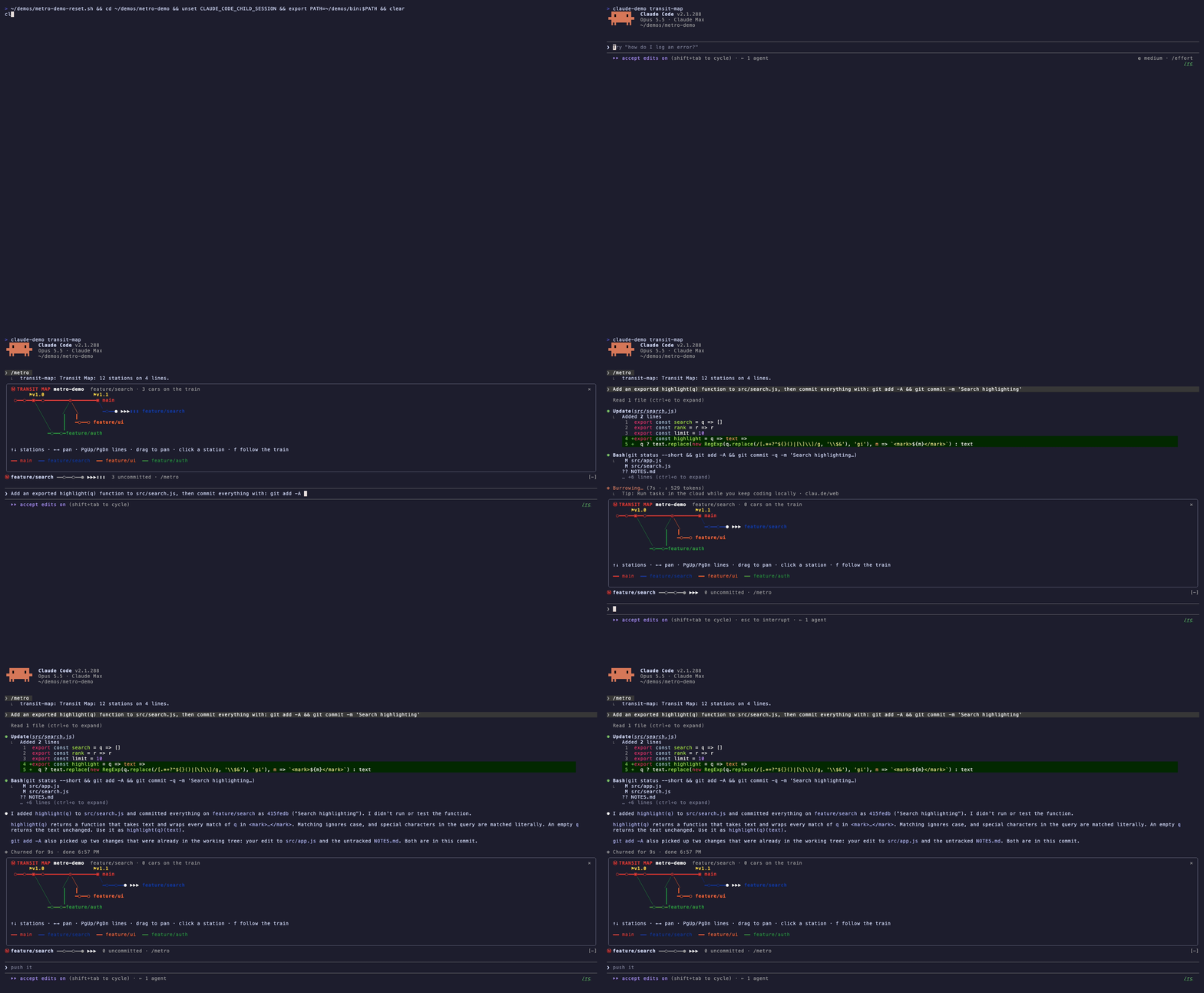
git の履歴を Vignelli 風の地下鉄路線図として描く Claude Code mod。ブランチは色付きの路線、コミットは駅、作業ツリーは列車として表示し、プラグインマーケットプレイスからインストールします。
ccdwyer/transit-map
Transit Map は、リポジトリの git 履歴を Claude Code 内に Vignelli 風の地下鉄路線図として描画します。ブランチは太く平面的な色の路線になり(幹線の main/master は常に赤)、コミットは ○ 駅、マージは ◎ 乗換駅、タグは ▣ 終点として上にラベル付きで表示されます。リモートにしかないブランチは破線で描かれます。作業ツリーは HEAD の少し先に停まる列車で、未コミットのファイル 1 つにつき 1 車両(最大 60)が付き、Claude が編集すると黄色に点灯します。地図はライブです。Claude がコミットすると新しい駅が現れ、ブランチを切り替えると列車が別の路線へ滑ります。/metro でペインに地図を開くと、パン、駅の順送り、路線のスクロール、コミット詳細、列車追従の操作とホバーツールチップを利用できます。最初に開いた後は、プロンプトの上に 1 行のストリップが表示され、現在の路線、列車、ahead/behind の数を示します。/metro strip off で非表示にできます。全ブランチの最新 120 コミットを表示し、重なった先端は駅側のラベルにまとめ、10 を超える路線は灰色の +N more lines レーンにまとめます。サブエージェントのコミットも含め、ターンごとに更新し、モバイルのような対話できない画面では通常の時刻表にフォールバックします。/plugin marketplace add ccdwyer/claude-mods、/plugin install transit-map@ccdwyer-mods、/reload-plugins の順に実行してインストールします。session.start、command.run{command=metro}、tool.call、turn.complete、ui.message、Pane と AbovePrompt 用の ui.render にフックし、コマンド登録、git プロセス実行、セッション cwd、状態の取得/設定、UI の open/resolve にはエンジン関数を呼び出します。tool.call hook は結果を監視するだけで、git コマンドや編集後の再描画に使います。git とともに完全にローカルで動作し、ネットワークには何も送信しません(PRIVACY.md を参照)。MIT ライセンスです。
まず作者の README で marketplace とプラグイン名を確認してください。コマンドはリポジトリの構成によって変わる場合があります。
claude plugin marketplace add ccdwyer/transit-map
claude plugin install transit-map
/metro draws the repo as a subway map with tags and four lines; after Claude commits, a new station appears and the train runs empty. Watch the MP4
A Claude Code mod that draws your git history as a Vignelli-style subway map.
main, master) is always red.○ stations, merges are ◎ interchanges, and tags are ▣ termini with their name above.╍.▶▶▶ past HEAD on your current line, with one car ▮ per uncommitted file (up to 60). Cars light up yellow when Claude edits that file./metro opens the map in a pane:
| Key | Action |
|---|---|
| ← →, or drag | pan |
| ↑ ↓ | walk the stations |
| PgUp PgDn | scroll lines into view |
| click or Enter | show a commit's hash, author, subject and files |
| f | follow the train |
Hover over a station to see its subject.
After you open the map once, a one-row strip above the prompt shows the line you're on, your train and ahead/behind counts. /metro strip off hides it.
The map shows the newest 120 commits across all branches, plus HEAD's own history if you've checked out something older. A branch that shares another's tip (one you just created, or a merged remote) has no line of its own; its name rides beside the station. Past 10 lines, the rest share a grey +N more lines lane. The map refreshes after each turn, so commits a subagent made appear too. Surfaces without interactive regions, such as mobile, get a plain timetable instead.
/plugin marketplace add ccdwyer/claude-mods
/plugin install transit-map@ccdwyer-mods
/reload-plugins
Events this mod hooks, as claude plugin validate reads the module:
session.startcommand.run{command=metro}tool.callturn.completeui.messageui.render{component=Pane, requestId=transit-map}ui.render{component=AbovePrompt}Engine calls it makes: $.command.register, $.process.run (via git), $.session.cwd (via repoRoot), $.state.get, $.state.set, $.ui.open, $.ui.resolve.
A tool.call hook sits in the middle of every tool call: it can see the call, refuse it, or add context to its result. This mod only observes the result, to redraw the map after git commands and edits.
It runs entirely on your machine, using local git only. It sends nothing over the network. Full policy: PRIVACY.md.
MIT

neural-trader(v2.7+)を基盤にしたニューラル取引戦略です。自己学習する LSTM/Transformer/N-BEATS モデル、Rust/NAPI バックテスト、112+ の MCP ツール、スウォーム協調、ポートフォリオ最適化を備えます。

claude-seo 用の任意の mods companion。Claude Code 内では mod(function-hook plugin)として動くため、skill が要求するだけのことも強制できる。

Claude Code 用 Repowise プラグイン。Graph、Git、Docs、Decisions、Code Health の 5 層のコードインテリジェンスを提供し、MCP ツール、slash commands、自動 skills で Claude にアーキテクチャ、所有者、ホットスポット、欠陥リスクを理解させます。spinner ヒント、margin notes、変更レビュー、/lens パネルを備えた Claude Code mod の Lens も含みます。