
simplecore-inc@simplecore-inc
simplecore-inc/claude-mods/tree/main/mods/accounts
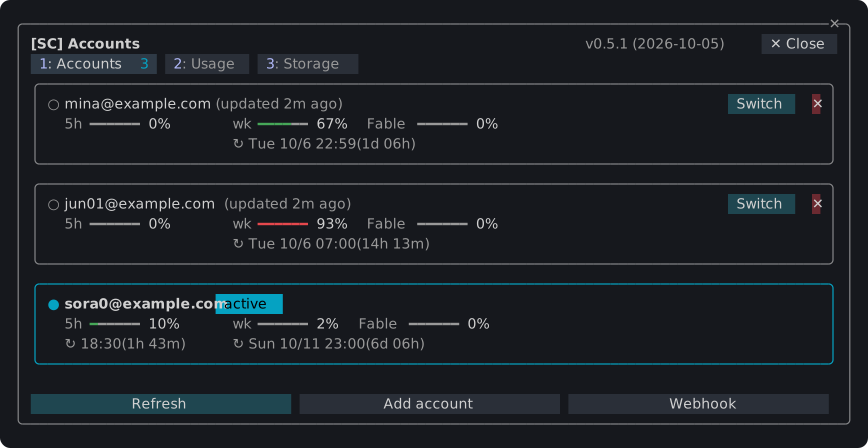
SimpleCORE Claude Mods の Accounts プラグインです。複数の Claude アカウントを切り替え、使用量とストレージを表示し、プロンプト上部にステータスバンドを追加します。
simplecore-inc/claude-mods/tree/main/mods/accounts
sc-accounts は simplecore-inc/claude-mods の一部です。/sc:accounts で複数の Claude ログインを保存して実行中のセッションを切り替え、5時間・週次・モデル別の使用量とリセット時刻を表示します。また、日・モデル・プロジェクト別のローカル token 使用量、~/.claude の内容とクリーンアップ、アカウント・モデル・タスク・ブランチ・変更行数のステータスを表示します。任意の webhook 送信はデフォルトでオフです。インストール:claude plugin marketplace add simplecore-inc/claude-mods;claude plugin install sc@simplecore-mods。
まず作者の README で marketplace とプラグイン名を確認してください。コマンドはリポジトリの構成によって変わる場合があります。
claude plugin marketplace add simplecore-inc/claude-mods
claude plugin install sc-accounts




Plugins for Claude Code that add panes, a status band and slash commands to the terminal: switch between several Claude accounts, watch their usage limits and token use, see and clean up what Claude Code keeps on the machine, and keep agents, worktrees, checkpoints, diffs and memory files in one pane. Install one plugin, sc, and you get them all.
/sc:accounts

~/.claude holds by kind and project, and a cleanup of idle sessions confirmed by typing a word./sc:workspace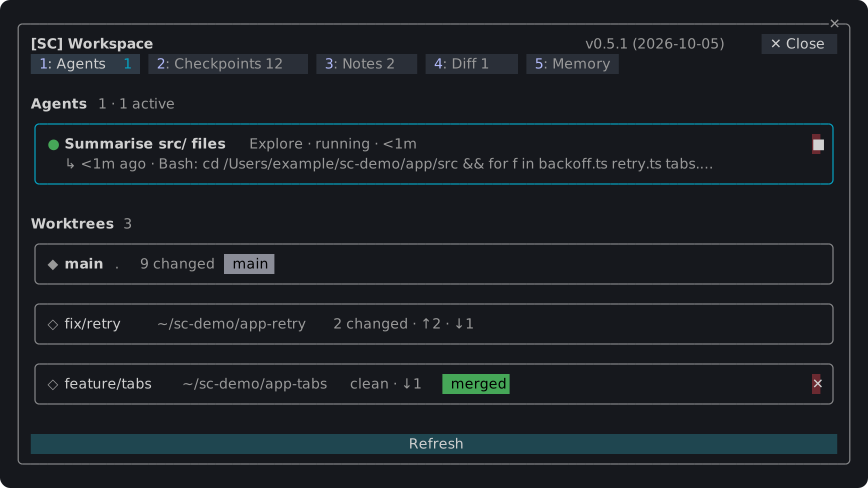
Anything that cannot be taken back asks in a dialog first; Esc cancels.
claude plugin marketplace add simplecore-inc/claude-mods
claude plugin install sc@simplecore-mods
sc installs sc-accounts and sc-workspace with it. The plugins are installed for your user, so they run in every session. Run /reload-plugins in a session that was already open.
To use a local clone instead, add its folder as the marketplace:
git clone https://github.com/simplecore-inc/claude-mods.git
claude plugin marketplace add ./claude-mods
claude plugin install sc@simplecore-mods
claude plugin marketplace update simplecore-mods
claude plugin update sc@simplecore-mods
claude plugin update sc-accounts@simplecore-mods
claude plugin update sc-workspace@simplecore-mods
Then run /reload-plugins in each open session. With a local clone, git pull in the clone and /reload-plugins are enough: a plugin from a folder marketplace is read from that folder.
claude plugin uninstall sc@simplecore-mods
claude plugin prune
claude plugin marketplace remove simplecore-mods
prune removes sc-accounts and sc-workspace, which were installed as dependencies of sc; uninstall them by name instead if you installed them yourself. marketplace remove is only needed when you will not install from it again.
The mods leave some data behind, which you can delete by hand:
| What | Where |
| --- | --- |
| Saved logins | macOS: keychain items of the service account-switch. Elsewhere: ~/.claude/account-switch/ |
| Webhook token | macOS: the keychain item of the service sc-webhook. Elsewhere: ~/.claude/sc-accounts/webhook-token |
| Webhook template | ~/.claude/sc-accounts/ |
| Settings, account index, notes, checkpoint lists | ~/.claude/plugins/store/sc-*.json |
| Checkpoints | in each repository: the refs under refs/sc/ and the files .git/sc-snapshot-*.index |
~/.claude is CLAUDE_CONFIG_DIR when that is set. To delete a repository's checkpoints:
git for-each-ref --format='%(refname)' refs/sc/ | xargs -n 1 git update-ref -d
rm -f "$(git rev-parse --git-dir)"/sc-snapshot-*.index
The account you are logged in with stays logged in; only the saved copies go.
The mods show English, and Korean where Claude Code's language setting is Korean; any other language falls back to English. Without that setting, LC_ALL, LC_MESSAGES and LANG decide, in that order.
Developing a mod covers the layout, the rules the engine enforces, the checks and how to release.

キャッシュを考慮する /loop worker と CronCreate のバックグラウンド自動化。ruflo ファミリーの繰り返しタスクすべてに使う基盤プラグインです。

Claude Code mod としての claude-reflect。短いプロンプトごとにモデルチェックを行い、再利用できる修正(任意の言語)を見つけ、プロンプト上のバンドを 1 回押すだけで CLAUDE.md に保存します。


Claude Code 内の初期版 crit。ペインで会話、差分、ファイルにコメントし、レビューを Claude に送り、スレッドで Claude の返答を読めます。
