Running multiple Claude Code sessions in parallel is great. Until my 16 GB Mac starts yelling at me. Idle sessions, leftover dev servers, orphaned processes, all eating up memory. So I built watch-my-ram, a small Claude Code mod to keep an eye on my Mac's memory. Here's what it does: • Shows RAM usage and memory pressure right above the prompt. • /watch-my-ram lists active sessions, their memory usage, PR merge status, leftover dev processes, and open ports. • Warns when Claude starts running tests while another session is already testing. It only reads and warns. It doesn't kill anything automatically. You can ask Claude for suggestions and decide what to close. It's open source. Link to repo: https://github.com/nguyenphusi/watch-my-ram P.S. A better solution is probably getting a new Mac with more RAM though 😂
watch-my-ram: Mac のメモリを監視する Claude Code MOD
プロンプトの上に RAM 使用量とメモリプレッシャーを表示し、アクティブなセッション、残っている開発プロセス、開いているポートを一覧表示する /watch-my-ram コマンドを追加する、小さなオープンソースの Claude Code MOD です。読み取りと警告のみを行い、何も自動で終了させることはありません。
この mod について
複数の Claude Code セッションを並行して実行するのは素晴らしいことです。私の 16 GB Mac が悲鳴を上げ始めるまでは。アイドル状態のセッション、残った開発サーバー、孤立したプロセスが、すべてメモリを食っています。
そこで私は watch-my-ram を作りました。Mac のメモリを監視するための小さな Claude Code MOD です。
できることは次のとおりです: • プロンプトのすぐ上に RAM 使用量とメモリプレッシャーを表示します。 • /watch-my-ram は、アクティブなセッションとそのメモリ使用量、PR のマージ状態、残った開発プロセス、開いているポートを一覧表示します。 • 別のセッションがすでにテストを実行しているときに Claude がテストを開始すると警告します。
読み取りと警告のみを行います。何も自動で終了させません。Claude に提案を尋ねて、何を閉じるかを自分で決められます。
オープンソースです。リポジトリへのリンク: https://github.com/nguyenphusi/watch-my-ram
インストール
まず作者の README で marketplace とプラグイン名を確認してください。コマンドはリポジトリの構成によって変わる場合があります。
claude plugin marketplace add nguyenphusi/watch-my-ram
claude plugin install watch-my-ram@watch-my-ram
原文 / README
Running multiple Claude Code sessions in parallel is great. Until my 16 GB Mac starts yelling at me.
Idle sessions, leftover dev servers, orphaned processes, all eating up memory.
So I built watch-my-ram, a small Claude Code mod to keep an eye on my Mac's memory.
Here's what it does:
• Shows RAM usage and memory pressure right above the prompt.
• /watch-my-ram lists active sessions, their memory usage, PR merge status, leftover dev processes, and open ports.
• Warns when Claude starts running tests while another session is already testing.
It only reads and warns. It doesn't kill anything automatically. You can ask Claude for suggestions and decide what to close.
It's open source. Link to repo: https://github.com/nguyenphusi/watch-my-ram
P.S. A better solution is probably getting a new Mac with more RAM though 😂
バッジを取得
あなたのプロジェクトですか?このバッジを README やサイトに貼ると、このページにリンクします。

関連作品
「Context Diet」を紹介する Reddit 投稿。これは、大規模なツール出力がコンテキストウィンドウを圧迫するのを防ぐことを目的とした Claude Code モッドです。投稿テキストには投稿メタデータ(著者、サブレディット、リンク/コメントのプレースホルダー)のみが含まれており、リポジトリへのリンク、インストール手順、デモメディアはありません。そのため、このモッドはソースだけでは検証できません。
✳︎ Context Diet:巨大なツール出力がコンテキストを圧迫するのを防ぐ Claude Code モッド
└─ 会話をもっと使いやすく
Context Diet:巨大なツール出力がコンテキストを圧迫するのを防ぐ Claude Code モッド
コンテキストウィンドウを脳として描画。ツール呼び出しで対応する脳領域が光り、使用量が増えるほど混み合い、compact 時には睡眠のような整理を表現します。

working-memory

Claude Code の function hooks プラグイン。主会話が idleMinutes(既定 50 分)放置されたとき、プロンプトキャッシュが切れる前に compact し、すべての compact に AGENTS.md の Compact Instructions を渡す。turn 実行中・minMessageTokens 未満・cutoffMinutes 超過時はスキップし、その理由をトランスクリプトに残す。
✳︎ idle-compact
└─ 会話をもっと使いやすく
idle-compact

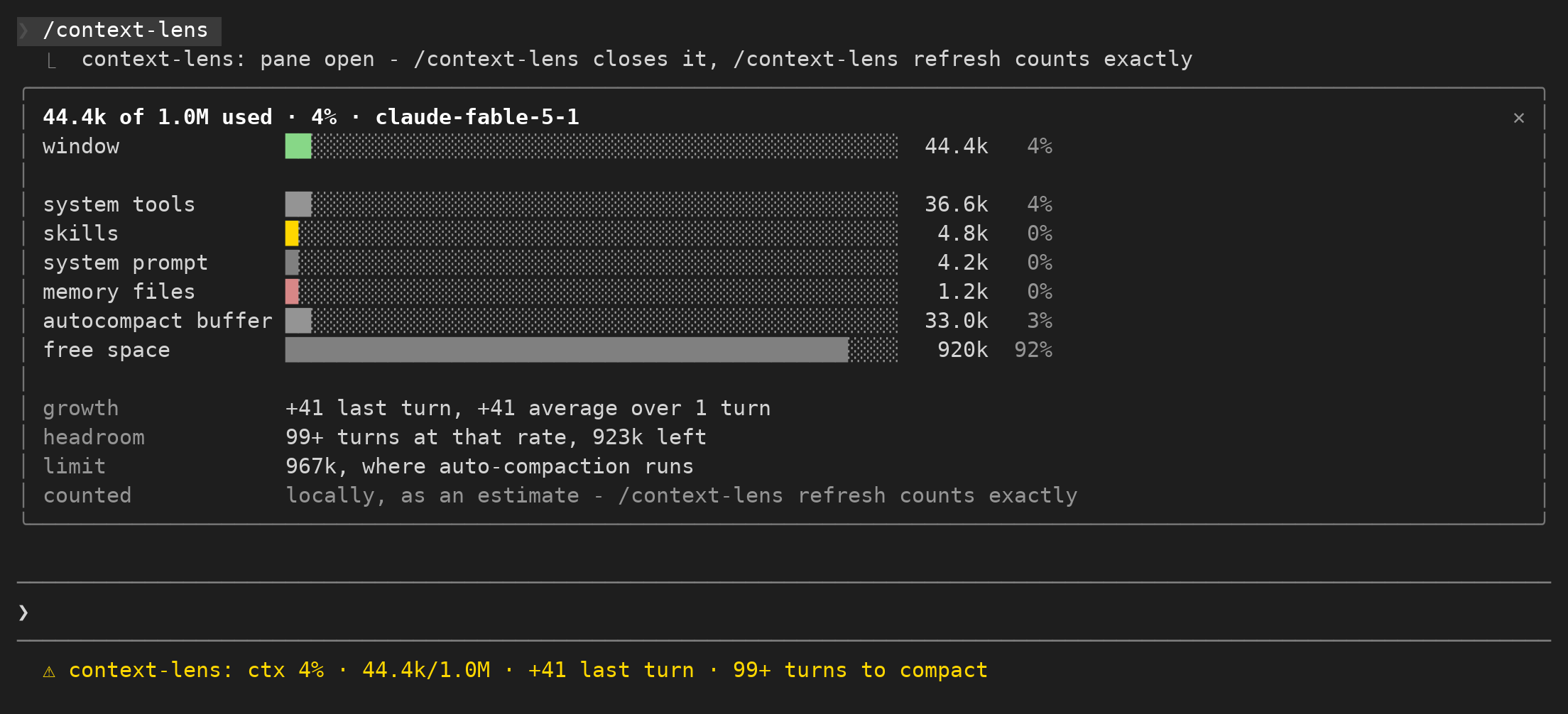
コンテキストウィンドウの使用量と各ターンの増加を表示し、整理のタイミングを判断できます。
context-lens
Crew は、AI 作業の引き継ぎのためのプレーン Markdown の記録管理システムで、GitHub ガイドへのリンクを含む Threads 投稿で共有されています。
✳︎ 「完了」は、次の人がファイルを探し回らなければならないなら、引き継ぎではない。Crew keeps A
└─ 会話をもっと使いやすく
「完了」は、次の人がファイルを探し回らなければならないなら、引き継ぎではない。Crew keeps A

lcm はエージェントをコーディングするための共有メモリ インフラストラクチャであり、sliding-window の忘却を、SQLite の永続性、DAG のサマリー、および cross-session メモリを備えた人間とエージェントの永続的なランタイムに置き換えます。
✳︎ lcm
└─ 会話をもっと使いやすく