
skanehira@skanehira
1/
サイドパネルにセッションの概要を表示するClaude Modsを作りました 複数のセッションを並行で進めると現状がよくわからなくなるので、そういうときに便利です https://github.com/skanehira/claude-recap-plus
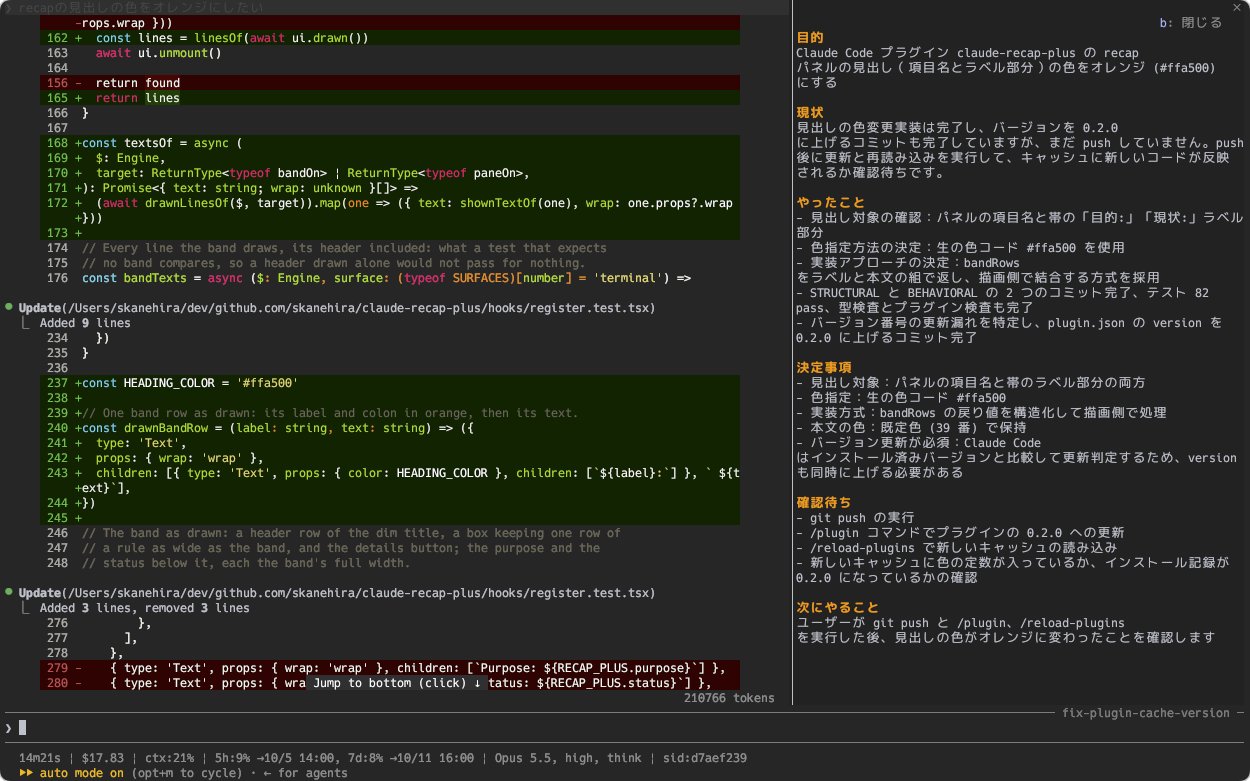
プロンプトのすぐ上にセッションの要約を表示するClaude Code mod:目的、ステータス、完了項目、決定事項、対応待ち項目、次のステップ。
サイドパネルにセッションの概要を表示するClaude Modsを作りました 複数のセッションを並行で進めると現状がよくわからなくなるので、そういうときに便利です https://github.com/skanehira/claude-recap-plus
recap-plusは、プロンプトの上に要約バンドを表示するClaude Codeプラグインです。これにより、会話をスクロールすることなく、各セッションの目的とステータスを確認できます。メイン会話のターンごとに更新され、進行中の状態は「(working)」と表示されます。また、/recap-plusコマンドまたはバンドの詳細ボタンで展開すると、目的、ステータス、完了、決定事項、対応待ち、次のステップが表示されます。要約はセッションごとに保存され、言語設定に従い、セッション自身のHaikuアカウントを使用して生成されるため、トークンを消費します。フックが有効になっている必要があります。インストールは、/plugin marketplace add skanehira/claude-recap-plus、/plugin install recap-plus@claude-recap-plus、/reload-pluginsで行います。VS Code拡張機能、モバイル、またはclaude -p実行では利用できません。オプションでカスタムキーバインディング(ペインを開くにはctrl+x b、バンドを折りたたむにはctrl+x i)を設定できます。
まず作者の README で marketplace とプラグイン名を確認してください。コマンドはリポジトリの構成によって変わる場合があります。
claude plugin marketplace add skanehira/claude-recap-plus
claude plugin install recap-plus
A Claude Code mod that shows a session summary right above the prompt. When you switch between sessions, you can see what each is for and where the work stands without scrolling through the conversation.
── recap-plus ──────────────────────────────────────────────────── b: details
Purpose: Add retry with backoff to the payment webhook handler
Status: The tests pass locally. Claude is waiting for your OK to open the pull
request.
Run these commands in Claude Code:
/plugin marketplace add skanehira/claude-recap-plus
/plugin install recap-plus@claude-recap-plus
/reload-plugins
Type /recap and check that /recap-plus appears. You can also check that recap-plus@claude-recap-plus is enabled with claude plugin list.
If you installed the plugin under its former name, disable that copy in /plugin before installing this one. Saved summaries and usage totals are not migrated; the new plugin rebuilds summaries from the conversation and starts usage totals from zero. Existing files are left in place.
Start a conversation as usual. The band shows the session's purpose and status, and updates after each turn of the main conversation. During a turn, it keeps the previous summary and marks the status with (working). The first summary appears after the first turn finishes.
Open the full summary with /recap-plus or the band's details button:
| Part | What it shows | | -------------- | --------------------------------------------------------------------------- | | Purpose | What the session is for, including the target file, feature or pull request | | Status | Where the work stands now | | Done | The latest 5 completed items | | Decisions | The latest 5 decisions, including answers to Claude's questions | | Waiting on you | The latest 5 things Claude is waiting for you to answer or do | | Next | What Claude will do next |
Text wraps to the available width. Close the pane with Esc or its close button; press b when the pane has focus. The band is hidden while the pane, a dialog or a survey is shown.
Summaries are saved per session. Resuming a session shows its saved summary, or generates one if it is missing or out of date. /clear starts a new summary.
Without custom bindings, use /recap-plus to open the pane, or ctrl+x tab to focus the band and then b. Use ctrl+x ctrl+a to fold or restore the band.
For shorter access, add these bindings to the Chat context in ~/.claude/keybindings.json. /keybindings opens that file. If a Chat context already exists, add the two entries to its bindings. Changes apply without restarting Claude Code.
{
  "bindings": [
    {
      "context": "Chat",
      "bindings": {
        "ctrl+x b": "app:cycleDiffBase",
        "ctrl+x i": "abovePrompt:toggle"
      }
    }
  ]
}
| Keys | Action | | -------- | --------------------------------------------------- | | ctrl+x b | Open the summary pane, or close it when it is shown | | ctrl+x i | Fold or restore the band |
ctrl+x b works only while the band or summary pane is visible. If the band is folded or a dialog is open, use /recap-plus once the dialog closes. In the diff panel, ctrl+x b retains its usual action of cycling the comparison base.
The summary follows Claude Code's language setting, for example in ~/.claude/settings.json:
{
  "language": "Japanese"
}
Japanese settings such as Japanese, 日本語, ja and ja-JP give Japanese labels and summaries. Other languages give English labels and summaries in the configured language. With no setting, both are English.
After changing the setting, run /reload-plugins or restart the session. Existing summary text changes language after the next turn.
The mod uses Haiku through the same account and provider as your Claude Code session. It calls Haiku after each main conversation turn, and when opening a session that needs a new summary. These calls use tokens and follow your session's billing arrangements.
Summary requests include the previous summary, your request, Claude's final answer, questions and answers, and selected tool activity such as command descriptions, file paths, URLs and search queries. When rebuilding a summary, they can also include earlier requests and the compaction summary. File-read and file-search tool activity is excluded; text quoted in a request or answer can still be included.
Non-interactive runs (claude -p) do not generate summaries. To stop Haiku calls, disable the plugin in /plugin or run:
claude plugin disable recap-plus@claude-recap-plus
There is no mode that keeps the band without Haiku calls. See request details and usage totals for more information.
Refresh the marketplace, update the plugin, and restart Claude Code:
claude plugin marketplace update claude-recap-plus
claude plugin update recap-plus@claude-recap-plus
/plugin, run /reload-plugins, and start a turn. Restore a folded band with ctrl+x ctrl+a or ctrl+x i if configured.claude -p runs./recap-plus is unavailable, try the band's details button or ctrl+x b if configured.claude plugin uninstall recap-plus@claude-recap-plus
claude plugin marketplace remove claude-recap-plus
Remove the two custom bindings from ~/.claude/keybindings.json if you added them. To also delete all saved summaries and usage totals:
rm ~/.claude/plugins/store/recap-plus_*.json
The documents below are in Japanese.

キャッシュを考慮する /loop worker と CronCreate のバックグラウンド自動化。ruflo ファミリーの繰り返しタスクすべてに使う基盤プラグインです。

Claude Code mod としての claude-reflect。短いプロンプトごとにモデルチェックを行い、再利用できる修正(任意の言語)を見つけ、プロンプト上のバンドを 1 回押すだけで CLAUDE.md に保存します。


Claude Code 内の初期版 crit。ペインで会話、差分、ファイルにコメントし、レビューを Claude に送り、スレッドで Claude の返答を読めます。