
fatwang2@fatwang2
fatwang2/Pulse/tree/main/plugins/claude-code
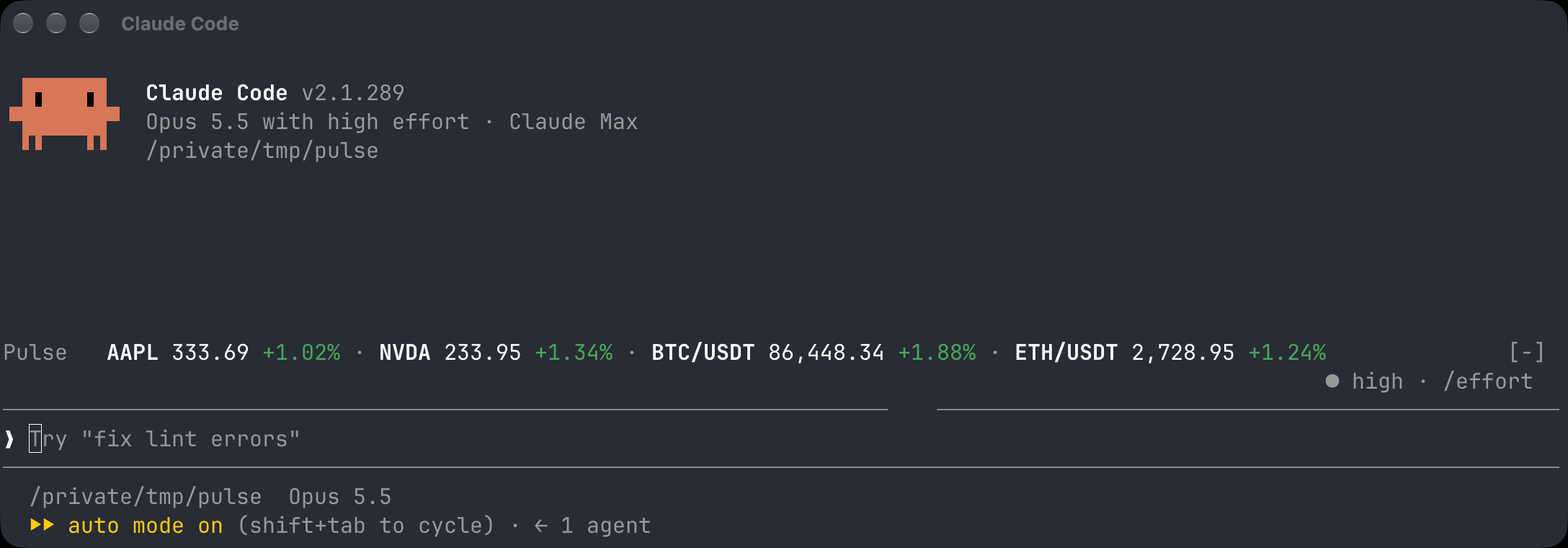
Claude Code 向け Pulse。プロンプトの上に株式と暗号資産の相場を表示し、/pulse パネルでウォッチリストを管理したり、MCP 経由で Pulse Mac のウォッチリストを表示したりできます。
fatwang2/Pulse/tree/main/plugins/claude-code
Pulse CC は、プロンプトの上にリアルタイムの相場帯を表示し、株式と暗号資産のウォッチリストを管理する /pulse パネルを提供する Claude Code mod です。AAPL、600519.SS、BTC/USDT のようなティッカーを追加できます。株式データは Yahoo Finance、暗号資産データは Binance の公開 Spot API から取得し、およそ 1 分ごとに更新します。付属の MCP 接続でローカルの Pulse Mac アプリに接続し、Mac のウォッチリストから選んだティッカーを表示することもできます。その読み取りには権限ルールが必要です。fatwang2/Pulse マーケットプレイスから claude plugin marketplace add fatwang2/Pulse && claude plugin install pulse-cc@pulse でインストールします。mods を有効にした Claude Code 2.1.287+ が必要です。ローカルのウォッチリストデータは Claude Code のプラグインストアに保存され、プラグインはモデルを呼び出さず、相場プロバイダーにはシンボルだけを送ります。
まず作者の README で marketplace とプラグイン名を確認してください。コマンドはリポジトリの構成によって変わる場合があります。
claude plugin marketplace add fatwang2/Pulse
claude plugin install pulse-cc
Market quotes above your Claude Code prompt. Open /pulse to manage the
watchlist while you work. Keep your own watchlist of stocks and crypto, or
connect Pulse Mac to display selected tickers from its watchlists through MCP.
Requires Claude Code 2.1.287 or later, with Mods enabled. The ticker and
panel support the terminal and Claude Desktop's Code tab in local sessions.
Headless (claude -p / Agent SDK) sessions do not poll or draw a ticker;
Claude Desktop starts polling when its window attaches to the session.
claude plugin marketplace add fatwang2/Pulse
claude plugin install pulse-cc@pulse
Restart Claude Code or run /reload-plugins, then add tickers:
/pulse add AAPL
/pulse add NVDA
/pulse add MSFT
/pulse add BTC/USDT
/pulse
The initial watchlist is empty. Add ticker symbols, not company names.
Examples: AAPL, BRK-B, 0700.HK, 600519.SS, 7203.T, ^GSPC.
Hong Kong leading zeros are normalized; Shanghai .SH is accepted as an alias
for .SS. The quote source's coverage determines which tickers return a quote.
Unknown tickers stay visible with an error so you can correct or remove them.
Add crypto as a pair written BASE/QUOTE, as in Pulse Mac: BTC/USDT,
ETH/USDT, SOL/USDC. Stocks and crypto share one list and one band. A symbol
with a dash, such as BTC-USD, is read as a ticker rather than a pair.
To update an installed plugin:
claude plugin marketplace update pulse
claude plugin update pulse-cc@pulse
Restart Claude Code or run /reload-plugins to apply the update.
| Command | Action |
| --- | --- |
| /pulse | Open or close the panel |
| /pulse add <ticker> | Add a ticker |
| /pulse remove <ticker> | Remove a ticker |
| /pulse source cc | Use the independent Pulse CC watchlist |
| /pulse source mac | Read Pulse Mac watchlists and select tickers to display |
| /pulse refresh | Request one refresh round, including while paused |
| /pulse off | Pause automatic refresh; keep the watchlist and cached quotes |
| /pulse on | Resume automatic refresh |
| /pulse help | Show command usage |
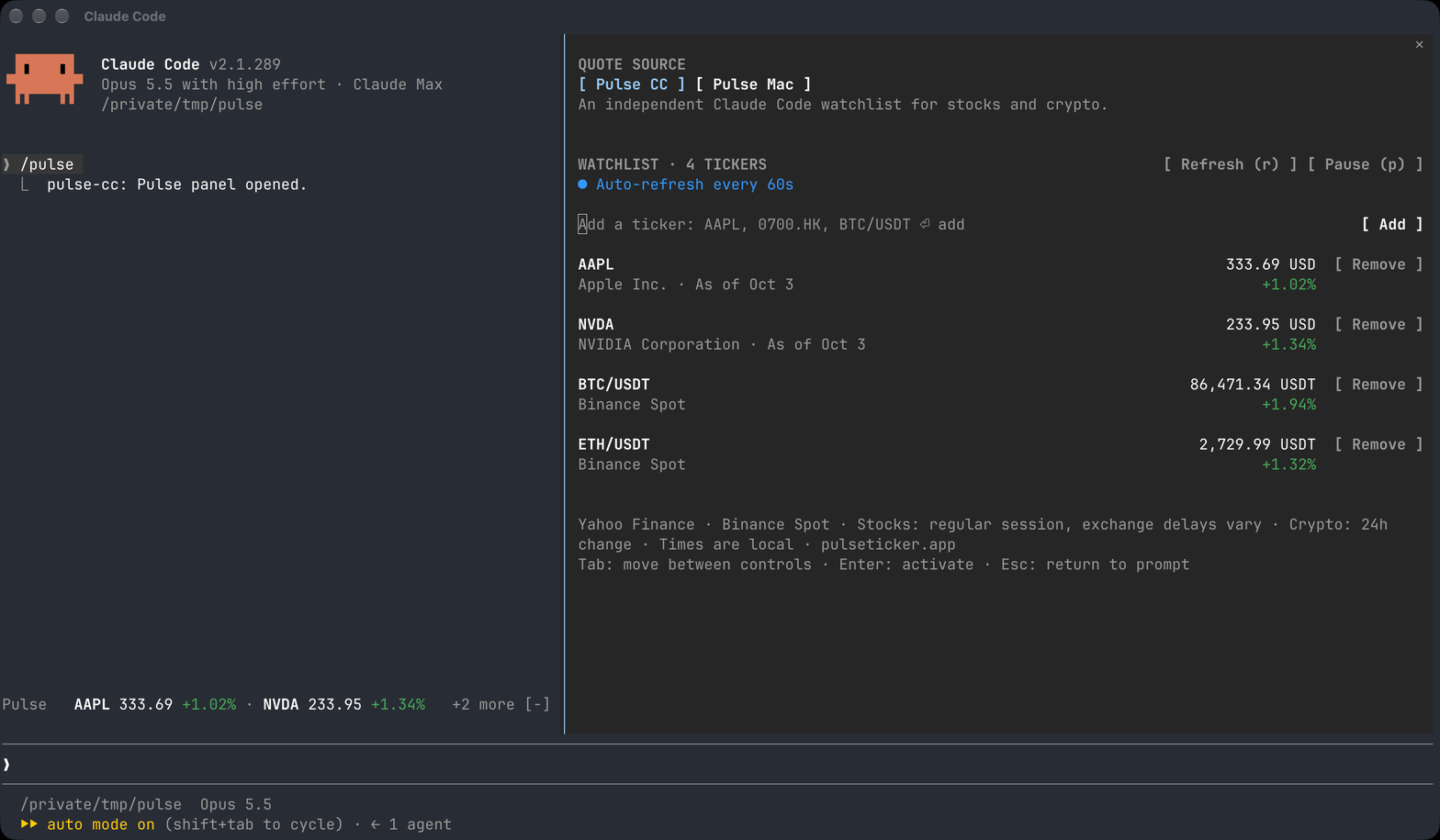
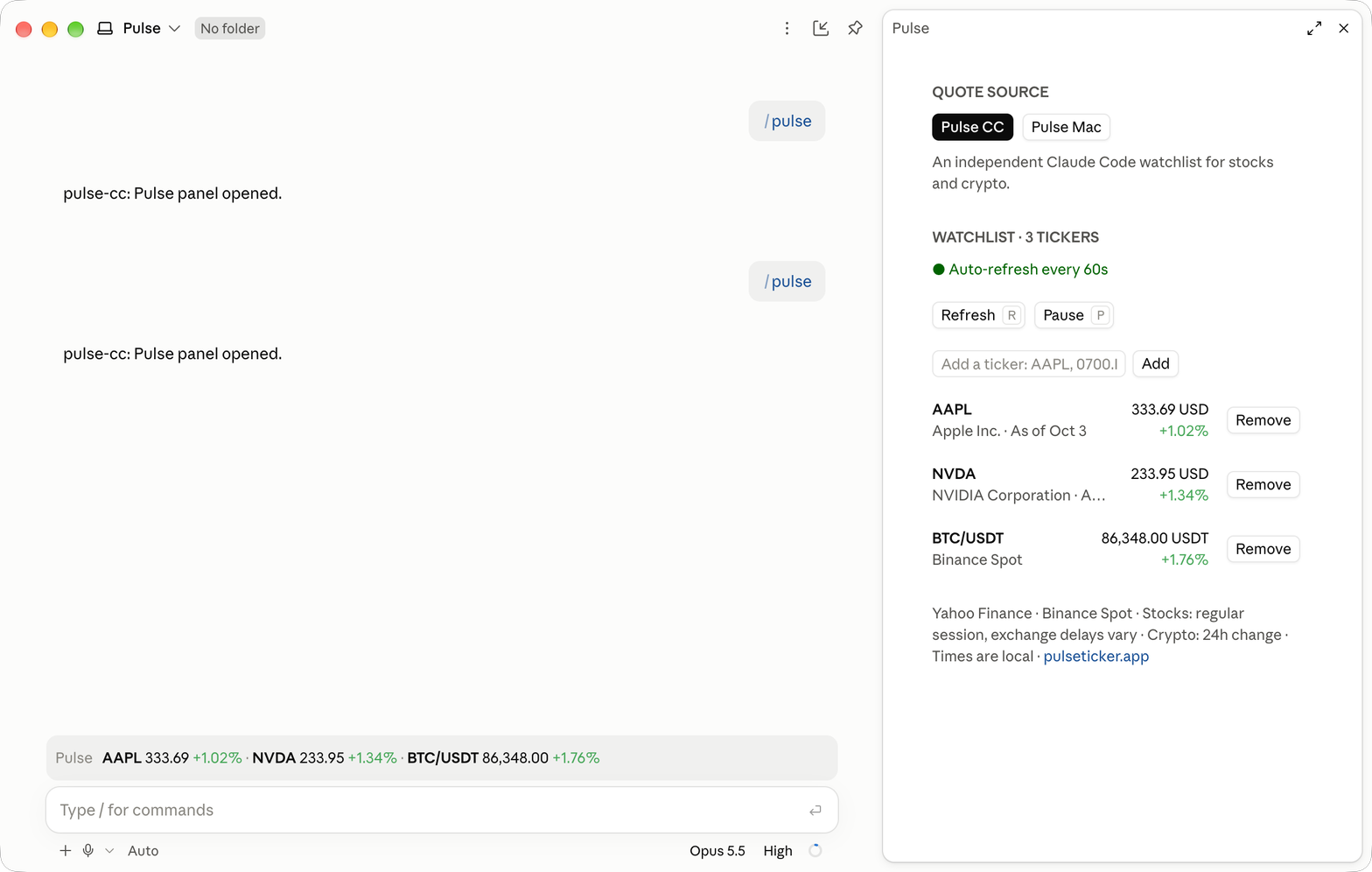
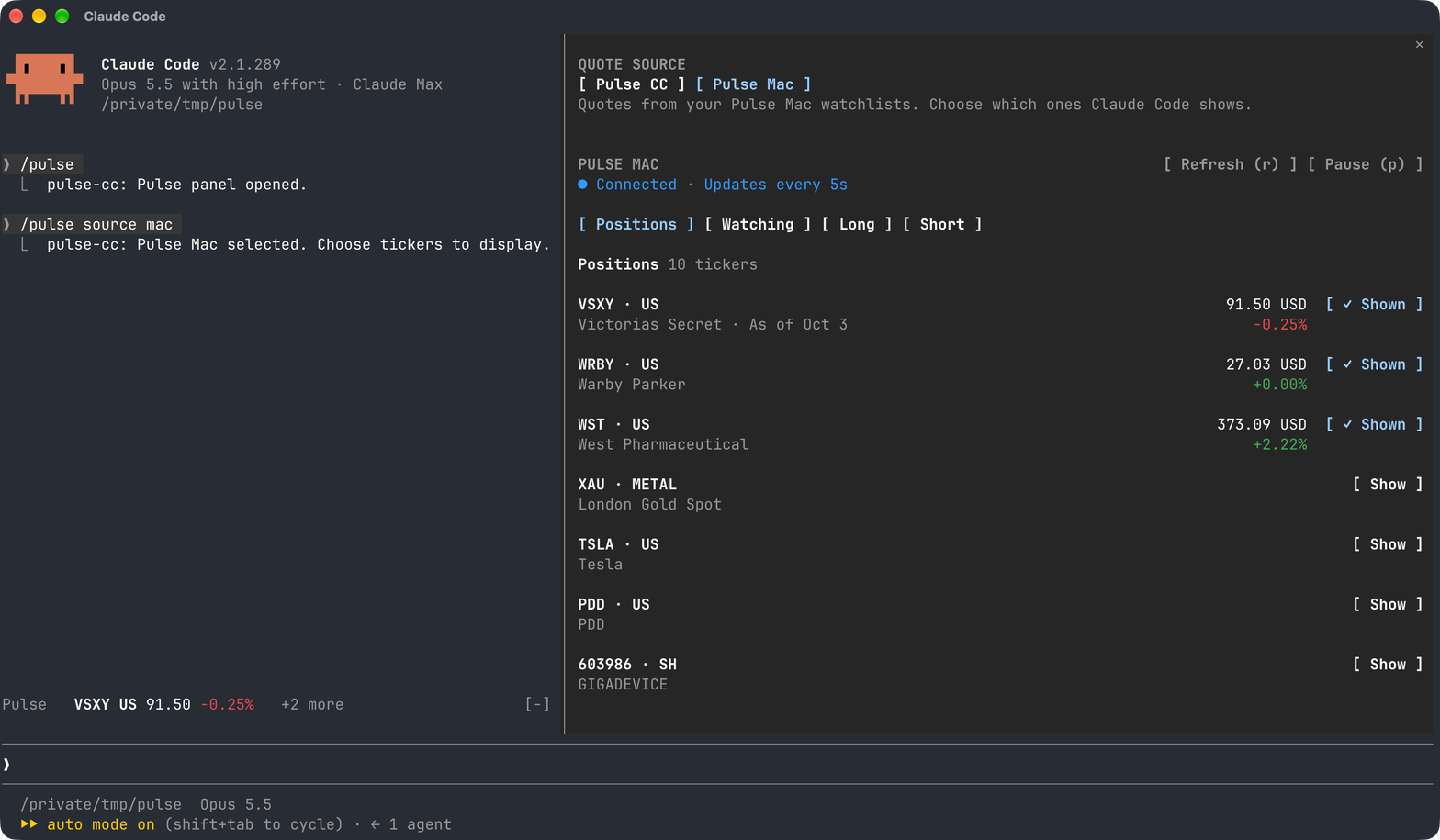
The panel header switches between Pulse CC (your own watchlist) and Pulse Mac (quotes from your Mac app), with Refresh and Pause beside them and a colored status line below.
In Pulse CC mode, an add field sits above the watchlist. Each row shows the
ticker and its name, the price and change on the right, and a Remove button.
Rows carry no per-row clock; a quote from an earlier day, such as the last close
over a weekend, is labelled with its date so it never reads as today's. Narrow panes stack the price below the ticker. Add with Enter or
the field's submit button. Press r or p while the panel has focus; input
fields keep ordinary typing. Press Escape to return to the prompt.
The panel uses native controls on Claude Desktop and text controls in the
terminal; both draw the same layout. The footer links to
pulseticker.app.
In the terminal, a fullscreen session docks the panel beside the conversation:
In Claude Desktop's Code tab, the band sits above the prompt and the panel opens beside the chat with native buttons:
Select Pulse Mac in /pulse. The first-connection card links to the
Mac download and takes the token. The local MCP
connection is included with the plugin; no claude mcp add command, server URL,
or port configuration is needed. The configuration dialog also lists
Pulse Mac MCP address, prefilled with Pulse Mac's local endpoint
(127.0.0.1); leave it as it is.
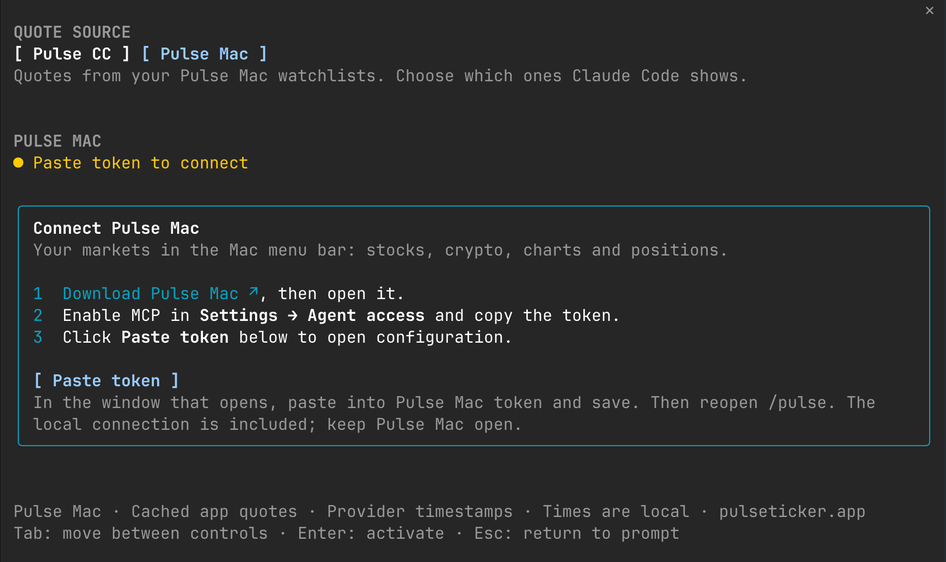
/pulse → Pulse Mac, press Paste token. Paste into Pulse Mac token
in Claude Code's configuration dialog, then save. Apply the reload if prompted
and reopen /pulse.Claude Desktop's local Code tab cannot show that dialog, so the card has a
token field instead: paste the token and press Save. Pulse passes it on
standard input to claude plugin configure --values-stdin, which saves it the
same way the dialog does. Start a new session to connect. The field shows the
token as you type.
The token is optional: leave it empty to keep using your own watchlist. Claude Code saves the token in its secure credential store. The plugin never saves the token in its watchlist store or sends it as command text or arguments.
Once connected, the checklist is replaced by your Mac watchlist groups. Press Show beside a ticker to include it above the prompt; press ✓ Shown to hide it again. Use Update token when you rotate the token in Pulse Mac.
The same panel in Claude Desktop:
<img src="https://raw.githubusercontent.com/fatwang2/Pulse/main/assets/readme/pulse-cc-desktop-mac-panel.png" width="480" alt="Pulse CC panel in Claude Desktop connected to Pulse Mac, with watchlist groups and Show buttons">The plugin reads Pulse Mac on its own, without a message of yours, and does
not approve those reads itself: Claude Code checks them against your permission
settings. Depending on the mode, for example the terminal's default mode or
Claude Desktop's Auto mode, it can refuse them even with a valid token.
Pulse then shows Blocked by Claude Code permissions, the refusal it
received, and the two read-only rules that allow it. Add them to ~/.claude/settings.json (or
with /permissions in the terminal) and start a new session:
{
  "permissions": {
    "allow": [
      "mcp__plugin_pulse-cc_pulse__list_watchlists",
      "mcp__plugin_pulse-cc_pulse__get_quotes"
    ]
  }
}
Merge them into an existing allow list. Writes, such as adding tickers or
recording trades in Pulse Mac, are not covered and still ask first.
The bundled connection appears in /mcp as plugin:pulse-cc:pulse. You can
inspect its status and tools or disable it there. The plugin configuration
contains only Pulse Mac token; refresh intervals and the local endpoint are
built in.
The plugin uses Claude Code's MCP connection and credentials. It calls only
list_watchlists and get_quotes. Showing or hiding a ticker never changes
Mac watchlists. Add/remove tickers and edit groups in Pulse Mac; their changes
appear at the next refresh. New tickers start unchecked. The same instrument
in multiple groups shares one selection and appears only once in the band.
The two sources are separate. Pulse CC retains your existing
watchlist, including its saved order. Pulse Mac keeps a separate local
display selection, in the order selected. Switching sources neither imports
nor overwrites either list. Only the selected source appears above the prompt.
/pulse add and /pulse remove are available only in Pulse CC mode.
Mac mode requires Claude Code running locally on the same Mac as Pulse.
Keep Pulse open and Agent access enabled. Remote sessions cannot reach a
server on your Mac through their own 127.0.0.1.
Mac quotes come from the app's in-memory cache. Refresh reads that cache; it does not request a new quote from a provider. Each row retains the provider's quote timestamp; an uncached instrument shows an unavailable message. Mac mode reads lists and selected quotes every five seconds. Pause stops automatic reads; Refresh performs one read while paused. Selecting Pulse Mac also performs one initial read, so its groups are available while paused.
If the MCP connection fails, the panel retains the last list and the band marks saved quotes cached and the source Offline. It retries every five seconds without falling back to the Pulse CC sources. Select Pulse CC to return to your independent list. A connection failure does not erase either selection.
The band shows up to five tickers in saved order, fitting fewer in a narrow
terminal. A +N more indicator points to the rest in /pulse. Gains are green,
losses red, and percentages always include their sign. USD is omitted in this
compact band; other currencies remain visible. The panel includes currency.
Neither surface displays charts or mini trends. Opening the panel does not
trigger an extra quote request.
Pulse CC refreshes 60 seconds after each round. Stock requests are spaced at least one second apart, so a large watchlist takes longer to complete a round; crypto pairs are read together in one request.
Stock and index quotes come from Yahoo Finance.
—.Retry-After (at least
60 seconds) and repeated throttling backs off. Manual refresh respects this
cooldown too.Yahoo's chart endpoint is unofficial, has no availability guarantee, and may change or be unavailable in some regions. Software's MIT license does not grant rights to Yahoo's market data. These quotes are for informational use.
data-api.binance.vision), the source Pulse Mac uses. No API key or account.The plugin saves Yahoo ticker symbols, Binance pairs and the paused setting in Claude Code's
local plugin store (watchlist.v1). It separately saves the selected source and
Mac instrument references (mac-view.v1). It does not copy the MCP token into
plugin storage. That store is shared by your local sessions.
Edits in one session are picked up by another at its next refresh; concurrent
writes across processes are last-writer-wins. Quote caches are in memory and are
fetched again in a new session.
In Pulse CC mode, watching a ticker sends it to Yahoo Finance and watching a
pair sends it to Binance. In Mac mode,
only selected instrument references are sent to the configured Pulse MCP server;
the Mac app manages its provider connections. The plugin has no analytics,
account system, external backend, filesystem scanner, or model calls. It does
not add quotes or your watchlist to model prompts. A command's short reply, such
as Added AAPL., is visible in the conversation. It never records trades.
See the Pulse privacy policy.
Pulse CC is a Claude Code mod: functions in hooks/register.tsx that Claude
Code calls in its own process. Everything it does goes through the mods API.
session.start registers /pulse and, in a terminal
session, starts the quote refresh. session.attach and session.detach
start and stop the refresh when Claude Desktop connects or disconnects.
session.end stops it. command.run answers /pulse. ui.render draws the
band above the prompt and the /pulse panel. It has no hook on Claude's tool
calls, prompts, or permission checks.GET requests to
query1.finance.yahoo.com for stock and index symbols and to
data-api.binance.vision for crypto pairs, about once a minute while prices
are shown, plus manual refreshes. They contain only the symbols. No other
hosts.list_watchlists and
get_quotes tools of its own bundled Pulse Mac connection about every five
seconds, at the address in Pulse Mac MCP address (by default
127.0.0.1:41927, your own Mac). These calls are made by the plugin, not by
Claude, and go through your permission settings as described above. It never
calls Pulse Mac's write tools./plugin configure pulse-cc, which opens Claude Code's configuration dialog.
In Claude Desktop, Save runs claude plugin list --json to find this
plugin's id, then claude plugin configure <id> --values-stdin with the token
on standard input. It starts claude from the path in CLAUDE_CODE_EXECPATH,
which Claude Code sets to its own executable, and falls back to claude on
your PATH. It runs no other commands or programs.CLAUDE_CODE_EXECPATH, which is not a credential. The links to
pulseticker.app in the panel open in your browser and send nothing.From the Pulse repository root, load a local checkout for one session:
claude --plugin-dir ./plugins/claude-code
This works before the marketplace is published and does not install the plugin. To install from a local checkout instead:
claude plugin marketplace add .
claude plugin install pulse-cc@pulse
Keep that checkout in place for updates. GitHub installation uses the published marketplace and plugin files on the repository's default branch.
Run the native checks:
claude plugin validate plugins/claude-code
claude plugin validate .
claude plugin test plugins/claude-code
Run these commands from the repository root. Tests use Claude Code's native Mods harness: mocked host network, local store and clock, plus terminal and Desktop drawing/input checks. They make no model calls or live requests.
The plugin ID is pulse-cc; the display title and command are Pulse and /pulse.
For type checking, first load this plugin with --plugin-dir so Claude Code
generates your installed version's declarations in .claude-plugin/types/, then:
npm exec --yes [email protected] -- tsc -p plugins/claude-code
Generated declarations stay local and are ignored by Git. All host API calls
live in hooks/register.tsx; watchlist.ts manages lifecycle, yahoo.ts
and binance.ts decode stock and crypto quotes, and mac.ts decodes Mac
snapshots and quotes.
The implementation was written independently;
it does not include code from meme-watch.
MIT. See LICENSE.

neural-trader(v2.7+)を基盤にしたニューラル取引戦略です。自己学習する LSTM/Transformer/N-BEATS モデル、Rust/NAPI バックテスト、112+ の MCP ツール、スウォーム協調、ポートフォリオ最適化を備えます。

claude-seo 用の任意の mods companion。Claude Code 内では mod(function-hook plugin)として動くため、skill が要求するだけのことも強制できる。

Claude Code 用 Repowise プラグイン。Graph、Git、Docs、Decisions、Code Health の 5 層のコードインテリジェンスを提供し、MCP ツール、slash commands、自動 skills で Claude にアーキテクチャ、所有者、ホットスポット、欠陥リスクを理解させます。spinner ヒント、margin notes、変更レビュー、/lens パネルを備えた Claude Code mod の Lens も含みます。