
ohosgor@ohosgor
ohosgor/podside
ohosgor/podside
podside は Claude Code の横にリアルタイムの Kubernetes pod 一覧を描画する mod です。名前空間ごとにグループ化され、pod の健全性を一目で確認できます。単一キーでログと describe 出力を読み取り、Ask Claude から選択した pod の describe 出力と最近のログを Claude に送って診断できます。ペインを開いている間は、選択した pod がすべてのプロンプトのコンテキストとして添付されます。設計上読み取り専用で、独自の kubeconfig を使って kubectl get、logs、describe、version、config の読み取りだけを実行し、他のネットワークリクエストは行いません。保存するのは組み込みヘルプを非表示にしたかどうかだけです。Claude Code v2.1.287+ と PATH 上の kubectl が必要で、/plugin marketplace add ohosgor/podside と /plugin install podside@podside からインストールできます。
まず作者の README で marketplace とプラグイン名を確認してください。コマンドはリポジトリの構成によって変わる場合があります。
claude plugin marketplace add ohosgor/podside
claude plugin install podside
A Kubernetes pod pane that lives beside Claude Code.
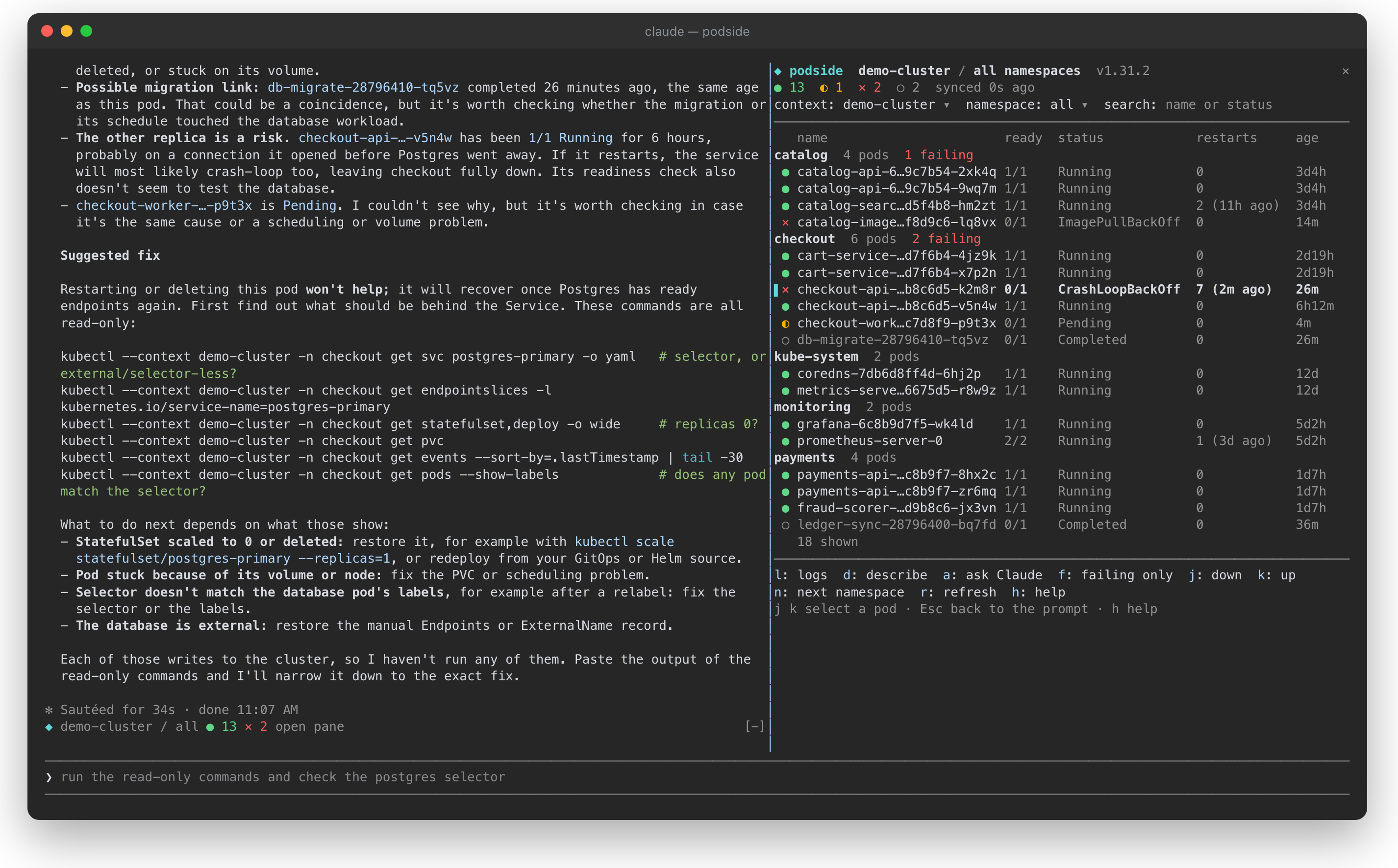
podside is a Claude Code mod: it draws a live pod list next to your conversation, lets you read logs and describe output with one key, and tells Claude which pod you are looking at, so you can just ask "why is this pod failing?".
It is inspired by the keyboard-first flow of k9s, but it is a separate project with no affiliation to k9s.
<sub>A demo cluster. Pressing <code>a</code> on the crash-looping <code>checkout-api</code> pod sent its describe output and logs to Claude, which traced the crash to a database Service with no ready endpoints and suggested read-only commands to confirm it.</sub>
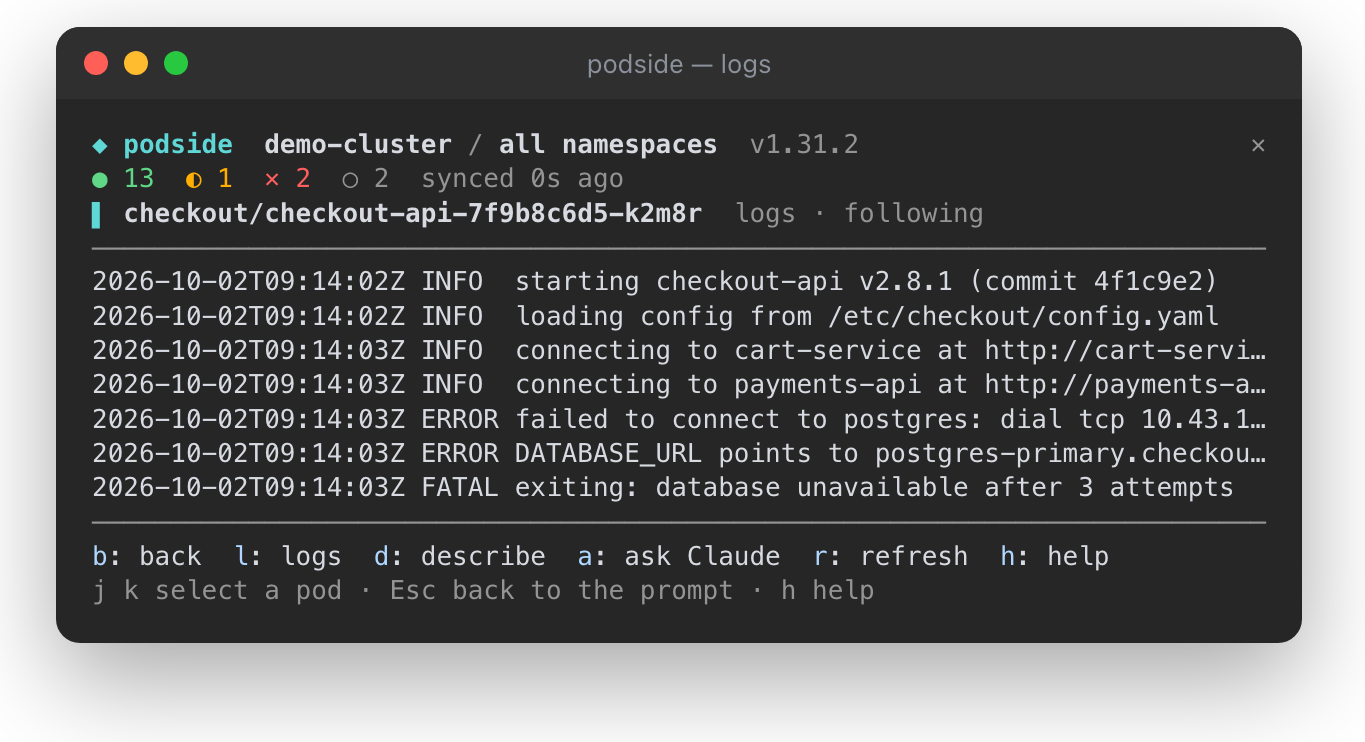
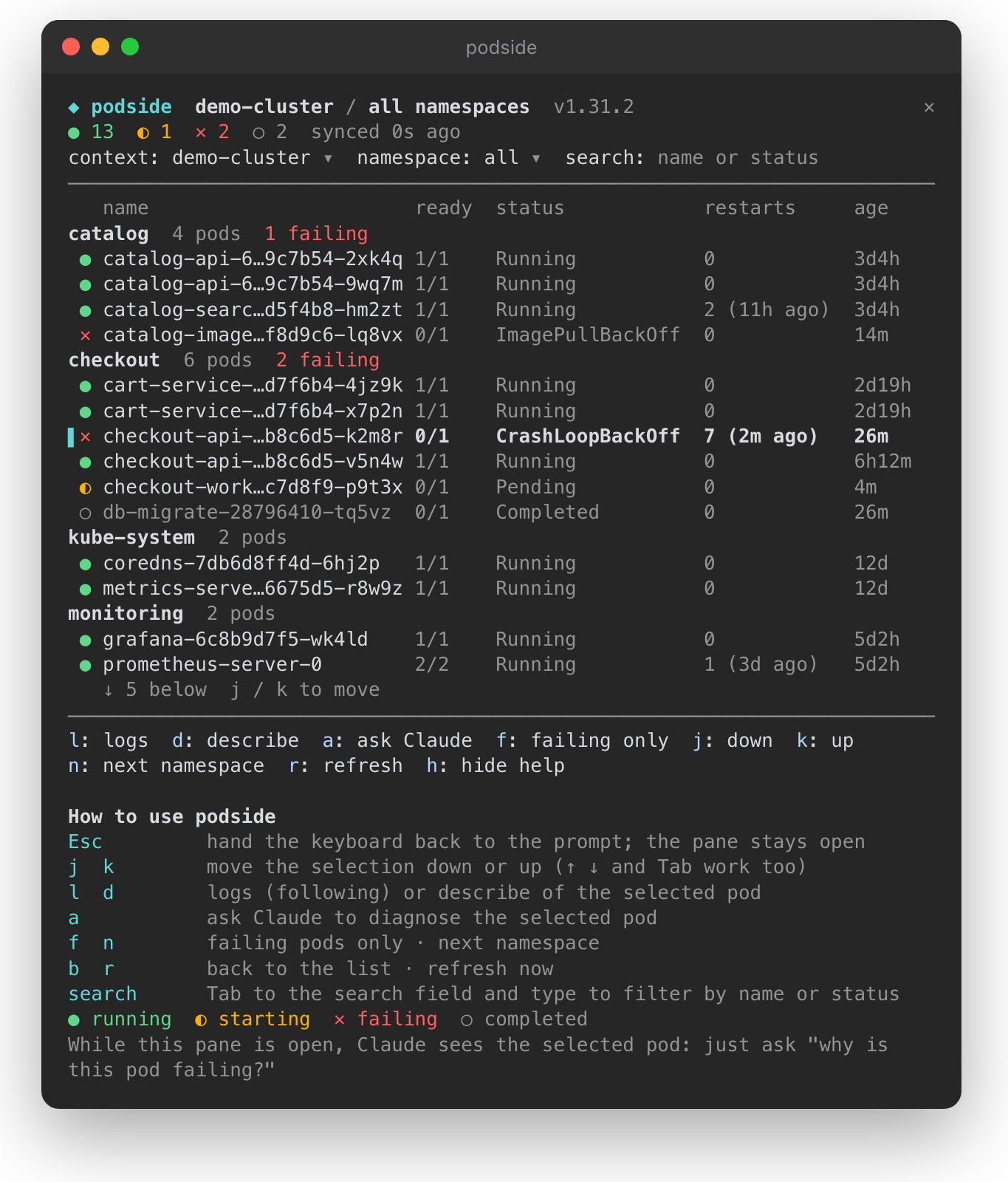
● running, ◐ starting, ✕ failing, ○ completed, with totals in the top bardescribe output and recent logs to Claude for a diagnosiskubectl get, logs, describe, version and config reads. It never writes to your cluster, and its context switcher passes --context instead of touching your kubeconfig.| Logs of the selected pod, following | The pane with its built-in help |
| --- | --- |
|  |
|  |
|
Requires Claude Code v2.1.287 or later and kubectl on your PATH.
/plugin marketplace add ohosgor/podside
/plugin install podside@podside
Or from your shell:
claude plugin marketplace add ohosgor/podside
claude plugin install podside@podside
/podside              # all namespaces
/podside my-namespace # one namespace
The pane takes the keyboard when it opens. Esc hands it back to the prompt; click the pane or press ctrl+x then Tab to return.
| Key | Action |
| --- | --- |
| j k | Move the selection down / up (↑ ↓ and Tab work too) |
| l | Logs of the selected pod |
| d | Describe the selected pod |
| a | Ask Claude about the selected pod |
| b | Back to the list |
| f | Toggle failing pods only |
| n | Next namespace |
| r | Refresh now |
| h | Show or hide the built-in help |
The context, namespace and search fields at the top are reachable with Tab. A short guide sits at the bottom of the pane on first use; h hides it and podside remembers that.
git clone https://github.com/ohosgor/podside
claude --plugin-dir ./podside   # hot-reloads on save
claude plugin validate ./podside
claude plugin test ./podside
The hooks module is hooks/register.tsx; its tests are in register.test.tsx and run against a stubbed kubectl.
A mod runs inside Claude Code with your permissions. podside's own calls are limited to the kubectl reads listed above, $.prompt.submit for "Ask Claude", and drawing its pane. You can list everything it hooks and calls without running it:
claude plugin validate .
kubectl, with your own kubeconfig: config get-contexts, config current-context, config view --minify, version, get ns, get pods, logs and describe pod. It talks to your cluster through kubectl and makes no other network requests.a, the pod's describe output and its last 120 log lines are sent as a prompt. Nothing is sent while the pane is closed or no pod is selected.h), in Claude Code's local plugin store. Pod data lives only in the session's memory.
neural-trader(v2.7+)を基盤にしたニューラル取引戦略です。自己学習する LSTM/Transformer/N-BEATS モデル、Rust/NAPI バックテスト、112+ の MCP ツール、スウォーム協調、ポートフォリオ最適化を備えます。

claude-seo 用の任意の mods companion。Claude Code 内では mod(function-hook plugin)として動くため、skill が要求するだけのことも強制できる。

Claude Code 用 Repowise プラグイン。Graph、Git、Docs、Decisions、Code Health の 5 層のコードインテリジェンスを提供し、MCP ツール、slash commands、自動 skills で Claude にアーキテクチャ、所有者、ホットスポット、欠陥リスクを理解させます。spinner ヒント、margin notes、変更レビュー、/lens パネルを備えた Claude Code mod の Lens も含みます。