ClaudeMods
☰
JA
● — 人がオンライン ・閲覧 — 回
スポンサー作品を投稿
GitHub リポジトリ · 投稿者 Anton Martyniuk

Microsoft、AI エージェント向けの既製 .NET スキル 99 個を静かに公開

Microsoft のオープンソース dotnet/skills リポジトリを宣伝する X 投稿——Claude Code、Codex、Copilot、Cursor で動作する 14 個のプラグインと 99 個のスキル——おすすめプラグイン 5 つの短いウォークスルーと、独自の Claude スキルを書く方法についての著者ブログガイドへのリンク付き。

A
Anton Martyniuk@AntonMartyniuk

1/

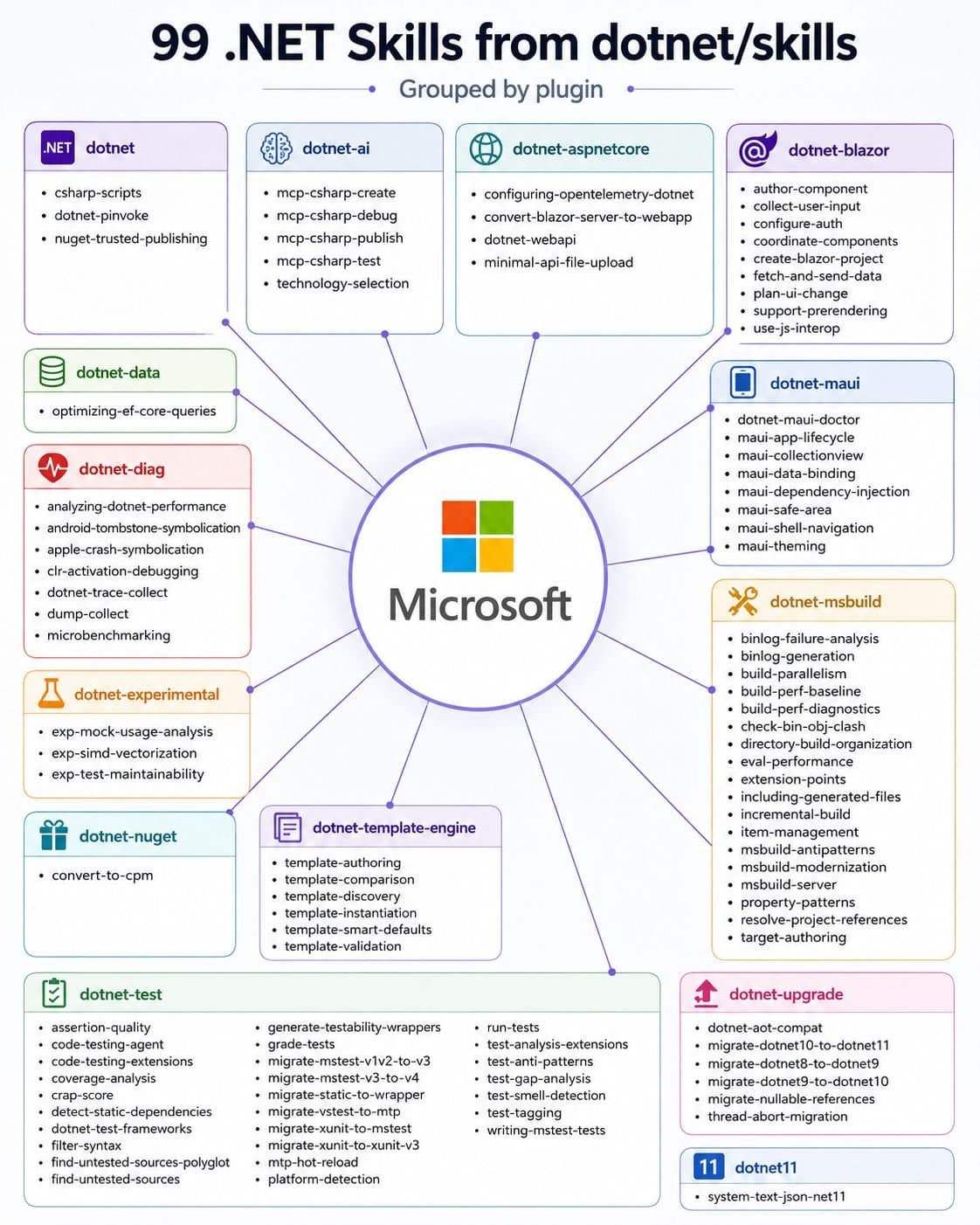
Microsoft quietly published 99 ready-made .NET skills for AI Agents. Most .NET developers have no idea they exist 👇 These skills are official and open source. They work in Claude Code, Codex, GitHub Copilot and Cursor. A skill is a folder with instructions. Your AI agent loads it only when a task needs it. You write the steps once, and the agent follows them every time. Microsoft keeps them in the dotnet/skills repo: 14 plugins, 99 skills. A plugin is a group of related skills. You install a plugin and get all its skills at once. Here are 5 I'd install first, in this order: 𝟭. 𝗱𝗼𝘁𝗻𝗲𝘁-𝘂𝗽𝗴𝗿𝗮𝗱𝗲 Moves a project from .NET 8 to 10 and turns on nullable reference types. 𝟮. 𝗱𝗼𝘁𝗻𝗲𝘁-𝗱𝗮𝘁𝗮 The optimizing-ef-core-queries skill catches N+1 queries, picks the right tracking mode and removes common EF Core performance traps. 𝟯. 𝗱𝗼𝘁𝗻𝗲𝘁-𝗮𝘀𝗽𝗻𝗲𝘁 Builds Web API endpoints and file-upload endpoints in Minimal APIs the right way. 𝟰. 𝗱𝗼𝘁𝗻𝗲𝘁-𝘁𝗲𝘀𝘁 The biggest plugin: 22 skills to run tests, filter them and move between test frameworks. 𝟱. 𝗱𝗼𝘁𝗻𝗲𝘁-𝗮𝗶 Builds, debugs and tests MCP servers with the C# SDK. These skills know .NET. They don't know YOUR project. They can't tell where you keep your entities, that you don't use repositories, or that your handlers return Result<T>. Your own skills fill this gap: → Microsoft's skills handle general .NET tasks → Your skills handle your house rules and conventions Use both, and your AI agent knows the framework and your style. 2 tips before you install: → Don't install all 99. Every skill adds its description to the agent's context, so pick the plugins that match your stack → Name the skill in your prompt instead of letting the agent guess which one to use In my article, I explain the full setup: → What a skill is and what's inside one → How to write a description so the skill triggers at the right time → How to turn your conventions into skills: rich entities, no repositories, full features → How to use the Skill Creator to bundle your real code files → How to install Microsoft's dotnet/skills in 4 steps 👉 Read the full step-by-step guide here: ↳ https://antondevtips.com/blog/creating-claude-skills-for-dotnet-apps?utm_source=twitter&utm_medium=social&utm_campaign=newsletter&utm_content=12-11-2026
画像1

2/

📌 You don't read my newsletter. I explain .NET and Architecture based on my 13+ years of experience. For each topic, I present the pros, cons, and trade-offs, and you get a checklist for when to use each approach and when not to. AI won't teach you this! Every Tuesday, I send an article to 28,000 people learning to master .NET. 📌 This week's blog on New Features in .NET 11 and C# 15 (you need to read this): https://antondevtips.com/blog/new-features-in-dotnet-11-and-csharp-15?utm_source=twitter&utm_medium=social&utm_campaign=newsletter&utm_content=12-11-2026 👉 Join us (and share with your friends and colleagues) → https://antondevtips.com?utm_source=twitter&utm_medium=social&utm_campaign=newsletter&utm_content=12-11-2026

翻訳済み

この mod について

Microsoft は、AI エージェント向けの既製 .NET スキル 99 個を静かに公開しました。

ほとんどの .NET 開発者はそれらが存在することを知りません 👇

これらのスキルは公式かつオープンソースです。

Claude Code、Codex、GitHub Copilot、Cursor で動作します。

スキルとは、指示をまとめたフォルダーです。

AI エージェントは、タスクが必要とするときだけそれを読み込みます。

手順を一度書けば、エージェントは毎回それに従います。

Microsoft はそれらを dotnet/skills リポジトリに置いています。14 個のプラグイン、99 個のスキルです。

プラグインは関連するスキルのグループです。プラグインをインストールすると、そのすべてのスキルを一度に取得できます。

まずインストールしたい 5 つを、この順で挙げます:

  1. dotnet-upgrade プロジェクトを .NET 8 から 10 に移行し、null 許容参照型を有効にします。

  2. dotnet-data optimizing-ef-core-queries スキルは N+1 クエリを検出し、適切な追跡モードを選択し、一般的な EF Core のパフォーマンスの落とし穴を除去します。

  3. dotnet-aspnet Minimal API で Web API エンドポイントとファイル アップロード エンドポイントを正しく構築します。

  4. dotnet-test 最大のプラグイン:テストを実行し、フィルターし、テスト フレームワーク間を移動するための 22 個のスキル。

  5. dotnet-ai C# SDK で MCP サーバーを構築、デバッグ、テストします。

これらのスキルは .NET を知っています。

しかし、あなたのプロジェクトは知りません。

エンティティをどこに置いているか、リポジトリを使っていないこと、ハンドラーが Result<T> を返すことは判断できません。

あなた自身のスキルがこのギャップを埋めます: → Microsoft のスキルは一般的な .NET タスクを処理します → あなたのスキルはあなたのハウスルールと規約を処理します

両方を使えば、AI エージェントはフレームワークとあなたのスタイルの両方を理解します。

インストール前の 2 つのヒント: → 99 個すべてをインストールしないでください。各スキルはその説明をエージェントのコンテキストに追加するので、あなたのスタックに合うプラグインを選んでください → エージェントにどれを使うか推測させるのではなく、プロンプトでスキルを指定してください

私の記事では、完全なセットアップを説明しています:

→ スキルとは何か、スキルの中身は何か → スキルが適切なタイミングでトリガーされるように説明を書く方法 → 規約をスキルに変える方法:リッチなエンティティ、リポジトリなし、完全な機能 → Skill Creator を使って実際のコードファイルをバンドルする方法 → Microsoft の dotnet/skills を 4 つのステップでインストールする方法

完全なステップバイステップ ガイドはこちら: https://antondevtips.com/blog/creating-claude-skills-for-dotnet-apps

インストール

インストール方法は元のソースをご確認ください。

原文 / README

Microsoft quietly published 99 ready-made .NET skills for AI Agents.

Most .NET developers have no idea they exist 👇

These skills are official and open source.

They work in Claude Code, Codex, GitHub Copilot and Cursor.

A skill is a folder with instructions.

Your AI agent loads it only when a task needs it.

You write the steps once, and the agent follows them every time.

Microsoft keeps them in the dotnet/skills repo: 14 plugins, 99 skills.

A plugin is a group of related skills. You install a plugin and get all its skills at once.

Here are 5 I'd install first, in this order:

𝟭. 𝗱𝗼𝘁𝗻𝗲𝘁-𝘂𝗽𝗴𝗿𝗮𝗱𝗲 Moves a project from .NET 8 to 10 and turns on nullable reference types.

𝟮. 𝗱𝗼𝘁𝗻𝗲𝘁-𝗱𝗮𝘁𝗮 The optimizing-ef-core-queries skill catches N+1 queries, picks the right tracking mode and removes common EF Core performance traps.

𝟯. 𝗱𝗼𝘁𝗻𝗲𝘁-𝗮𝘀𝗽𝗻𝗲𝘁 Builds Web API endpoints and file-upload endpoints in Minimal APIs the right way.

𝟰. 𝗱𝗼𝘁𝗻𝗲𝘁-𝘁𝗲𝘀𝘁 The biggest plugin: 22 skills to run tests, filter them and move between test frameworks.

𝟱. 𝗱𝗼𝘁𝗻𝗲𝘁-𝗮𝗶 Builds, debugs and tests MCP servers with the C# SDK.

These skills know .NET.

They don't know YOUR project.

They can't tell where you keep your entities, that you don't use repositories, or that your handlers return Result<T>.

Your own skills fill this gap: → Microsoft's skills handle general .NET tasks → Your skills handle your house rules and conventions

Use both, and your AI agent knows the framework and your style.

2 tips before you install: → Don't install all 99. Every skill adds its description to the agent's context, so pick the plugins that match your stack → Name the skill in your prompt instead of letting the agent guess which one to use

In my article, I explain the full setup:

→ What a skill is and what's inside one → How to write a description so the skill triggers at the right time → How to turn your conventions into skills: rich entities, no repositories, full features → How to use the Skill Creator to bundle your real code files → How to install Microsoft's dotnet/skills in 4 steps

👉 Read the full step-by-step guide here: ↳ https://antondevtips.com/blog/creating-claude-skills-for-dotnet-apps?utm_source=twitter&utm_medium=social&utm_campaign=newsletter&utm_content=12-11-2026

📌 You don't read my newsletter.

I explain .NET and Architecture based on my 13+ years of experience. For each topic, I present the pros, cons, and trade-offs, and you get a checklist for when to use each approach and when not to. AI won't teach you this!

Every Tuesday, I send an article to 28,000 people learning to master .NET.

📌 This week's blog on New Features in .NET 11 and C# 15 (you need to read this): https://antondevtips.com/blog/new-features-in-dotnet-11-and-csharp-15?utm_source=twitter&utm_medium=social&utm_campaign=newsletter&utm_content=12-11-2026

👉 Join us (and share with your friends and colleagues) → https://antondevtips.com?utm_source=twitter&utm_medium=social&utm_campaign=newsletter&utm_content=12-11-2026
バッジを取得

あなたのプロジェクトですか?このバッジを README やサイトに貼ると、このページにリンクします。

Featured on ClaudeMods
サイズ
テーマ
Markdown
HTML

関連作品