
amitozalvo@amitozalvo
amitozalvo/mesimon/tree/main/crates/mesimon-daemon/mod
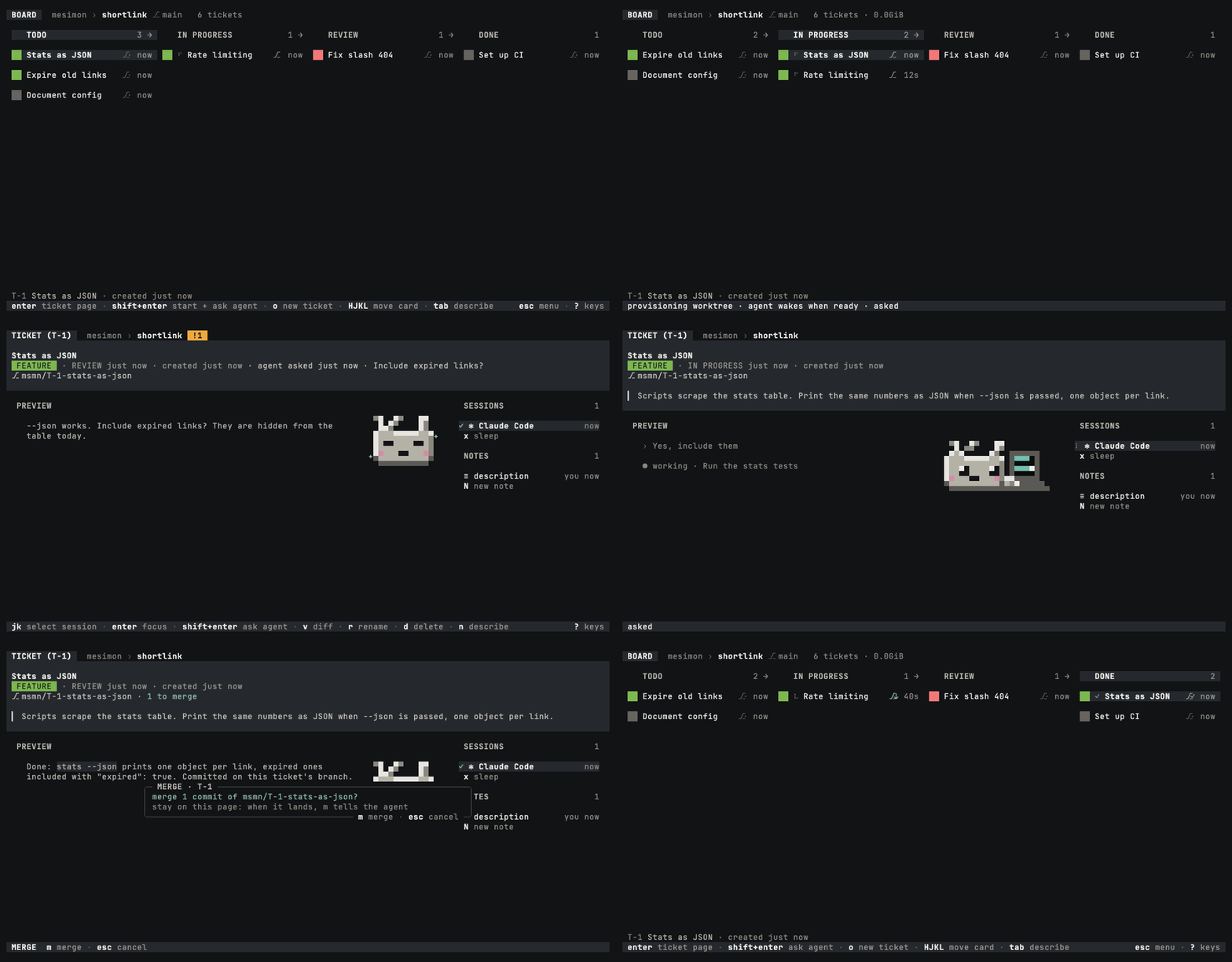
mesimon は、ticket 上で Claude Code と Codex の agent を動かすターミナル kanban board。agent ごとに worktree、ブランチ、マージフローを持ち、bridge plugin がセッションイベントを board に報告する。
amitozalvo/mesimon/tree/main/crates/mesimon-daemon/mod
mesimon は coding agent を動かすターミナル kanban board。キー 1 つで ticket 上の agent を起動し、各 agent に専用の worktree とブランチを割り当てる。入力が必要になるとカードが点灯し、キー 1 つでレビューとマージができる。crates/mesimon-daemon/mod には bridge mod も含まれ、agent のセッションを board に接続し、イベントを報告し、board のファイルへの書き込みをゲートし、board のツールを公開して、board のコマンドを受け取る。shell script または Homebrew でインストールし、mesimon doctor を実行する。
まず作者の README で marketplace とプラグイン名を確認してください。コマンドはリポジトリの構成によって変わる場合があります。
claude plugin marketplace add amitozalvo/mesimon
claude plugin install mesimon
mesimon (Hebrew משימון, "the task instrument" — pronounced me-si-MON) is a terminal kanban board that runs your coding agents. Like Kubernetes is to containers, mesimon is to Claude Code and Codex.
Your agent is the real Claude Code or Codex, in its own terminal: step into it and you have the same prompt, the same slash commands and the same permission dialogs, and mesimon never sits between you and it.
<sub>Start an agent with Shift+Enter on the board. When its card lights, open the ticket and
answer with Shift+Enter there, then merge its branch with m. Recorded with a scripted stand-in agent so the take is reproducible;
assets/demo/ re-records it.</sub>
Alpha. It works and it is used every day, and it will change under you. Each version's changes are in the CHANGELOG.
v shows the branch's diff and m merges it,
fast-forward only.curl -fsSL https://mesimon.dev/install.sh | sh
Or with Homebrew:
brew install amitozalvo/tap/mesimon
Then run mesimon doctor. It checks your setup and prints fixes, and changes nothing.
You need macOS on Apple Silicon or Linux (x86_64 or aarch64, WSL2 included), git, and Claude Code or Codex, signed in. On Linux you also need tmux 3.3 or newer; on macOS mesimon brings its own. Requirements in detail covers the rest, and Updating says how new versions arrive.
cd into a git repository and run mesimon.o and type a task as the title, for example Add a --version flag.shift+tab so the line under the title reads ⎇ worktree. The agent gets its own
branch.shift+enter. The ticket is saved, an agent starts on it, and its card spins while it
works.space on it to read what the agent
said, then m twice to merge its branch.If a card lights before then, its agent is asking you something. Press shift+enter on the
card to answer it, or enter to go into the agent's own terminal; ctrl-] brings you back.
shift+enter needs a terminal that reports it, such as iTerm2, Ghostty, kitty or WezTerm. If
? does not list it, press enter in step 4 to save the ticket, then c to start its agent,
and type the task into it.
? lists every key on the screen you are on. Closing the board does not stop your agents:
Stopping everything says how to.
Your agent, your way. enter on a ticket with a working agent takes you into the agent
itself: Claude Code or Codex, exactly as you know it.
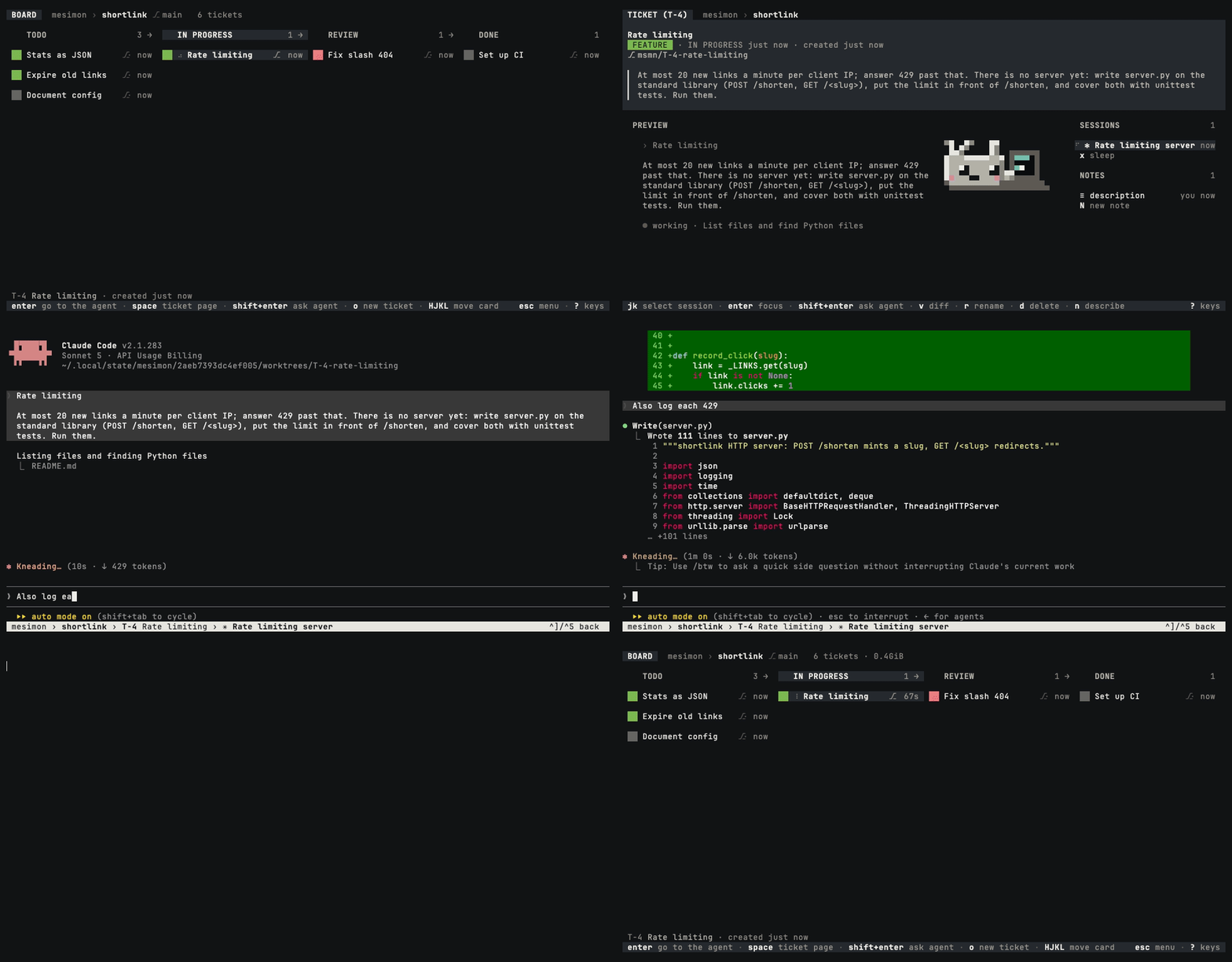
<sub>enter steps into the agent's own terminal, where you type to it as you always do, and
ctrl-] steps back out while it keeps working.</sub>
The ticket page. tab on a card writes its description, and ctrl-k lists the links in
its notes.
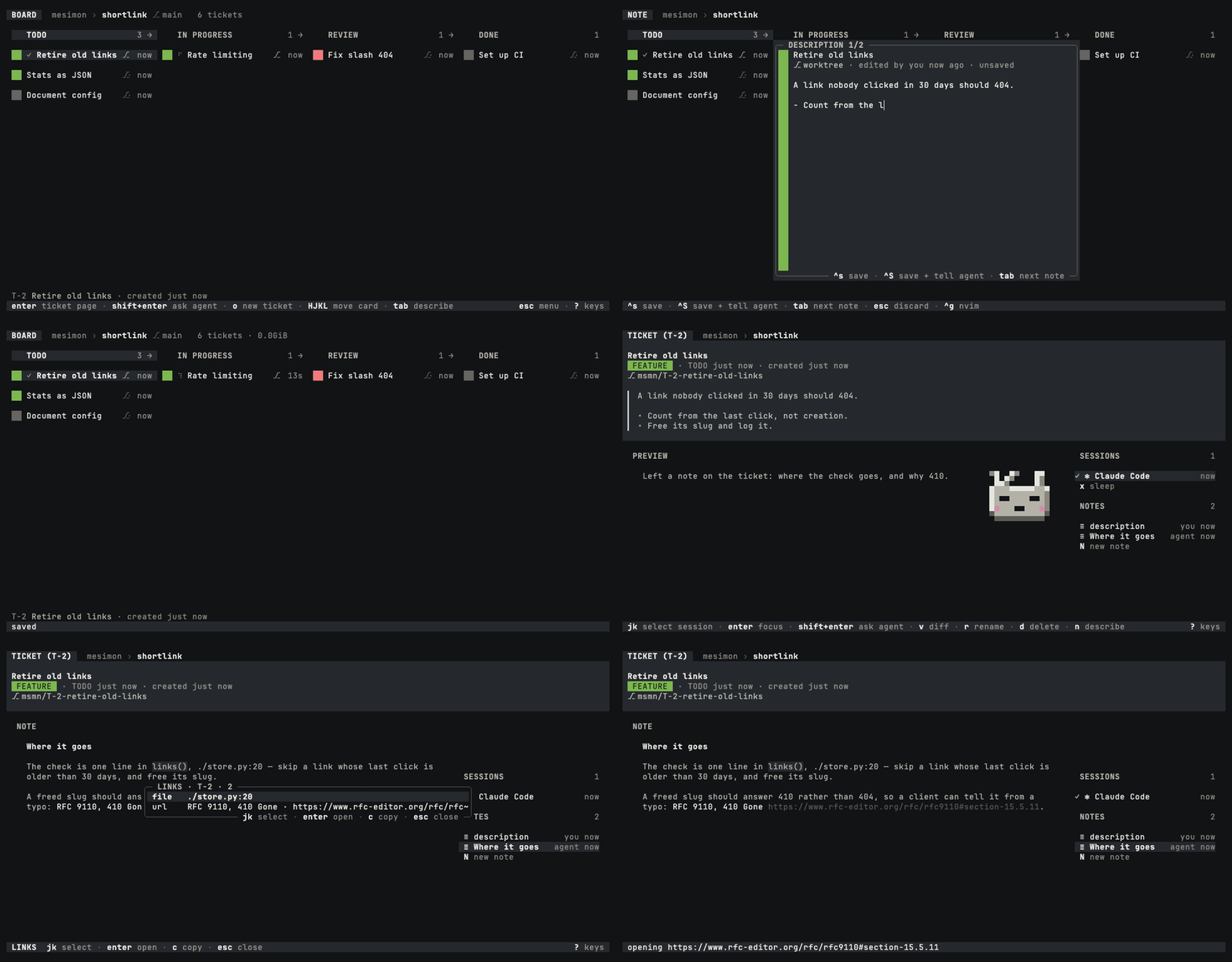
<sub>tab adds two lines to the brief, enter opens the page with the note its agent left, and
ctrl-k opens one of that note's links.</sub>
Search. / finds any ticket by a few letters of its title, key, column or tag.
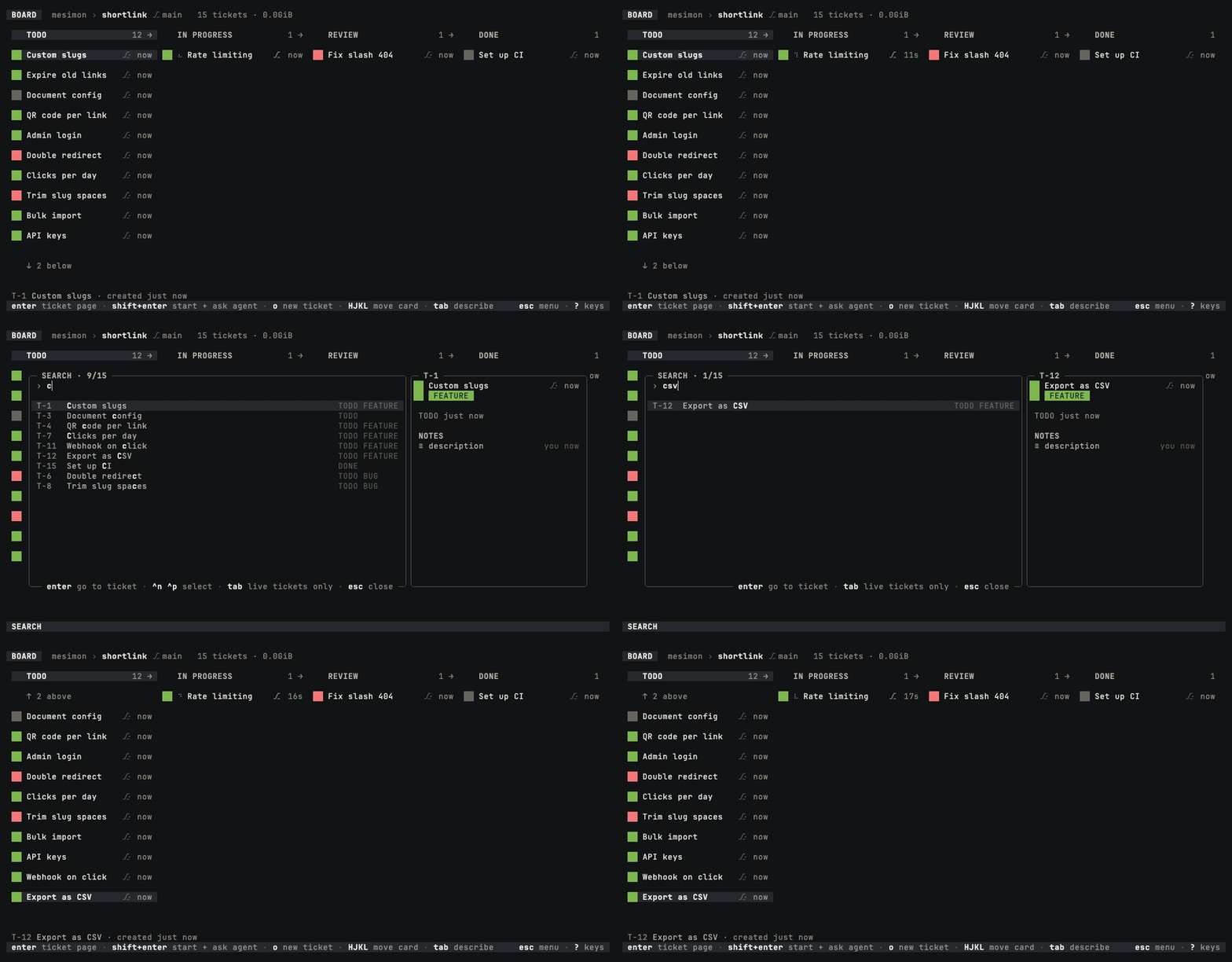
<sub>Three letters narrow fifteen tickets to one, and enter scrolls the board to its card.</sub>
The crown. ctrl-o on a card lets its agent file, move, tag and start the other tickets.
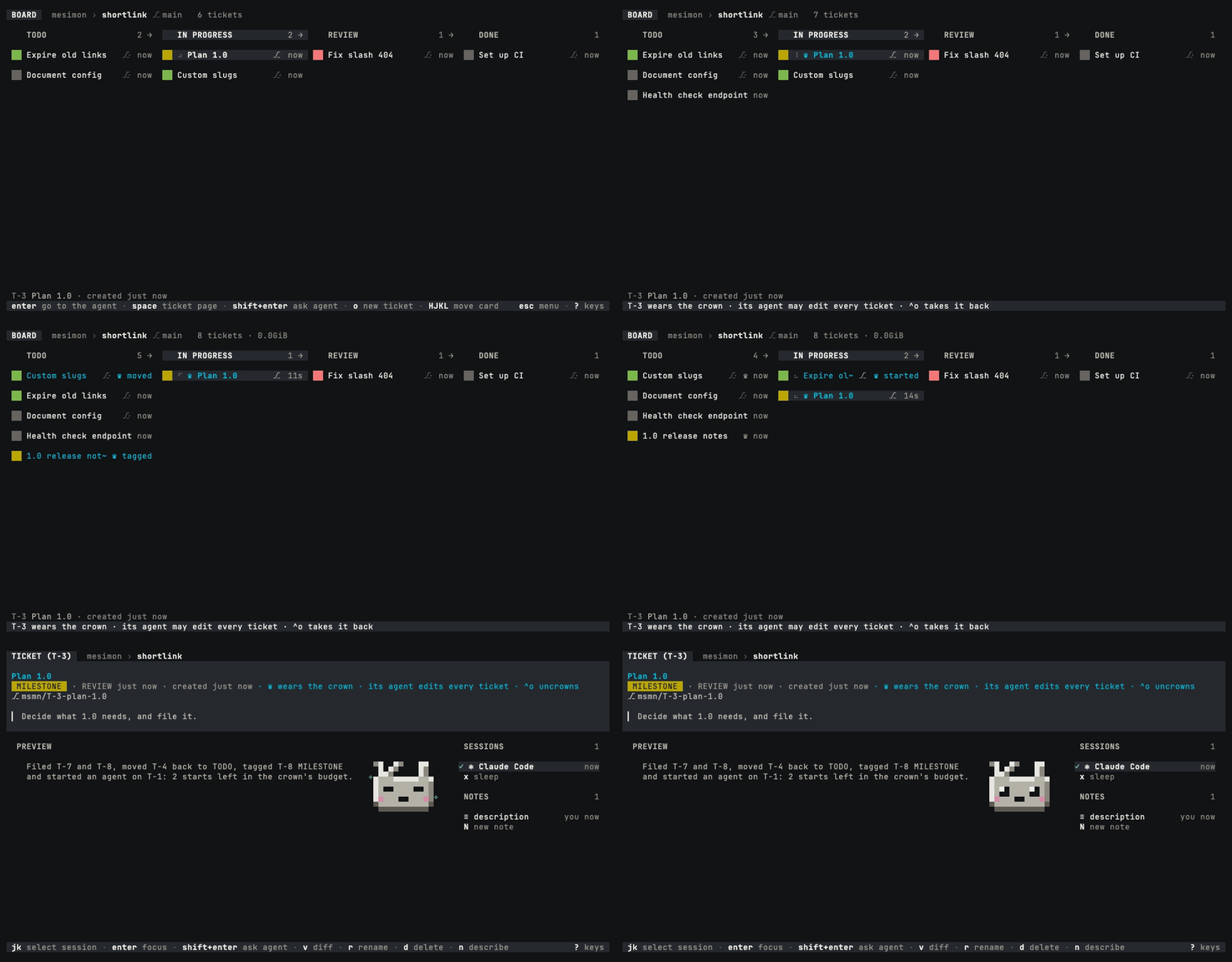
<sub>The crowned agent runs the board, and you keep the crown: ctrl-o on its card takes it
back. More on the crown.</sub>
mesimon doctor prints fixes for you to apply; it never applies one
itself.The promises in full, with every path mesimon writes. If you find mesimon breaking one, report it.
Apache-2.0. See LICENSE, NOTICE and TRADEMARK.md.

ADR のライフサイクル管理——作成、インデックス化、整合、置き換え、コンプライアンス確認を行い、AgentDB の階層ストアと因果エッジ(supersedes/amends/depends-on/related)で Architecture Decision Record をコードにリンクします

Claude Code mod としての claude-reflect。短いプロンプトごとにモデルチェックを行い、再利用できる修正(任意の言語)を見つけ、プロンプト上のバンドを 1 回押すだけで CLAUDE.md に保存します。


Claude Code 内の初期版 crit。ペインで会話、差分、ファイルにコメントし、レビューを Claude に送り、スレッドで Claude の返答を読めます。