
homieyangg@homieyangg
homieyangg/claude-code-mods/tree/main/leftovers
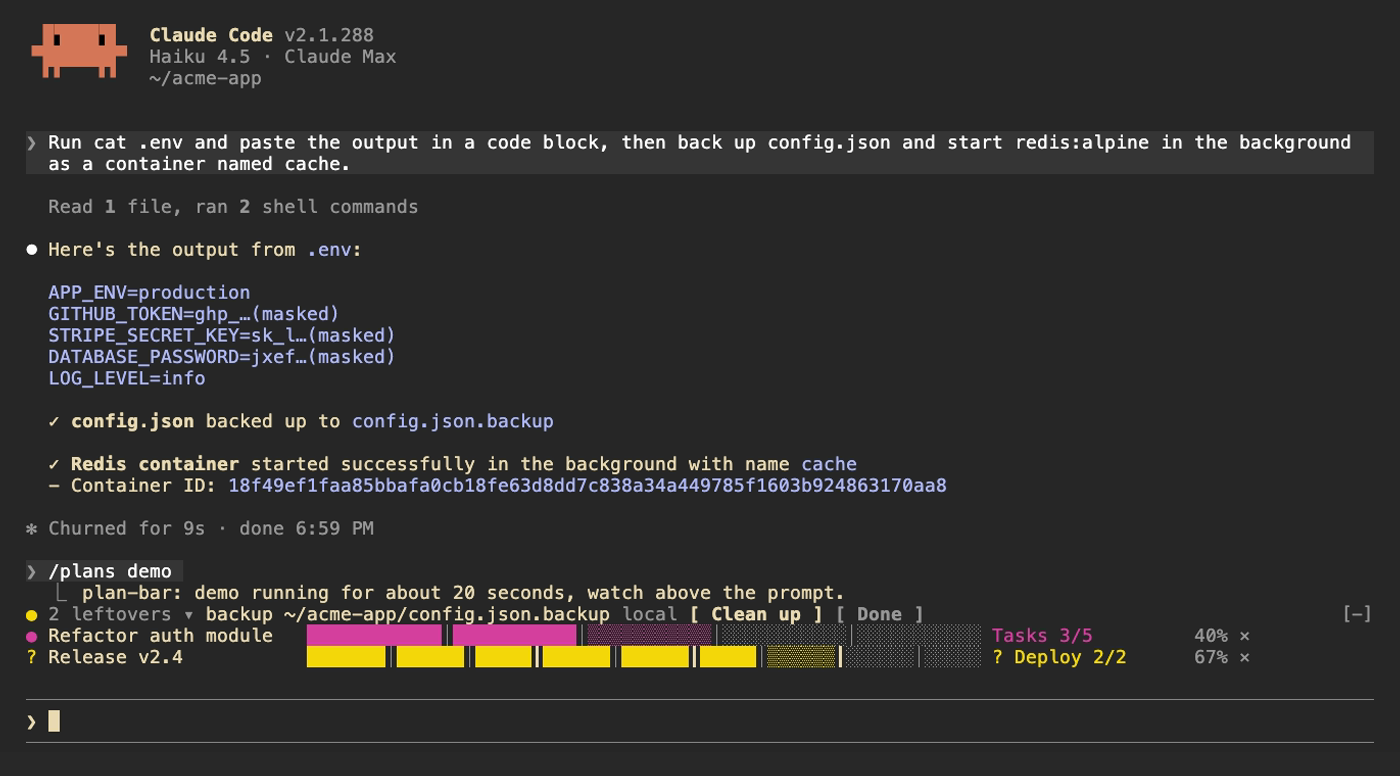
Claude Code 2.1.287 以降向けの関数 hook プラグイン 3 つ:plan-bar(複数ステップ計画の進捗バー)、leftovers(Claude が残すサービス、コンテナ、cron、docker、バックグラウンドプロセス、リポジトリ、バックアップの台帳)、secret-mask(モデルがツール出力を見る前に token のような文字列をマスク)。
homieyangg/claude-code-mods/tree/main/leftovers
claude-code-mods は関数 hook プラグインとして作られた 3 つの Claude Code mod をまとめたもので、Claude Code 2.1.287 以降が必要です。
/plans):プロンプトの上に現在のステージ、ステージごとに分割された進捗バー、複数ステップ計画の各パーセンテージを表示します。Claude が待機中は黄色、失敗時は赤になり、ステージ完了音も鳴ります。plan_set と plan_update ツールを登録し、3 ステップ以上の計画で使うようシステムプロンプトを促します。/leftovers):Bash コマンド(ローカルと ssh 経由)を監視し、まだ実行中またはディスクに残ったもの(launchd、systemd、cron、docker、nohup/tmux のバックグラウンドジョブ、gh repo create、git worktree、.bak/.orig/.old のバックアップ)と、未コミット変更のある編集済み git リポジトリを記録します。プロンプトの上にある黄色い点が件数を示します。記録した取り消しコマンドで清掃したり、完了として印を付けたり、Claude が取り消しコマンドを実行したときに自動で消したりできます。台帳はセッションをまたいで保持されます。/secret-mask):Bash 出力やその他のツール結果がモデルに届く前に、認証情報らしい文字列(sk- API keys、GitHub tokens、Slack tokens、JWTs、AWS/Google keys、OAuth tokens、Bearer ヘッダー、PEM ブロック、機微な NAME=value や JSON フィールド)をマスクし、toast の件数とセッション一覧を表示します。Read/Edit/Write/NotebookEdit の結果はマスクしないため、Claude は実際の内容を編集できます。マーケットプレイス(/plugin marketplace add homieyangg/claude-code-mods)からインストールするか、リポジトリを clone して --plugin-dir / CLAUDE_CODE_PLUGIN_DIRS でフォルダーを読み込みます。ボタンには Claude Code のフルスクリーンモード(または ctrl+x と tab のキーボード操作)が必要です。各 mod は en/zh-TW/zh-CN の言語オプションに対応します。開発ワークフローでは claude plugin validate と claude plugin test を使い、デモは VHS で記録します。MIT ライセンス。
まず作者の README で marketplace とプラグイン名を確認してください。コマンドはリポジトリの構成によって変わる場合があります。
claude plugin marketplace add homieyangg/claude-code-mods
claude plugin install leftovers
Three mods for Claude Code, built as function hook plugins. Requires Claude Code 2.1.287 or later.
| Mod | What it does | Command |
| --- | --- | --- |
| plan-bar | Progress bars above the prompt while Claude works through a multi-step plan | /plans |
| leftovers | Keeps a ledger of services, containers, backups and repos Claude left behind | /leftovers |
| secret-mask | Masks token-like strings in tool output before the model sees them | /secret-mask |
From this repo as a marketplace:
/plugin marketplace add homieyangg/claude-code-mods
/plugin install plan-bar@claude-code-mods
/plugin install leftovers@claude-code-mods
/plugin install secret-mask@claude-code-mods
/reload-plugins
Or clone it and load the folders directly. Edits reload while a session is running.
git clone https://github.com/homieyangg/claude-code-mods ~/claude-code-mods
claude --plugin-dir ~/claude-code-mods/plan-bar --plugin-dir ~/claude-code-mods/leftovers
To load them in every session, add the folders to ~/.claude/settings.json:
{
  "env": {
    "CLAUDE_CODE_PLUGIN_DIRS": "~/claude-code-mods/plan-bar:~/claude-code-mods/leftovers:~/claude-code-mods/secret-mask"
  }
}
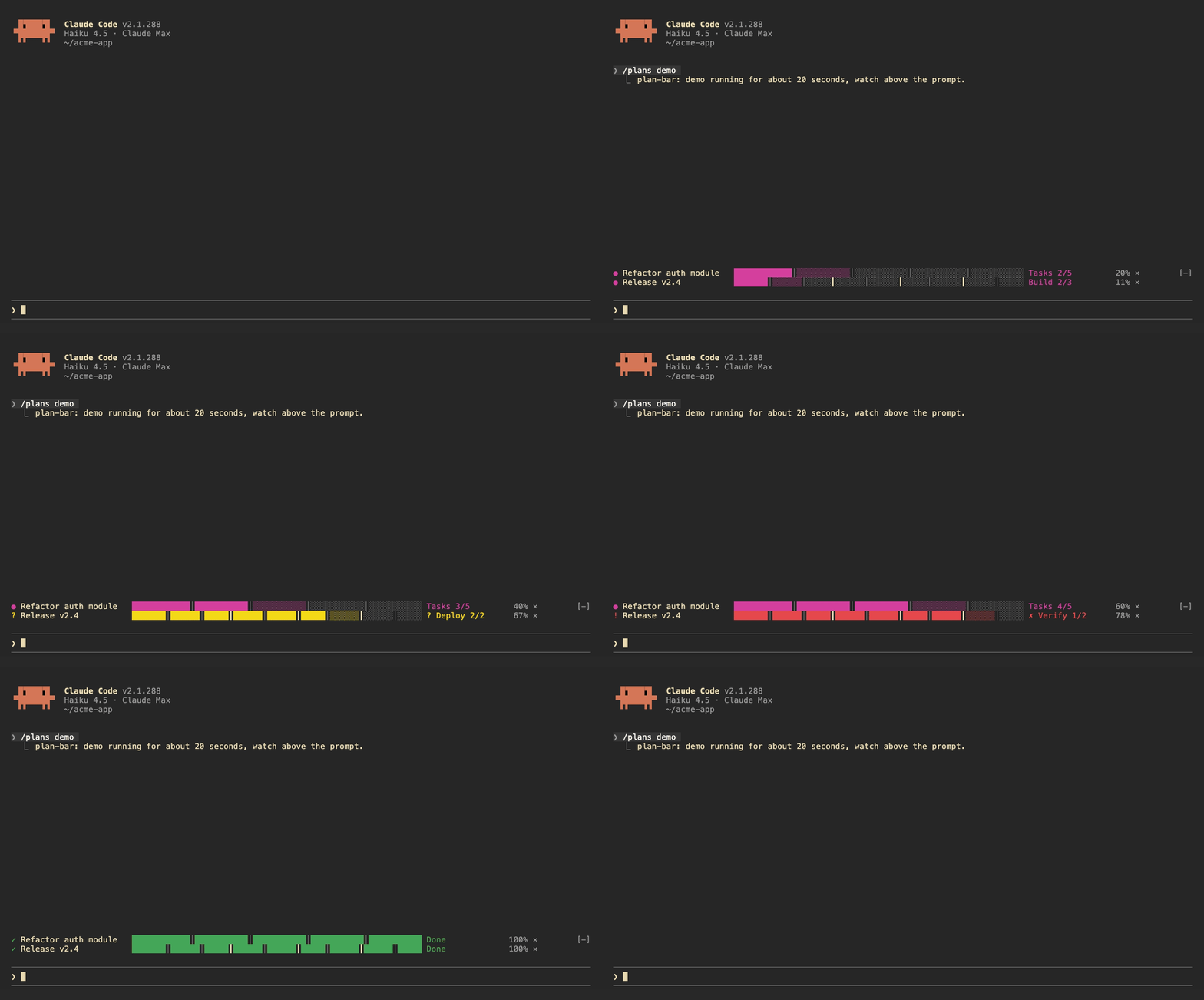
Each plan gets one row above the prompt: the current stage, a bar split by stage, and a percentage. The row turns yellow while Claude is waiting on you and red when a task fails. A short sound plays when a stage finishes, when the plan waits, and when it ends.
Claude drives the bars itself. The mod registers two tools, plan_set and plan_update, and adds a short note to the system prompt asking Claude to use them for work with three or more steps.
| Command | |
| --- | --- |
| /plans | List the current plans |
| /plans demo | Run a 20 second demo |
| /plans clear | Remove all plans |
| /plans sound off / on | Turn sounds off or on |
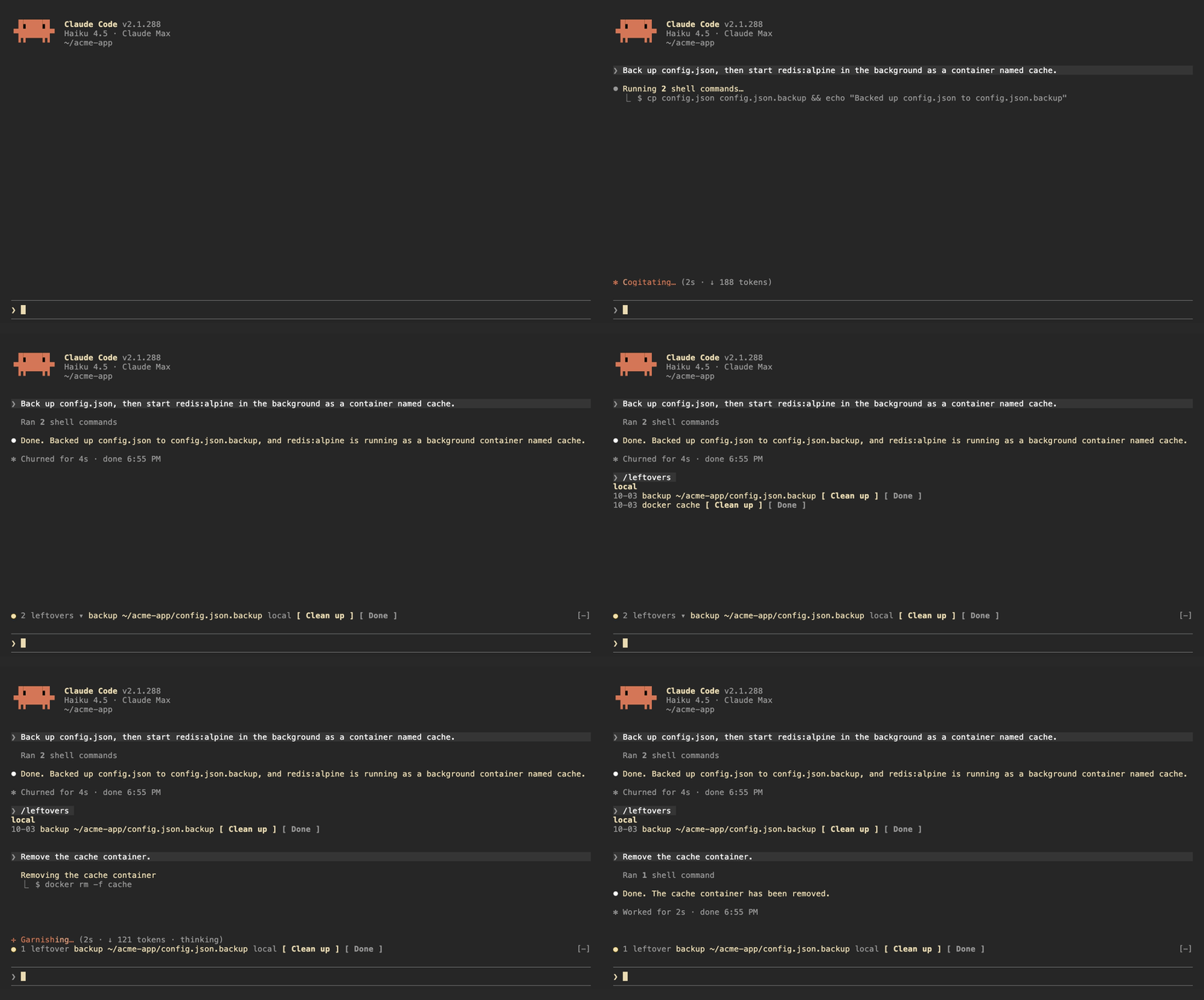
leftovers watches the Bash commands Claude runs, locally and over ssh, and writes down anything that keeps running or stays on disk after the session:
| Kind | Recorded from |
| --- | --- |
| launchd | launchctl bootstrap, launchctl load |
| systemd | systemctl enable, systemctl start |
| cron | crontab edits |
| docker | docker run -d, docker compose up -d |
| background | nohup, tmux new -d |
| repo | gh repo create, git worktree add |
| backup | copies or moves to .bak, .orig, .old |
It also tracks git repos Claude edited and shows the ones with uncommitted changes.
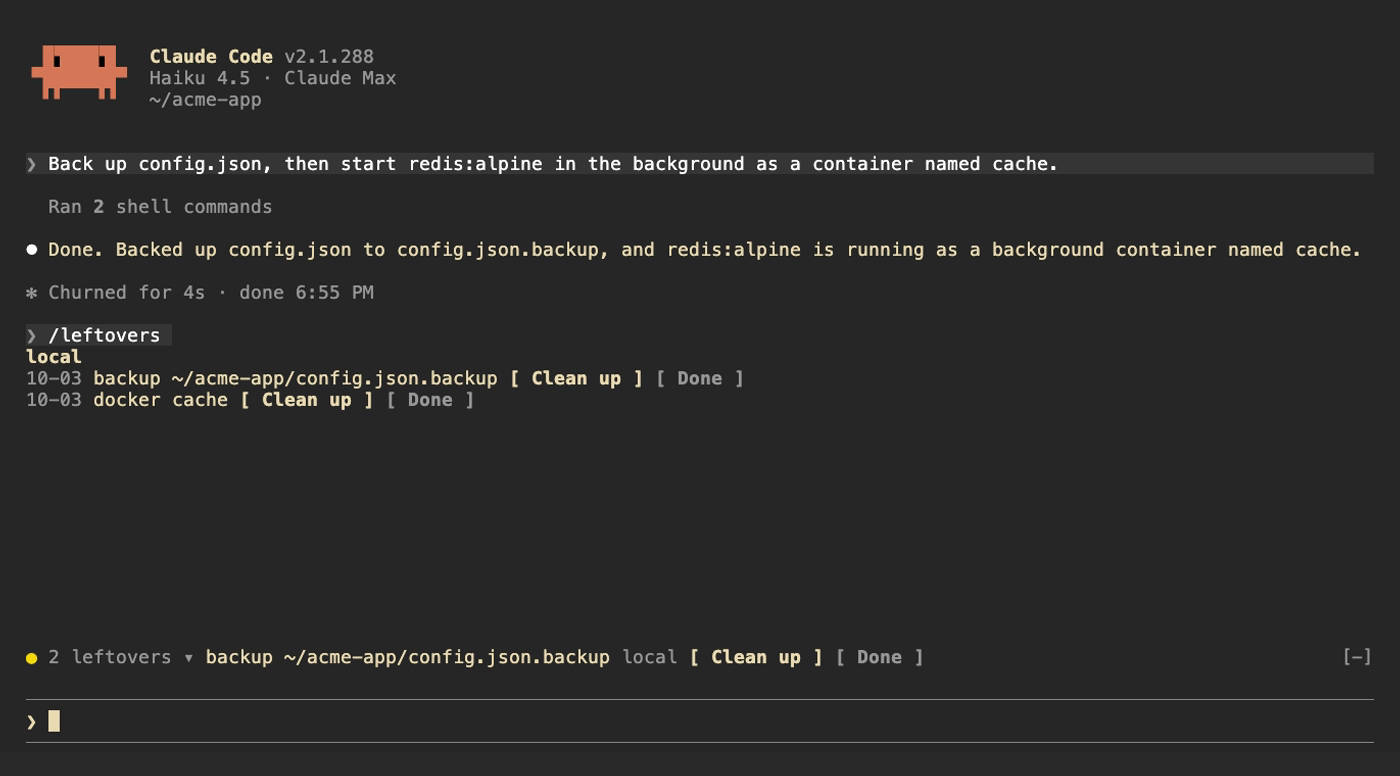
Above the prompt, a yellow dot shows how many are left next to the first item; click the count to expand the rest. /leftovers shows the full list grouped by machine. Clean up asks Claude to remove the item using the undo command it recorded, Done drops it from the ledger. Uncommitted repos get See changes and Ignore. When Claude runs the undo command itself (docker rm -f, systemctl disable, git worktree remove and so on) the item drops off on its own. The ledger is kept across sessions.
| Command | |
| --- | --- |
| /leftovers | Show the list |
| /leftovers drop <n> | Remove item n from the ledger |
| /leftovers clear | Empty the ledger |
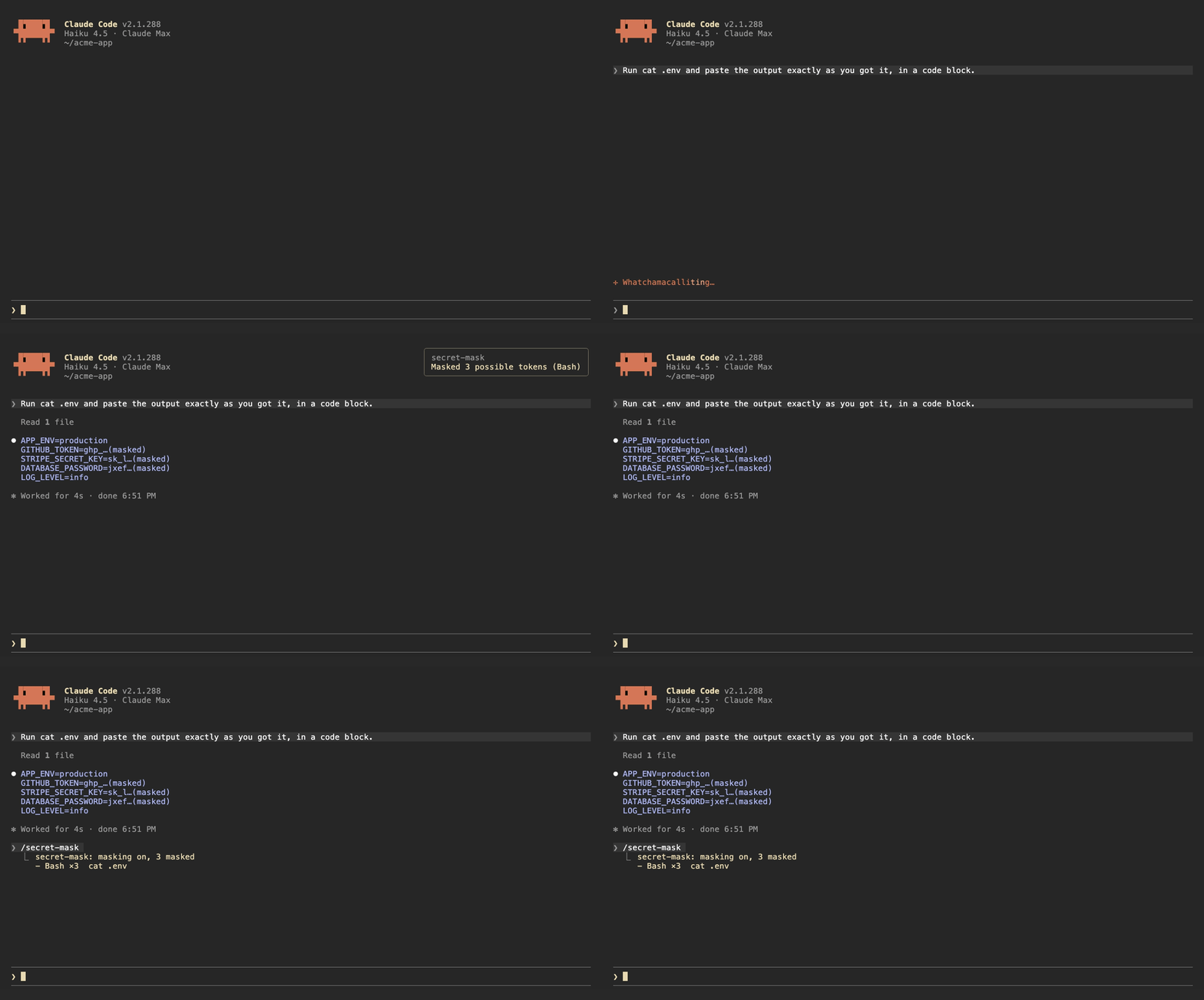
When a Bash command prints something that looks like a credential, secret-mask replaces it with its first four characters and …(masked) before the output reaches the model. Results from other tools, such as MCP tools and web fetches, are masked when they are written to the conversation. A toast says how many were masked, and /secret-mask lists them.
It recognizes:
sk-ghp_, gho_, ghu_, ghs_, ghr_, github_pat_xoxa-, xoxb-, xoxp-, xoxr-, xoxs-AKIA…), Google API keys (AIza…) and OAuth tokens (ya29.…)Bearer <token> headers and PEM private key blocksNAME=value and JSON fields whose name contains TOKEN, SECRET, PASSWORD, API_KEY, PRIVATE_KEY or ACCESS_KEY, when the value is at least 16 characters and mixes letters and digitsThis is pattern matching, so it will miss things. Results from Read, Edit, Write and NotebookEdit are left alone, because Claude needs the real file contents to edit them. Treat it as a guard against accidents, not as a way to hand Claude a file full of secrets.
| Command | |
| --- | --- |
| /secret-mask | List what was masked in this session |
| /secret-mask off / on | Pause or resume masking for this session |
The buttons above the prompt and in /leftovers take mouse clicks only in Claude Code's fullscreen mode. The default renderer does not turn on mouse reporting, so clicks never reach it. Turn fullscreen on in /config, or add "tui": "fullscreen" to ~/.claude/settings.json. In the default mode, press ctrl+x then tab to move into the row above the prompt, tab to pick a button and Enter to press it.
Each mod has a language option: en (default), zh-TW or zh-CN. Change it in /config, or in ~/.claude/settings.json:
{
  "pluginConfigs": {
    "leftovers@claude-code-mods": { "options": { "language": "zh-TW" } }
  }
}
Use leftovers@inline as the key when the mod is loaded with --plugin-dir or CLAUDE_CODE_PLUGIN_DIRS.
/plugin install notes that the option is not set yet. You can ignore that; it falls back to en.
claude plugin validate ./leftovers
claude plugin test ./leftovers
The demo recordings are made with VHS. media/tapes/setup-demo.sh builds a separate Claude Code config in ~/.claude-demo and a sample project in ~/acme-app; log in once with CLAUDE_CONFIG_DIR=~/.claude-demo claude auth login, then run media/tapes/record.sh plan-bar leftovers secret-mask hero.
MIT

キャッシュを考慮する /loop worker と CronCreate のバックグラウンド自動化。ruflo ファミリーの繰り返しタスクすべてに使う基盤プラグインです。

Claude Code mod としての claude-reflect。短いプロンプトごとにモデルチェックを行い、再利用できる修正(任意の言語)を見つけ、プロンプト上のバンドを 1 回押すだけで CLAUDE.md に保存します。


Claude Code 内の初期版 crit。ペインで会話、差分、ファイルにコメントし、レビューを Claude に送り、スレッドで Claude の返答を読めます。