
jamubc@jamubc
jamubc/toolbox/tree/main/plugins/instantnotes
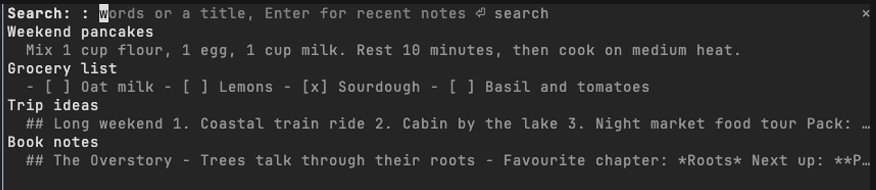
InstantNotes MCP サーバーまたはローカルの `instantnotes mcp` を使い、ターミナルのペインから InstantNotes のノートを検索、閲覧、記録する Claude Code プラグインです。
jamubc/toolbox/tree/main/plugins/instantnotes
instantnotes は jamubc による Claude Code プラグインで、InstantNotes のライブラリを Claude Code の隣のペインに表示します。/plugin marketplace add jamubc/toolbox と /plugin install instantnotes@toolbox でインストールします。コマンドは、最近のノートをペインで開く /notes、ライブラリ全体を検索する /notes <words>、新しいノートを保存する /note <text>(先頭行がタイトルになります)です。ペインでは入力しながら絞り込み、ノートを Markdown として開き、プロンプトでノートに言及して Claude に MCP 経由で読ませ、ノートのテキストを貼り付けたりコピーしたり、新しいノートを作成したりできます。InstantNotes には、実行中の instantnotes MCP サーバー経由、またはリクエストごとに instantnotes mcp を実行してアクセスします。プログラムは ~/.claude.json、.mcp.json、/Applications/InstantNotes.app、~/Applications、PATH から見つけます。Settings › Agents で Access を有効にした InstantNotes 0.9.0+ が必要です。ノートをプロンプトに追加したときだけ Claude に届き、プラグインはローカルプログラムとのみ通信してネットワークには接続しません。
まず作者の README で marketplace とプラグイン名を確認してください。コマンドはリポジトリの構成によって変わる場合があります。
claude plugin marketplace add jamubc/toolbox
claude plugin install instantnotes
Your InstantNotes library, directly in Claude Code. Search, read and capture notes without leaving the terminal.
Every note you have, one command away.
Add the marketplace:
/plugin marketplace add jamubc/toolbox
Install the plugin:
/plugin install instantnotes@toolbox
| Command | What it does |
| --- | --- |
| /notes | Opens a pane with your recent notes. |
| /notes <words> | Opens the pane searching for those words or a title. |
| /note <text> | Saves the text as a new note. The first line becomes the title. |
In the pane:
b goes back.u) puts a reference to the note in your prompt, so Claude can read it through the InstantNotes MCP server. paste into prompt (p) puts the note's text itself there. copy (c) copies it.r) reads one again.The plugin uses what InstantNotes › Settings › Agents sets up, in this order:
instantnotes MCP server Claude Code already runs, once you ran the claude mcp add instantnotes … command from that page. This is the fast path: the server stays up, and every request is a call to it.instantnotes mcp run by the plugin, one request at a time. It finds the program from what claude mcp add wrote in ~/.claude.json or the project's .mcp.json (the exact program and library you use), from /Applications/InstantNotes.app or ~/Applications/InstantNotes.app, or on your PATH.When none of these can start, the pane says so and lists the steps.
<details> <summary>Setup details</summary> <br>/config → InstantNotes program names the program when the plugin cannot find it. /config → Notes library names a library other than the one the app or claude mcp add uses; the attachments folder is read beside it.~/.local/share/com.instantnotes.app on Linux, ~/Library/Application Support/com.instantnotes.app on macOS.hooks/register.tsx draws the pane and answers /notes and /note.hooks/library.ts finds the program and library from your configuration, and shapes text for the pane.tools/call, through the connected server or one instantnotes mcp process, so the plugin follows the same rules as any agent./clear and /compact leave the search and the open note in the pane./note, or the field in the pane).instantnotes program or the MCP server you connected, never the network. ~/.claude.json is read only to find that server's command line.claude --plugin-dir plugins/instantnotes # load it; edits hot-reload
claude plugin validate plugins/instantnotes
claude plugin test plugins/instantnotes

キャッシュを考慮する /loop worker と CronCreate のバックグラウンド自動化。ruflo ファミリーの繰り返しタスクすべてに使う基盤プラグインです。

Claude Code mod としての claude-reflect。短いプロンプトごとにモデルチェックを行い、再利用できる修正(任意の言語)を見つけ、プロンプト上のバンドを 1 回押すだけで CLAUDE.md に保存します。


Claude Code 内の初期版 crit。ペインで会話、差分、ファイルにコメントし、レビューを Claude に送り、スレッドで Claude の返答を読めます。