ClaudeModsClaude Code mod ディレクトリ
☰
● 0 人がオンライン ・閲覧 0 回
+ 作品を投稿
← 作品一覧へ
X の投稿 · マルチエージェント・連携 / 開発・デバッグ / ダッシュボード・HUD / ワークフロー・CI

Claude Code 検索効率メーター — Claude Code プラグイン · ClaudeMods

この作品を報告あなたの作品ですか?所有者確認へ

ClaudeMods でこの Claude Code プラグインのソースと必要な権限を確認できます。 作者が初のClaude Code Modを自作:Claudeがコードベース内で見つける難易度を示すメーターと、次回の検索を速くするボタン付き。

JJJ Englert@JJEnglert

1/

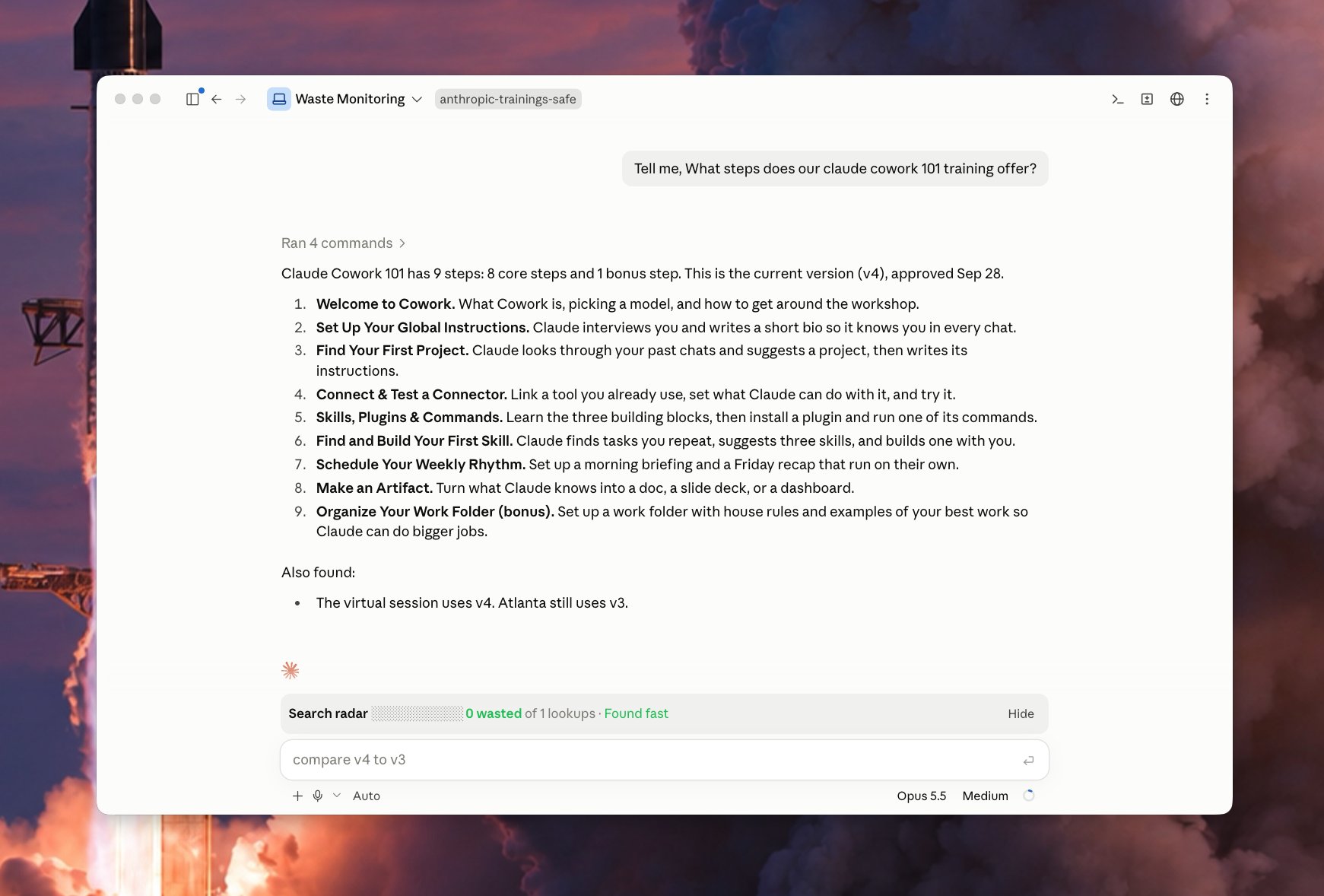
I just built my first Claude Code Mod! 🔥 I built a meter that shows how easily Claude finds things in my code. It comes with a button that makes the next search faster. What it does Every time you ask Claude something, the bar watches Claude look through your files. It counts the wasted searches: a) searches that found nothing b) the same search done twice c) files Claude opened but didn't need Green means Claude found it fast. Yellow means some waste. Red means Claude got lost. It also tells you which folder caused the most trouble. The fix button Click Patch the waste and a helper Claude starts in the background. It writes a short note in your project that says "the thing you need is here." Next time, Claude reads that note and goes straight to the right spot. The helper only writes notes. It never changes your code. It works on its own, so your main chat stays clean. Why it matters Think of your codebase as a library. The bar shows when Claude wandered the shelves. The button adds a sign to the shelf, so the next visit is quick. Over time, the bar shows which parts of your code need better notes.

元の投稿の画像1
翻訳済み

この mod について

作者が初のClaude Code Modを公開:リアルタイムメーターで、各質問時にClaudeがファイルを走査する過程を観察し、3種類の無駄な検索をカウントする——何も見つからなかった検索、繰り返し実行された同じ検索、開いたが不要だったファイル。緑は高速特定、黄は無駄あり、赤はClaudeが迷子を意味し、どのフォルダが最も厄介かを指摘する。また「Patch the waste」ボタンがあり、クリックするとバックグラウンドで補助Claudeを起動し、プロジェクトに「必要なものはここにある」といった短いヒントのみを書き込み、コードは絶対に変更せず、メイン会話に影響を与えず独立して動作する。時間の経過とともに、メーターはどのコード領域により良いコメントが必要かを示せる。

インストール

インストール方法は元のソースをご確認ください。

原文 / README

I just built my first Claude Code Mod! 🔥

I built a meter that shows how easily Claude finds things in my code. It comes with a button that makes the next search faster.

What it does

Every time you ask Claude something, the bar watches Claude look through your files. It counts the wasted searches: a) searches that found nothing b) the same search done twice c) files Claude opened but didn't need

Green means Claude found it fast.

Yellow means some waste.

Red means Claude got lost.

It also tells you which folder caused the most trouble.

The fix button

Click Patch the waste and a helper Claude starts in the background.

It writes a short note in your project that says "the thing you need is here."

Next time, Claude reads that note and goes straight to the right spot.

The helper only writes notes. It never changes your code.

It works on its own, so your main chat stays clean.

Why it matters

Think of your codebase as a library. The bar shows when Claude wandered the shelves.

The button adds a sign to the shelf, so the next visit is quick.

Over time, the bar shows which parts of your code need better notes.
元のソースを見る ↗

関連作品

