
hacksurvivor@hacksurvivor
hacksurvivor/claude-mods/tree/main/mods/grudge
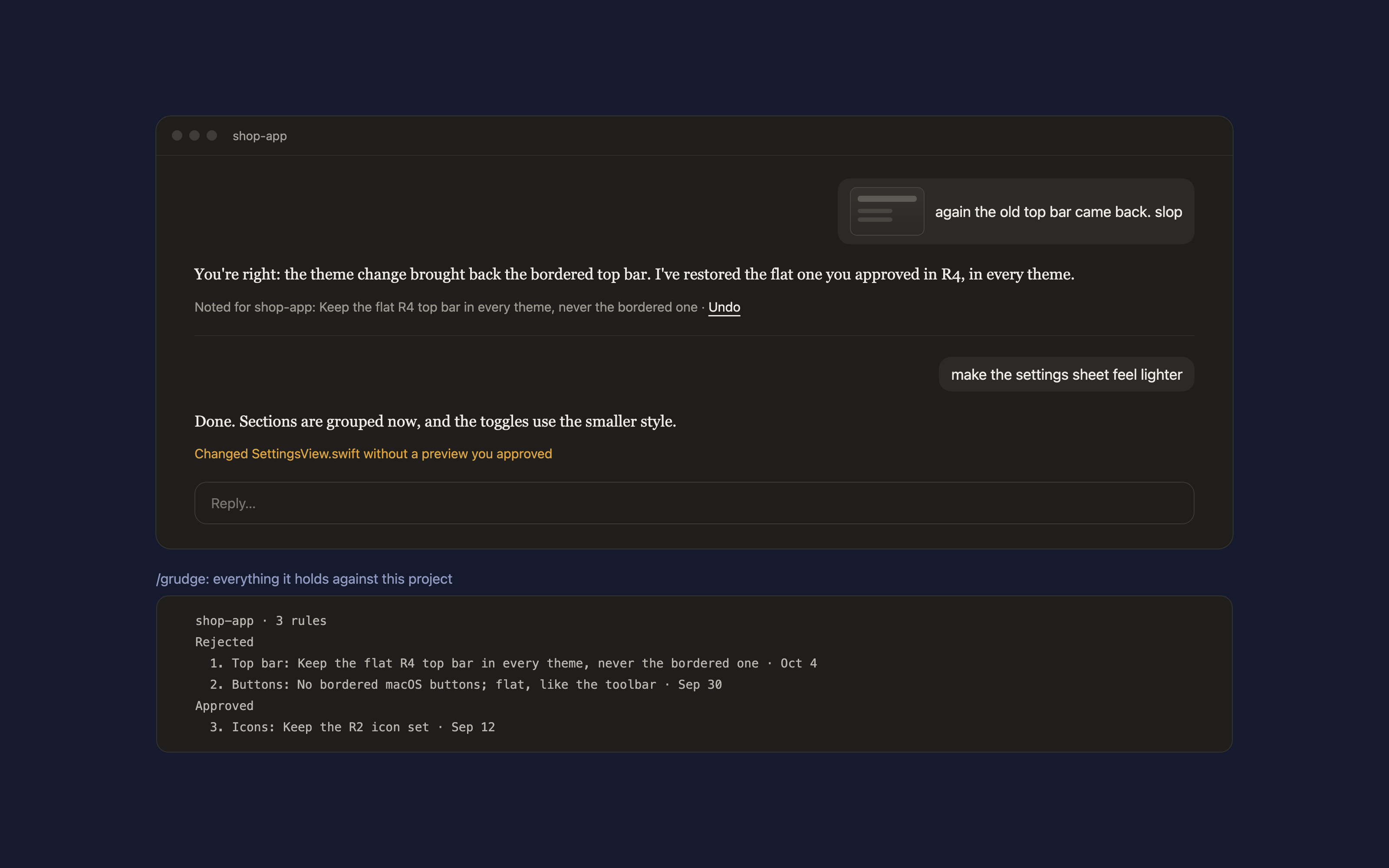
UI の見た目を却下するたびに、それをスクリーンショット付きのプロジェクトルールに変える Claude Code mod です。承認済みのプレビューなしで Claude が UI ファイルを編集すると警告します。
hacksurvivor/claude-mods/tree/main/mods/grudge
Grudge では、スクリーンショットやコメントで UI の見た目を却下すると、Claude にそれをスクリーンショットと一緒に保持する1つのプロジェクトルールへ変換させられます。ルールは Claude の返答の下に Undo オプション付きで表示されます。UI を編集する前に、Claude にはプロジェクトのルールと、2つの習慣が渡されます。UI を考案する前に実際の参考を探すこと、新しい見た目を作る前にプレビューを表示することです。セッション中にプレビューの承認なしで行われた UI 変更も検出します。"looks right" のような承認や、プレビューのバリエーションを選ぶこともルールになります。コマンドは、/grudge でルール一覧、/grudge forget N で1つ削除、/grudge add <rule> で1つ追加、/grudge off と /grudge on で一時停止と再開です。スクリーンショットをセッションのトランスクリプトからコピーするため、Claude Code 2.1.286+ と PATH 上の Python 3 が必要です。/plugin marketplace add hacksurvivor/claude-mods でインストールし、その後 /plugin install grudge@hacksurvivor と /reload-plugins を実行します。入力したメッセージ、Claude が編集したファイルのパスを読み取り、スクリーンショット画像を ~/.claude/projects から ~/.claude/grudge/<project>/ へコピーします。自分から何かを送信することはありません。Apache-2.0 ライセンスです。
まず作者の README で marketplace とプラグイン名を確認してください。コマンドはリポジトリの構成によって変わる場合があります。
claude plugin marketplace add hacksurvivor/claude-mods
claude plugin install grudge
A Claude Code mod that holds a grudge against every look you reject, so Claude never brings it back.
You reply "this is slop" with a screenshot, or "again the old top bar". Grudge asks Claude to turn that into one rule for the project, written after it has looked at your screenshot, and keeps the screenshot with it. A line under Claude's reply shows what was noted, with Undo:
Noted for shop-app: keep the R4 top bar in every theme · Undo
The next time Claude edits a UI file in that project, it is handed every rule first, along with two habits: look for real references before inventing UI, and show a preview before a new look. When Claude changes UI files without a preview you approved in the session, the reply says so:
Changed SettingsView.swift without a preview you approved
Approvals count too. "Looks right" or picking variant "A" after a preview keeps that look as a rule, so later changes don't quietly undo it.
/grudge lists the project's rules, numbered./grudge forget 2 drops one; /grudge add <rule> writes one yourself./grudge off pauses it for the session, /grudge on resumes it.PATH, to copy a screenshot out of the session's transcript.In Claude Code:
/plugin marketplace add hacksurvivor/claude-mods
/plugin install grudge@hacksurvivor
/reload-plugins
bin/shot.py with Python when you reject a look with a screenshot. It reads this session's transcript in ~/.claude/projects and copies that message's images into ~/.claude/grudge/<project>/. Nothing else.~/.claude/grudge/.See PRIVACY.md.
Apache-2.0

キャッシュを考慮する /loop worker と CronCreate のバックグラウンド自動化。ruflo ファミリーの繰り返しタスクすべてに使う基盤プラグインです。

Claude Code mod としての claude-reflect。短いプロンプトごとにモデルチェックを行い、再利用できる修正(任意の言語)を見つけ、プロンプト上のバンドを 1 回押すだけで CLAUDE.md に保存します。


Claude Code 内の初期版 crit。ペインで会話、差分、ファイルにコメントし、レビューを Claude に送り、スレッドで Claude の返答を読めます。