
yzwooyi@yzwooyi
yzwooyi/claude-glance/tree/main/glance
yzwooyi/claude-glance/tree/main/glance
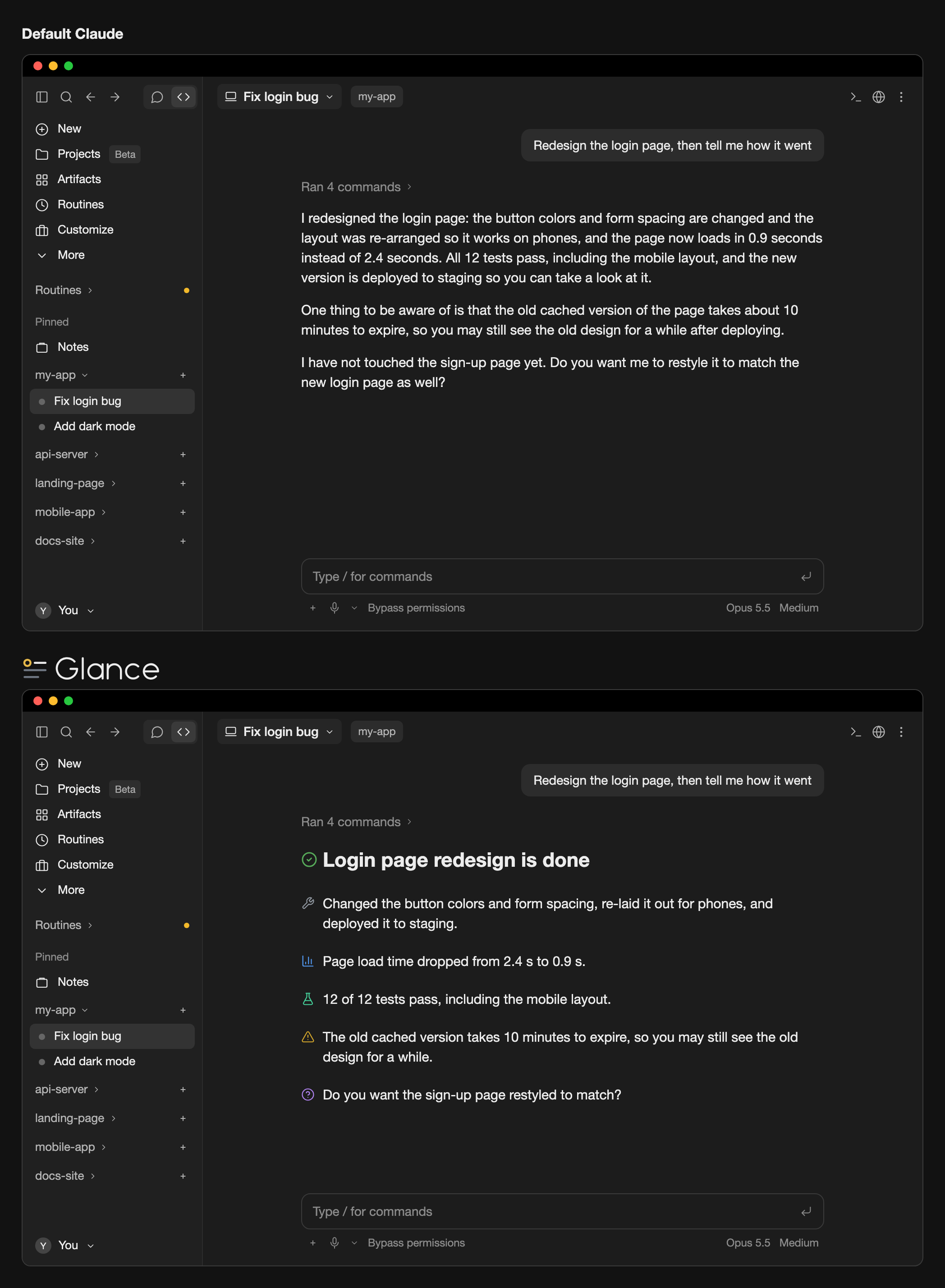
GlanceはClaude Codeデスクトップアプリのプラグインです。/output-style用の返答スタイル(glance-enまたはglance-zh)で短い段落を書かせ、24個のマーカーの1つで要点をタグ付けします。デスクトップのラインアイコンはそのマーカーをUI内で色付きのラインアイコンとして描画します。画面上の描画だけに作用し、会話テキストは変えません。ターミナル、コードブロック、文中のマーカーもそのままです。インストールにはClaude Code 2.1.286+と、~/.claude/settings.jsonへのCLAUDE_CODE_ENABLE_FUNCTION_HOOKS=1の追加が必要です。
まず作者の README で marketplace とプラグイン名を確認してください。コマンドはリポジトリの構成によって変わる場合があります。
claude plugin marketplace add yzwooyi/claude-glance
claude plugin install glance
Two things working together: a reply style that makes Claude write short paragraphs and mark each key point (conclusion, warning, verified result, and so on) with one of 24 markers, and desktop line icons that draw those markers as colored line icons, with a highlight line like # ✅ **Conclusion** drawn as a large heading. You need both enabled: install the plugin, then pick glance-en or glance-zh in /output-style.
It only changes what is shown on screen, never the conversation text itself; the terminal, code blocks, and markers in the middle of a sentence are left alone.
Requires Claude Code 2.1.286 or later (the version bundled with the desktop app is fine).
claude plugin marketplace add yzwooyi/claude-glance
claude plugin install glance@claude-glance --scope user
~/.claude/settings.json and add one line inside "env" (create env if it isn't there):"env": { "CLAUDE_CODE_ENABLE_FUNCTION_HOOKS": "1" }
To update later: claude plugin update glance@claude-glance, then start a new session.
| marker | meaning | |---|---| | 🔴 | Red line / serious pitfall | | ⚠️ | Needs attention | | ✅ | Verified (actually tested) | | 📊 | Measured numbers | | 💡 | Conclusion / recommendation | | ❓ | I can't answer / you decide | | 🔧 | What I changed | | ⏳ | Waiting on a result / has a due date | | 👉 | You do this by hand | | 📎 | Deliverable (file / link) | | 🛡️ | Money / security path | | 📤 | Shipped (in effect) | | 🔍 | What I found | | 💬 | Why / how it works | | 🧪 | Tests | | 🐛 | Bug / error | | ⚙️ | Settings / config | | 📁 | File / location | | 🎨 | Design / look | | 💰 | Quota / cost | | 📅 | Date / point in time | | 🤖 | Subagents | | 🔗 | External link | | ↩️ | Revert / undo |
The plugin ships two reply styles that tell Claude when to use each of the 24 markers. After installing, pick one: in the terminal run /output-style (or open /config and change Output style); in the desktop app choose it under Output style in settings. Choose glance-en (English replies) or glance-zh (Chinese replies). Without one of these styles Claude won't use the markers, so there is nothing to draw.
To have Claude use these 24 markers without switching reply style, add this to ~/.claude/CLAUDE.md:
## Key-point markers in replies
Put one emoji at the start of a paragraph for a real conclusion, finding, or warning, one per point; none on transitional sentences. Use only these 24:
🔴 red line / serious pitfall · ⚠️ needs attention · ✅ verified by actual testing · 📊 measured numbers · 💡 conclusion / recommendation · ❓ you decide
🔧 what I changed · ⏳ waiting on a result / due date · 👉 you do this by hand · 📎 deliverable (file / link) · 🛡️ money / security · 📤 shipped
🔍 what I found · 💬 why / how it works · 🧪 tests · 🐛 bug / error · ⚙️ settings · 📁 file location
🎨 design / look · 💰 quota / cost · 📅 date · 🤖 subagents · 🔗 external link · ↩️ revert / undo
Write the single most important conclusion on its own line as `# ✅ **Conclusion**` (at most 1–3 such lines per reply).

キャッシュを考慮する /loop worker と CronCreate のバックグラウンド自動化。ruflo ファミリーの繰り返しタスクすべてに使う基盤プラグインです。

Claude Code mod としての claude-reflect。短いプロンプトごとにモデルチェックを行い、再利用できる修正(任意の言語)を見つけ、プロンプト上のバンドを 1 回押すだけで CLAUDE.md に保存します。


Claude Code 内の初期版 crit。ペインで会話、差分、ファイルにコメントし、レビューを Claude に送り、スレッドで Claude の返答を読めます。