
nogu66@nogu66
nogu66/claude-code/tree/main/git-ops
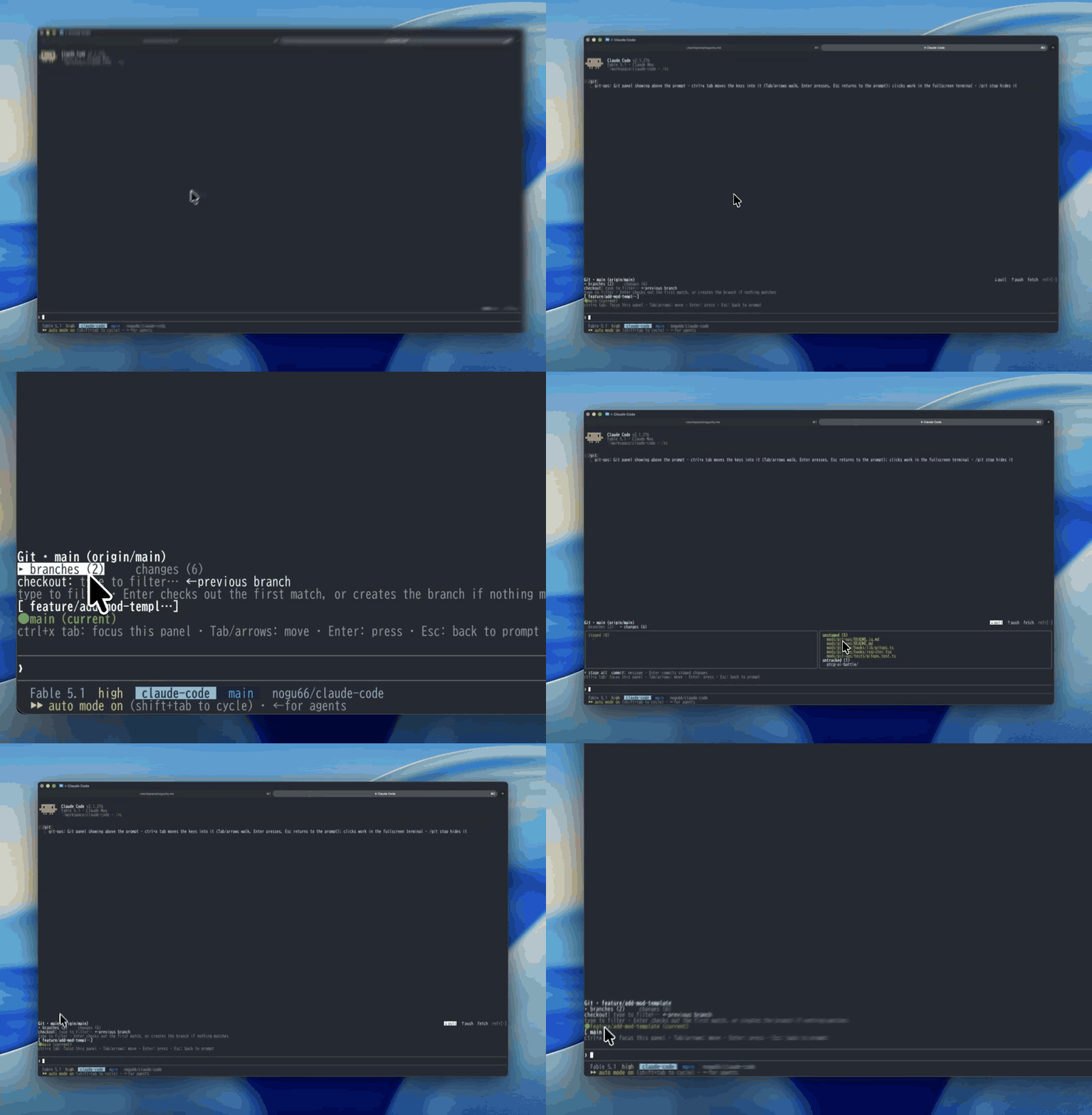
Claude Mod(Claude Code の function hooks プラグイン)。`/git` でプロンプト上部に日常の git 操作用クリックパネルを表示し、ボタン(または絞り込み後の Enter、数字キー)でブランチを選び、確認して切り替えます。pull/push/fetch、全ステージ、commit もボタンから実行できます。force-push、reset、rebase は公開しません。
nogu66/claude-code/tree/main/git-ops
Claude Mod(function hooks で構築された Claude Code プラグイン)です。/git はプロンプトの上にある帯へ、クリックできる git パネルを描画します。ボタンでブランチを選び、確認すると切り替えられます。pull / push / fetch、全ステージ、commit も、git コマンドを入力せずに実行できます。

Git · main (origin/main, ahead 4)              ↓ pull  ↑ push  fetch  refresh
▸ branches (12)     changes (13)
checkout: type to filter…            ← previous branch
[ feat/sandbox-rewrite ]       [ feature/seo-optimization ]
[ fix/sandbox-trailing-slash ] ● main (current)
[ feat/github-link-card ]      [ pensive-lamport ]
$.process.run を通じて通常の git を呼び出します(shell 文字列ではなく argv 配列を使います)。そのため独自の認証や設定は必要ありません。現在の作業ディレクトリで git が解決するリモート、認証情報、上流追跡設定がそのまま使われます。
**安全な日常操作に意図的に限定しています。**status、ブランチ一覧、checkout(既存ブランチまたは新規ブランチ)、pull、push、fetch、全ステージ、commit に対応します。force-push、reset、rebase、clean はありません。パネルのボタンから破壊的な操作をワンクリックで実行できるようにはしません。
CLAUDE_CODE_ENABLE_FUNCTION_HOOKS=1 で有効化した function hooks 対応の Claude Code ビルド。function hooks は early-access で、API は変更される可能性があります。未対応のビルドでは、このプラグインの hooks モジュールは無視されます。PATH 上の git と、作業ディレクトリになっている git リポジトリ。/plugin marketplace add nogu66/claude-code
/plugin install git-ops@nogu-marketplace
インストールせずに試すこともできます。
git clone https://github.com/nogu66/claude-code.git
cd claude-code/git-ops
claude --plugin-dir .        # .claude/settings.json here turns function hooks on
任意の git リポジトリ内で /git を実行してください。
/git(または /git show)でパネルを表示し、/git stop で隠します。
まずパネルにキー入力のフォーカスを移します。パネルを開いただけではキー入力は通常のプロンプトに残ります。フィルターボックスに入力する文字や数字のホットキーは、パネルには届きません。ctrl+x tab を押してフォーカスし、Tab/矢印で移動、Enter で実行、Esc でプロンプトに戻ります。マウスクリックは、ターミナルが報告する場所(全画面レイアウト)でのみ使えます。
↓ pull、↑ push、fetch、refresh を表示します。操作対象は現在のブランチに設定された上流です。branches (n) と changes (n)。一度に 1 つの本文だけを描画するので、帯を短く保てます。branches タブ——別のブランチへ素早く移動するためのタブです。
● name (current) ラベルになります。1–9、切り替え可能な先頭 9 ブランチ)を押します。/ セグメントの接頭辞、部分文字列の順)。下の行には Enter の動作が表示されます。Enter → checkout <best match>、一致がなければ Enter → create new branch <name> です。← previous branch——git checkout - を実行します。Check out <branch>? · [ OK ] / [ cancel ]、ホットキー y / n)を先に表示します。未コミットの変更がある場合は警告も表示します。changes タブ——左にステージ済み(緑)、右に未ステージ(黄)と未追跡を表示します。その下に + stage all(git add -A)と、Enter で git commit -m を実行する commit ボックスがあります。checkout は先に確認します。**それ以外——pull、push、fetch、全ステージ、commit——はクリックまたは Enter の瞬間に実行されます。**git コマンドを入力した場合とまったく同じです。push はマシンの外部へ接続します。
パネルなしで同じ argv ビルダーを使います。
| Command | Runs |
|---|---|
| /git status | git status |
| /git branch | git branch |
| /git checkout <branch> | git checkout <branch> |
| /git checkout -b <branch> | git checkout -b <branch> |
| /git back | git checkout - |
| /git pull · /git push · /git fetch | the same, no flags |
| /git stage | git add -A |
| /git commit <message> | git commit -m <message> |
| /git help | prints this list |
テキストサブコマンドは確認なしで即座に実行されます。
refresh をクリックした後に更新されます。別の場所で git が実行されても更新されません(たとえば Bash ツール呼び出し)。- と空白だけを防ぎます(そのため名前が git のフラグとして解釈されません)。その他の不正な値は git 自身が拒否します。next(e) で連結するため積み重ねられますが、その組み合わせはテストされていません。bun test # pure logic in hooks/lib/gitops.ts — no $ or UI to mock
claude plugin validate . # lists the hooked events and $ calls
hooks/register.tsx——$ に触れる唯一のファイルです。/git を登録し、git を実行し、AbovePrompt パネルを描画し、メモリ上の UI 状態を保持します。hooks/lib/gitops.ts——純粋関数です。コマンド解析、git argv ビルダー、ブランチ/ステータス出力の解析、ブランチ絞り込み、Enter の対象決定、列レイアウトを担当します。tests/gitops.test.ts——上記のテストです。正確な型を確認するには、function hooks を有効にしたセッションで /plugin-types を実行してください。.claude/types/claude-code.d.ts に書き出されます。
MIT
まず作者の README で marketplace とプラグイン名を確認してください。コマンドはリポジトリの構成によって変わる場合があります。
claude plugin marketplace add nogu66/claude-code
claude plugin install git-ops
A Claude Mod (a Claude Code plugin built on function hooks): /git draws a clickable git
panel in the band above the prompt. Pick a branch with a button, confirm, and it checks out —
plus pull / push / fetch, stage-all and commit, without typing a git command.
Git · main (origin/main, ahead 4)              ↓ pull  ↑ push  fetch  refresh
▸ branches (12)     changes (13)
checkout: type to filter…            ← previous branch
[ feat/sandbox-rewrite ]       [ feature/seo-optimization ]
[ fix/sandbox-trailing-slash ] ● main (current)
[ feat/github-link-card ]      [ pensive-lamport ]
It shells out to plain git through $.process.run (an argv array, never a shell string), so
it needs no auth or config of its own: whatever git already resolves in the current working
directory — remotes, credentials, upstream tracking — is what runs.
Deliberately limited to safe, everyday operations: status, branch listing, checkout (existing or new branch), pull, push, fetch, stage-all, commit. No force-push, reset, rebase or clean — a panel button shouldn't put a destructive operation one click away.
CLAUDE_CODE_ENABLE_FUNCTION_HOOKS=1.
Function hooks are early-access and their API can change; builds without them simply ignore
this plugin's hooks module.git on PATH, and a git repository as the working directory./plugin marketplace add nogu66/claude-code
/plugin install git-ops@nogu-marketplace
Or try it without installing:
git clone https://github.com/nogu66/claude-code.git
cd claude-code/git-ops
claude --plugin-dir .        # .claude/settings.json here turns function hooks on
Then run /git inside any git repository.
/git (or /git show) shows the panel; /git stop hides it.
Move the keys into the panel first. Opening the panel leaves your keystrokes with the normal
prompt — text meant for the filter box, or a digit hotkey, never reaches the panel. Press
ctrl+x tab to focus it; then Tab/arrows move, Enter presses, Esc returns to the prompt.
Mouse clicks only work where the terminal reports them (the fullscreen layout).
↓ pull, ↑ push,
fetch, refresh on the right. They act on the current branch's existing upstream.branches (n) and changes (n). Only one body is drawn at a time, which keeps the
band short.branches tab — built for getting to another branch quickly:
● name (current) label instead;1–9, the
first nine switchable branches);/-segment
prefix, then substring), and the line beneath says what Enter will do —
Enter → checkout <best match>, or Enter → create new branch <name> when nothing matches;← previous branch — git checkout -;Check out <branch>? · [ OK ] / [ cancel ], hotkeys y / n), with a warning when
there are uncommitted changes.changes tab — staged (green) on the left, unstaged (yellow) and untracked on the right;
below them + stage all (git add -A) and a commit box (Enter runs git commit -m).Checkout asks first. Everything else — pull, push, fetch, stage all, commit — runs the moment
you click or press Enter, exactly as if you had typed the git command. push reaches outside
your machine.
The same argv builders, without the panel:
| Command | Runs |
|---|---|
| /git status | git status |
| /git branch | git branch |
| /git checkout <branch> | git checkout <branch> |
| /git checkout -b <branch> | git checkout -b <branch> |
| /git back | git checkout - |
| /git pull · /git push · /git fetch | the same, no flags |
| /git stage | git add -A |
| /git commit <message> | git commit -m <message> |
| /git help | prints this list |
Text subcommands run immediately, without the confirmation step.
refresh click — not when git runs elsewhere
(for instance in a Bash tool call).- and whitespace
(so a name can't be read as a git flag); git itself rejects anything else invalid.next(e) so
they stack, but that combination isn't tested.bun test # pure logic in hooks/lib/gitops.ts — no $ or UI to mock
claude plugin validate . # lists the hooked events and $ calls
hooks/register.tsx — the only file that touches $: registers /git, runs git, draws the
AbovePrompt panel, and holds its in-memory UI state.hooks/lib/gitops.ts — pure functions: command parsing, git argv builders, branch/status
output parsing, branch filtering and the Enter-target decision, column layout.tests/gitops.test.ts — tests for the above.For exact types, run /plugin-types in a session with function hooks on; it writes
.claude/types/claude-code.d.ts.
MIT

キャッシュを考慮する /loop worker と CronCreate のバックグラウンド自動化。ruflo ファミリーの繰り返しタスクすべてに使う基盤プラグインです。

Claude Code mod としての claude-reflect。短いプロンプトごとにモデルチェックを行い、再利用できる修正(任意の言語)を見つけ、プロンプト上のバンドを 1 回押すだけで CLAUDE.md に保存します。


Claude Code 内の初期版 crit。ペインで会話、差分、ファイルにコメントし、レビューを Claude に送り、スレッドで Claude の返答を読めます。