
theonly1me@theonly1me
theonly1me/claude-code-mods/tree/main/plugins/decision-lens
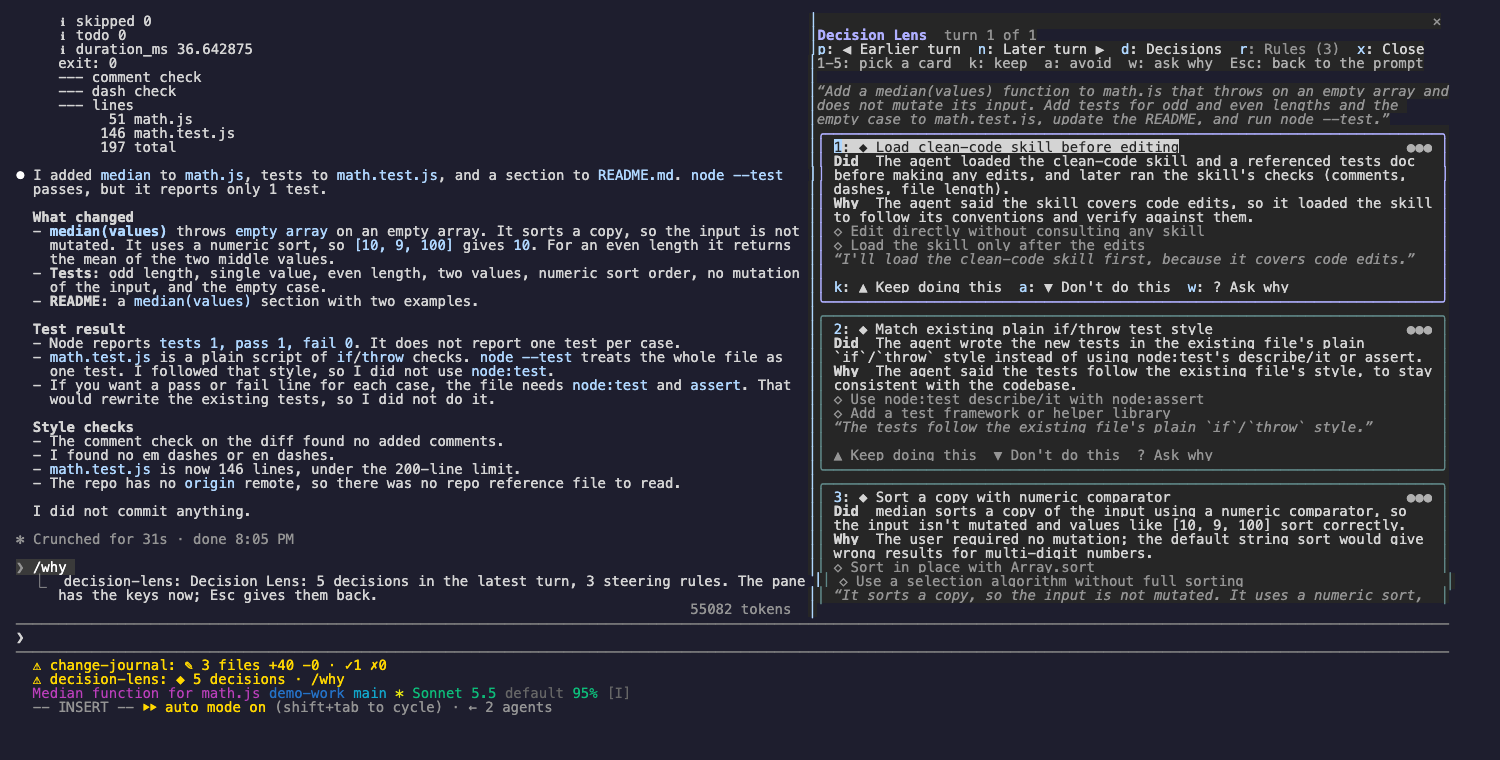
各ターンで Claude が行った決定、その理由、選ばなかったことを確認し、次のターンを keep と avoid のルールで誘導します。
theonly1me/claude-code-mods/tree/main/plugins/decision-lens
Claude が各ターンで行った決定、その理由、そして選ばなかったことを確認できます。次のターンを誘導し、気に入った行動は残し、望まない行動は止めます。

claude plugin marketplace add theonly1me/claude-code-mods
claude plugin install decision-lens@claude-code-mods
marketplace は一度登録します。インストール後、開いているセッションで /reload-plugins を実行します。Claude Code 2.1.289 以降が必要で、ビルド手順やランタイム依存関係はありません。
このレンズは Claude が作業する各ターンを記録します。Claude が書いたもの、モデルが共有した思考、すべてのツール呼び出しとその結果を対象にします。ターンが終わるとヘルパーモデルがそのトレースを読み、最大 5 個の実際の決定に名前を付けます。ステータス行には ◆ 3 decisions · /why が表示されます。
各決定はカードになり、次を含みます。
◆ 3 decisions · /why が表示されます。/why と入力します。レンズが最新ターンで開き、キー入力を受け取ります。ペインがキー入力を受け取っていないときも、コマンドはいつでも使えます。
/why:最新ターンでレンズを開く。/why keep 2:カード 2 から、行動を繰り返すよう Claude に伝えるルールを保存する。/why avoid 2:カード 2 から、行動を止めるよう Claude に伝えるルールを保存する。/why ask 2:セッション自身のモデルとキャッシュされた会話を通して Claude に尋ね、カード 2 を自分の言葉で説明させる。回答はカードに表示される。/why rules:Rules タブを開く。ルールは次のリクエストから Claude の system prompt に入り、それ以降のすべてのセッションでも使われます。プロジェクト単位で保存され、リポジトリのファイルは変更しません。
タイトルの下のヒント行には、その時点で使えるキーが常に表示されます。
| キー | 動作 |
| --- | --- |
| 1 から 5 | カードを選びます。選択したカードは明るいフレームになり、ボタンにキーが表示されます。 |
| k | これを続ける:選択したカードの keep ルールを保存します。 |
| a | これはしない:選択したカードの avoid ルールを保存します。 |
| w | 理由を尋ねる:Claude が選択したカードを自分の言葉で説明します。 |
| p、n | 前後のターンを表示します(直近 20 ターン)。 |
| d、r | Decisions タブまたは Rules タブを表示します。 |
| x | レンズを閉じます。 |
| Tab、Enter | 次のボタンへ移動して押します。 |
| Esc | キー入力をプロンプトへ戻します。ペインは開いたままです。 |
| ctrl+x tab | もう一度キー入力をペインに戻します。 |
Rules タブでは各ルールに番号があり、2 つのボタン「Make global」(または「This project only」)と「Remove」があります。Tab と Enter で押します。
/plugin で変更します。
explainTurns(on):ヘルパーモデルで各ターンを読みます。追加のトークンを使います。helperModel(claude-sonnet-5-5):各ターンを読むモデルです。「理由を尋ねる」は常にセッションのモデルを使います。helperEffort(medium):ヘルパーモデルの思考量(low、medium、high)。思考テキストを共有しないモデルもあります。その場合、レンズは Claude が書いた内容と実行したツール呼び出しから動作します。
設定、プライバシー、更新、削除については marketplace README を参照してください。
まず作者の README で marketplace とプラグイン名を確認してください。コマンドはリポジトリの構成によって変わる場合があります。
claude plugin marketplace add theonly1me/claude-code-mods
claude plugin install decision-lens
See the decisions Claude made in each turn, why it made them, and what it chose not to do. Then steer the next turns: keep a behavior you like, or stop one you do not.
claude plugin marketplace add theonly1me/claude-code-mods
claude plugin install decision-lens@claude-code-mods
Register the marketplace once. Run /reload-plugins in an open session after installing. Requires Claude Code 2.1.289 or later; no build step or runtime dependencies.
The lens records each turn as Claude works: what Claude wrote, any thinking the model shares, and every tool call with its result. When the turn ends, a helper model reads that trace and names up to five real decisions. The status line then shows ◆ 3 decisions · /why.
Each decision is a card with:
◆ 3 decisions · /why./why. The lens opens on the latest turn and takes the keys.Commands work at any time, also while the pane does not have the keys:
/why: open the lens on the latest turn./why keep 2: save a rule from card 2 that tells Claude to repeat the behavior./why avoid 2: save a rule from card 2 that tells Claude to stop./why ask 2: ask Claude, through the session's own model and cached conversation, to explain card 2 in its own words. The answer appears on the card./why rules: open the Rules tab.Rules go into Claude's system prompt from the next request and in every later session. They are saved for this project. No repository files change.
The hint row under the title always names the keys that work now.
| Key | What it does |
| --- | --- |
| 1 to 5 | Pick a card. The picked card has a bright frame, and its buttons show their keys. |
| k | Keep doing this: save the picked card's keep rule. |
| a | Don't do this: save the picked card's avoid rule. |
| w | Ask why: Claude explains the picked card in its own words. |
| p, n | Show the earlier or later turn (the last 20 turns). |
| d, r | Show the Decisions tab or the Rules tab. |
| x | Close the lens. |
| Tab, Enter | Move to the next button, and press it. |
| Esc | Give the keys back to the prompt. The pane stays open. |
| ctrl+x tab | Give the keys to the pane again. |
On the Rules tab, each rule is numbered and has two buttons: "Make global" (or "This project only") and "Remove". Use Tab and Enter to press them.
Change these in /plugin:
explainTurns (on): read each turn with the helper model. This uses extra tokens.helperModel (claude-sonnet-5-5): the model that reads each turn. Ask why always uses the session's model.helperEffort (medium): how hard the helper model thinks (low, medium, or high).Some models share no thinking text. The lens then works from what Claude wrote and the tool calls it made.
See the marketplace README for configuration, privacy, updates, and removal.

キャッシュを考慮する /loop worker と CronCreate のバックグラウンド自動化。ruflo ファミリーの繰り返しタスクすべてに使う基盤プラグインです。

Claude Code mod としての claude-reflect。短いプロンプトごとにモデルチェックを行い、再利用できる修正(任意の言語)を見つけ、プロンプト上のバンドを 1 回押すだけで CLAUDE.md に保存します。


Claude Code 内の初期版 crit。ペインで会話、差分、ファイルにコメントし、レビューを Claude に送り、スレッドで Claude の返答を読めます。