
MaryCache@MaryCache
MaryCache/claude-code-companion-mod/tree/main/plugins/companion
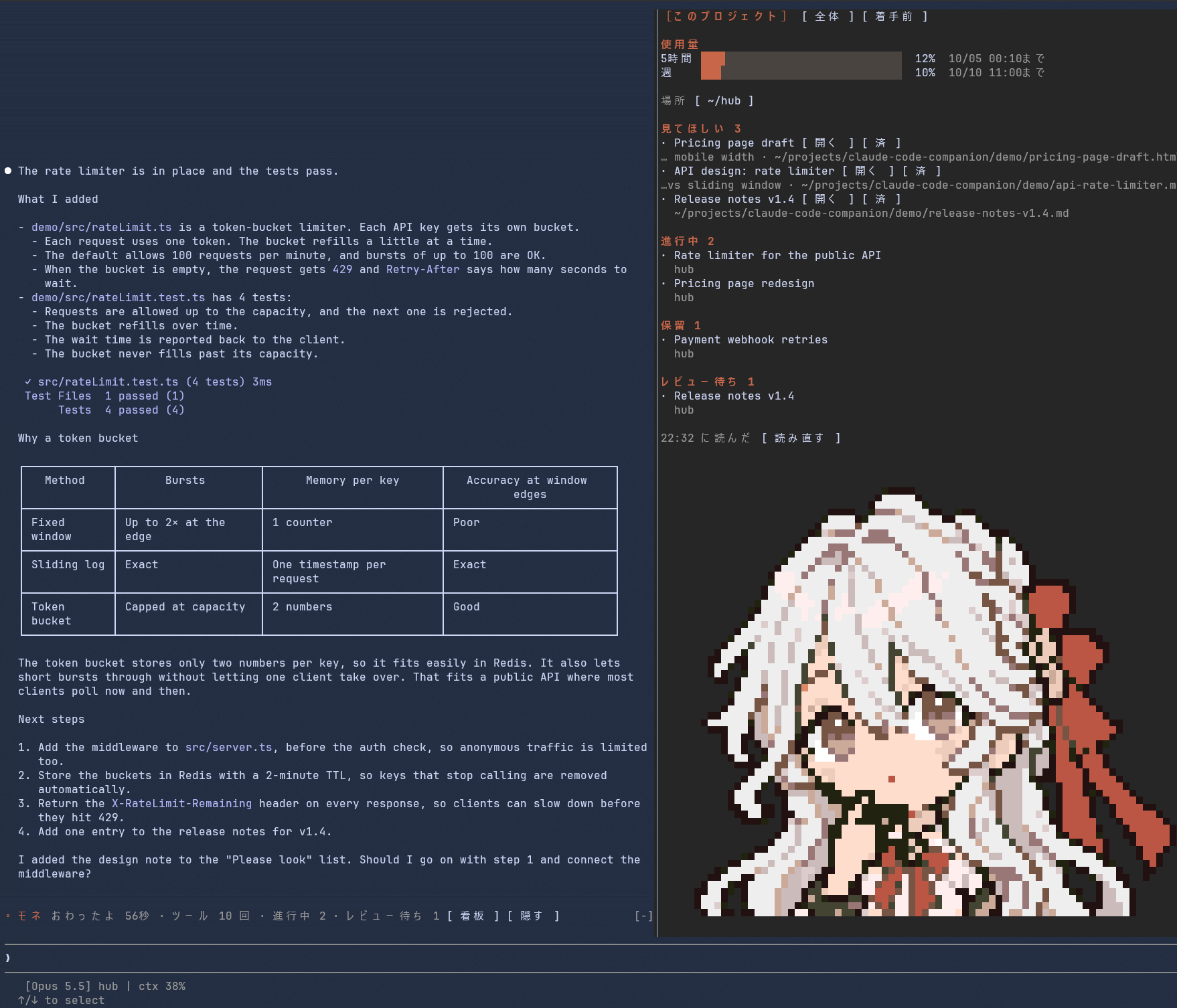
Markdown カンバン、please look キュー、レート制限の使用量バー、Claude の返答に合わせて気分が変わるピクセルアートの companion を表示するサイドペインを追加する Claude Code mod。
MaryCache/claude-code-companion-mod/tree/main/plugins/companion
companion は非公式の Claude Code mod で、トランスクリプトの横にサイドペインを追加します。ペインには This project/All/Backlog タブ付きの Markdown カンバン(/board)、ask_to_look ツールがレポート、ページ、画像を表示する please look リスト、5 時間および週次のレート制限使用量バー、Claude の返答に表情が反応するピクセルアート companion が表示されます。プロンプトの上にはキャラクター名、ターン時間、ツール数、ボードボタンを持つ 1 行の帯も描画します。Claude Code v2.1.287+、macOS/Linux/WSL が必要です。claude plugin marketplace add MaryCache/claude-code-companion-mod と claude plugin install companion@claude-code-companion-mod でインストールします。
まず作者の README で marketplace とプラグイン名を確認してください。コマンドはリポジトリの構成によって変わる場合があります。
claude plugin marketplace add MaryCache/claude-code-companion-mod
claude plugin install companion
A Claude Code mod that adds a side pane next to the transcript. The pane shows:
This screenshot is from the author's own setup, with the Japanese UI. The character art in it belongs to the author: it is not part of this repository and is not covered by the MIT license. To use your own character, see Add your own character.
This is an unofficial personal project. Anthropic did not make or endorse it.
Run /board to open a pane that shows the In Progress, Blocked and Review entries of your Markdown kanban board.
The pane has three tabs: This project, All and Backlog. This project shows only the entries whose tags are linked to the folder where you started Claude Code. See Your board file for how to link them.
In a folder that is not linked, there is no This project tab, and All is shown as Board.
The mod gives Claude a tool called ask_to_look.
When Claude finishes something you should check, such as a report, a page or an image, it adds the item to the list and opens it right away.
See Opening files for what it opens and what it does not.
The list appears only on the leftmost tab. On This project, it shows only the items added from the folder where you started Claude Code, or from a folder above or below it. In a folder that is not linked, the leftmost tab is Board, and it shows the items added from all sessions.
Press Open to view an item again, or Done to remove it. The list keeps the 15 most recent items and drops older ones.
For the five-hour and weekly rate-limit windows, the bars show how much you have used and when each window resets. A bar turns red above 80%.
A pixel-art character sits at the bottom of the pane.
It shows a thinking face while Claude works, and when a turn ends it smiles, looks worried or stays calm, depending on the words in Claude's reply.
While a skill you choose (sleep by default) is running, it sleeps, and it wakes up when you send the next message.
A one-line band appears above the prompt. See The band for what it shows.
claude --version to check)The pane appears only in a terminal session (claude) and in the Code tab of the Claude Desktop app.
In the VS Code extension, claude -p and cloud sessions, the mod runs but draws nothing.
Plugins do not load in WSL sessions of the Desktop app.
claude plugin marketplace add MaryCache/claude-code-companion-mod
claude plugin install companion@claude-code-companion-mod
Restart Claude Code, or run /reload-plugins in an open session.
Then create your board file (see the next section) and run /board.
The pane opens by itself only when the terminal is at least 144 columns wide and in the full-screen layout.
Otherwise, run /board to open it.
To see what the mod does before you install it, clone the repository and run claude plugin validate ./plugins/companion.
The hooks: and calls: lines show the events it handles and what it asks Claude Code to do.
claude plugin marketplace update claude-code-companion-mod
claude plugin update companion@claude-code-companion-mod
The update takes effect when you restart Claude Code.
claude plugin uninstall companion@claude-code-companion-mod
claude plugin marketplace remove claude-code-companion-mod
Uninstalling leaves behind the files written outside the plugin.
These are two files in ~/.claude/companion/: look-queue.json (the "please look" list, written by the mod) and, if you added a character, sprites.json (written by the sprite tool) (in CLAUDE_CONFIG_DIR/companion/ if you set CLAUDE_CONFIG_DIR).
If you do not need them, delete the folder.
rm -r ~/.claude/companion
The board file is ~/.claude/board.md by default (or board.md in CLAUDE_CONFIG_DIR if you set it).
Only unchecked - [ ] entries are shown, and other sections, such as Done, are not read.
## Backlog
- [ ] [web][docs] **Write the onboarding guide** — anything after the title is ignored
## In Progress
- [ ] [api] **Rate limiter for the public API**
## Blocked
- [ ] [api] **Payment webhook retries**
## Review
- [ ] [web] **Pricing page redesign**
## Done
- [x] [web] **Landing page**

## Folders
| Tags | Folder |
|---|---|
| `[web]` `[docs]` | `~/projects/site` |
| `[api]` | `~/projects/api` |
## Backlog, ## In Progress, ## Blocked, ## Review and ## Folders (Japanese headings also work: 着手前, 進行中, 保留, レビュー待ち and フォルダ).- [ ] (lines that start with * [ ] or are indented are not read).[...] at the start of an entry (written together, as in [web][docs], or with spaces between them).—, (, 、 or 。, cut at 40 characters).The Folders table links tags to folders. When you start Claude Code in a listed folder, or in a folder inside it, the This project tab shows only the entries with those tags. In folders that are not listed, the tabs are Board and Backlog.
The mod reads the file again every minute and at the end of each turn.
If you want Claude to keep the board up to date, tell it where the file is, for example in your CLAUDE.md.
Run /plugin configure companion@claude-code-companion-mod to open the settings dialog.
The same dialog opens when you install the plugin from /plugin.
| Setting | Default | What it does |
|---|---|---|
| Board file | empty (reads ~/.claude/board.md) | Path to the board file. ~ is expanded |
| Language | auto | en or ja for the UI text. auto checks LC_ALL, LC_MESSAGES and LANG, in that order |
| Character name | Companion | Name shown in the band |
| Sleep skill | sleep | The character sleeps while this skill runs |
| UTC offset | the machine's offset | Time zone for times in the pane, such as +09:00. Set it if the times are hours off |
| Open the pane automatically | on | Opens the pane when a session starts. /board works either way |
When Claude calls ask_to_look, the mod opens the item right away.
The mod answers that tool call itself, so it does not go through Claude Code's permission prompt.
Because of this, the mod opens only these kinds of targets:
| Target | How it is opened |
|---|---|
| URLs | http:// and https:// only, in the system's default app |
| Images and PDFs (png, jpg, jpeg, gif, webp, bmp, pdf) | In the system's default app |
| Web pages and SVG (html, htm, svg) | In the system's default app, only when the file is inside the folder where you started Claude Code |
| Text (md, markdown, txt, csv, json) | In VS Code (code) if you have it, otherwise in the system's default app |
| Other files | In VS Code only (not opened if code is not installed) |
| Folders and paths that do not exist | Refused |
The system's default app is opened with open on macOS, xdg-open on Linux and explorer.exe on WSL.
Web pages and SVG are limited because, opened as local files, the JavaScript inside them can read other files on the same computer in some browsers. A page opened from an http(s) URL runs on its own site and cannot read your local files. When such a file is outside the folder where you started Claude Code, the mod adds it to the list but does not open it; it opens when you press Open.
A symbolic link is judged by the name and kind of the file it points to.
On WSL, URLs and paths that contain a comma are refused, because explorer.exe splits its arguments at commas and one target could be opened as two.
xdg-open may choose the app from the file's contents, depending on the desktop. A file named .png that contains HTML could open in a browser (not tested by the author).~, every web page and SVG under it opens automatically.No character art comes with the mod, so the pane shows no character until you add one.
idle.png, think.png, smile.png, worry.png, wave.png and sleep.png, and a prefix such as pip-smile.png also works.
If a mood is missing, idle is used instead.
pip install into the system Python is refused (PEP 668), so install Pillow in a virtual environment.
python3 -m venv ~/.venvs/companion-sprites
~/.venvs/companion-sprites/bin/pip install pillow
git clone https://github.com/MaryCache/claude-code-companion-mod
~/.venvs/companion-sprites/bin/python claude-code-companion-mod/plugins/companion/tools/build_sprites.py ~/my-sprites --preview preview.png
~/.claude/companion/sprites.json.
To keep only the top of the images, such as the head and shoulders, add --rows N.| Situation | Mood |
|---|---|
| The sleep skill is running | sleep |
| Claude is working | think |
| The reply ends with a question for you | think |
| Apology words (sorry, failed, mistake…) are at least as many as success words | worry |
| Success words (done, fixed, passed…) are more | smile |
| Neither kind of word appears | idle |
| No turn has finished yet in this session, between 5:00 and 11:00 | wave |
Words near the end of the reply count twice, because the conclusion usually comes last. Both Japanese and English words are counted.
The mood comes only from these words, so it is sometimes wrong.
From left to right, the band shows:
After you hide the band, run /board to show it again.
cd plugins/companion
claude plugin test .                         # tests that run without a session
npx -y -p typescript tsc --noEmit -p .       # needs .claude-plugin/types/, which Claude Code writes
                                             # the first time a session loads the plugin
claude plugin validate --strict .
To try your changes without installing them, start Claude Code with claude --plugin-dir ./plugins/companion.
hooks/register.tsx handles events, files and processes, and pane.tsx and band.tsx draw the pane and the band.
The other logic, such as parsing the board, choosing the mood, deciding how to open files and reading the sprites, is in the other files in hooks/.
The code is under the MIT license.
The character art in docs/screenshot-ja.png belongs to the author and is not covered by the license.
You may not reuse it.

neural-trader(v2.7+)を基盤にしたニューラル取引戦略です。自己学習する LSTM/Transformer/N-BEATS モデル、Rust/NAPI バックテスト、112+ の MCP ツール、スウォーム協調、ポートフォリオ最適化を備えます。

Claude Code 用 Repowise プラグイン。Graph、Git、Docs、Decisions、Code Health の 5 層のコードインテリジェンスを提供し、MCP ツール、slash commands、自動 skills で Claude にアーキテクチャ、所有者、ホットスポット、欠陥リスクを理解させます。spinner ヒント、margin notes、変更レビュー、/lens パネルを備えた Claude Code mod の Lens も含みます。

Claude Code 向けの Power BI / Microsoft Fabric プラグインです。fabric-cli(fab)スキル、移行コマンド、fab に従ってワークスペースと項目をツリー表示する /fabric-pane mod を提供します。
