
sivori@sivori
sivori/claude-mods/tree/main/plugins/commit-drift
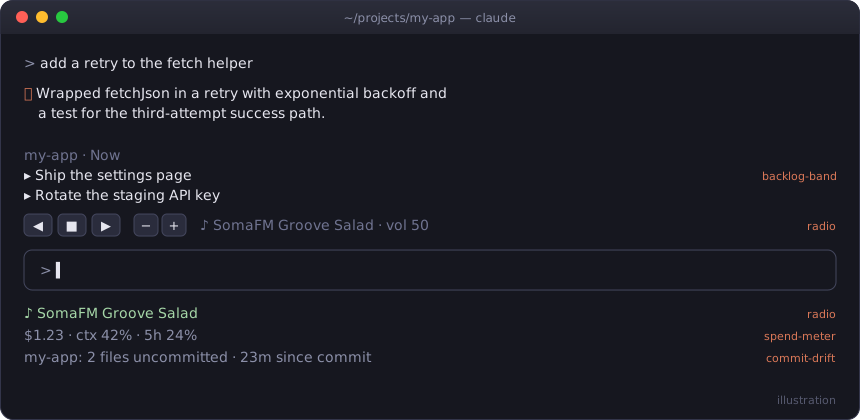
[Claude Code](https://claude.com/claude-code) 用の小さな mod です。ステータス行、プロンプト上のバンド、ドッキングペイン、ラジオを提供し、いずれも function hooks のプラグインです。
sivori/claude-mods/tree/main/plugins/commit-drift
Claude Code 用の小さな mod です。ステータス行、プロンプト上のバンド、ドッキングペイン、ラジオを提供し、いずれも function hooks のプラグインです。

claude plugin marketplace add sivori/claude-mods
claude plugin install radio@claude-mods        # または以下の任意の mod
後で claude plugin marketplace update claude-mods を使って更新できます。
インストールせず試すには、リポジトリをクローンして claude --plugin-dir ./plugins/<mod> を実行します。
/tune は Claude Code の中でインターネットラジオをストリーミングします:SomaFM、lo-fi、クラシック、合唱音楽です。(Claude Code には組み込みの /radio があるため、コマンドは /tune です。)すべてのセッションで 1 つのプレーヤーを共有するので、2 つのセッションで開始した音楽が重複して再生されることはありません。どのセッションでステーションを切り替えても現在のストリームが置き換わり、ステータス行にはどこでも再生中の内容が表示されます。再生中はプロンプトの上にボタンの行が表示されます:◀ ■ ▶ で変更または停止し、− + で音量を調整します。停止しても行は残り、play ボタンで最後のステーションを再開できます。
/tune              切り替え(最後のステーションを再開);/tune listen は再生だけ
/tune groove       名前、ジャンル("jazz"、"choral")、番号で選択
/tune next | prev | stop | list
/tune vol 30       vol +10 / vol -10 も利用可能
/tune band         ボタンを隠す/表示する
mpv(brew install mpv)で再生すると音量を途切れずに変更できます。それ以外では ffmpeg の ffplay を使い、音量を変えるたびにストリームを再起動します。
デフォルトでは、Claude Code を閉じても /tune stop まで音楽は再生され続けます。/config で stopWithLastSession をオンにすると、開いているセッションがなくなった時点で停止します。セッションのクラッシュもウォッチドッグが約 1 分以内に検知します。
ステータス行にセッションコスト、コンテキストの使用量、5 時間のレート制限使用量を表示します($1.23 · ctx 42% · 5h 24%)。支出が $5、$10、$25、$50、$100 を超えるたびに 1 回トーストを表示します。
編集中のリポジトリについて、未コミットのファイル数と最後のコミットからの経過時間をステータス行に表示します。30 分以上コミットされていないツリーで編集 turn を終えると、最大 10 分に 1 回の頻度で促します。
アクティブなリポジトリの BACKLOG.md にある未完了の ## Now 項目をプロンプトの上に表示します。/later <item> は ## Next に追加し、/backlog-band はバンドを表示または非表示にします。次の形式が必要です:
## Now
- [ ] Blocking or imminent work

## Next
- [ ] The normal queue

## Someday
- [ ] Ideas

## Done
- [x] 2026-08-01 Completed
作業をいつも新規開始にしないための mod です。作業中はプロンプト、編集したファイル、作成したコミットを記録します。セッションが 10 分間静かになると、モデルに 2 行の要約(完了したこと、次の手順)を求め、リポジトリごとに保存します。次にそのリポジトリで Claude Code を開くと、最初のプロンプトの上に要約が表示されます:
↩ Last time in dash · yesterday 5:12pm
  Done: Added the spend chart and matched its colors.
  Next: Write a test for the empty-data case.
/recap は今すぐ書き込み、/recap last は前回の要約を呼び出します。何もしなかったセッションでは以前の要約が残ります。要約が書き込まれる前に終了すると、次のセッションが記録済みの活動を使い、Haiku で要約を書き込みます。
アクティブなリポジトリから、毎日のクエストを 3 つペインに表示します。解決すべき TODO/FIXME コメント、閉じるべきオープンな GitHub issue(gh が必要)、合格させるために失敗したテストコマンドを 1 つずつ選びます。選べる場合は各種類から 1 つを選び、ボードはその日の間同じまま、翌日に新しくします。TODO の行が消える、issue が閉じる、テストコマンドが通るとクエストは自動で消えます。消えるたびにトーストを表示し、3 つすべて消えると大きな通知を表示します。ステータス行は ⚔ quests 1/3 です。
/quests             ボードを開く
/quests reroll      未完了のクエストを新しいものに入れ替える
/quests check       issue を今すぐ再確認する(それ以外は 10 分ごと)
Art Institute of Chicago のパブリックドメイン絵画を表示するドッキングペインです。「天気」はリポジトリに従い、クリーンなツリーでは穏やかな風景、変更が積み上がるかコマンドが失敗すると曇り、嵐では難破船になります。絵画は 20 分ごとに入れ替わり、/commonplace next で新しい絵を表示します。
画像には kitty グラフィックスプロトコルに対応したターミナル(kitty、Ghostty)が必要です。それ以外ではペインにタイトルと画家を表示します。macOS の sips で画像を変換します。絵画は ~/.cache/commonplace-pane/ にキャッシュされ、最新の 30 枚を残し、新しい絵の追加後にそれ以外を削除します。/config には任意の設定が 2 つあります:
AIC-User-Agent ヘッダーに送るメールアドレスまたは URL。seed-*.jpg 画面のフォルダー。各 mod は plugins/<name>/ にあり、.claude-plugin/plugin.json、hooks/hooks.json、hooks/register.ts(x) モジュールで構成されます。確認方法:
claude plugin validate plugins/<name>
claude plugin test plugins/<name>
MIT
まず作者の README で marketplace とプラグイン名を確認してください。コマンドはリポジトリの構成によって変わる場合があります。
claude plugin marketplace add sivori/claude-mods
claude plugin install commit-drift
Small mods for Claude Code: status lines, a band above the prompt, a docked pane, and a radio. Each one is a plugin of function hooks.
claude plugin marketplace add sivori/claude-mods
claude plugin install radio@claude-mods        # or any mod below
Update later with claude plugin marketplace update claude-mods.
To try one without installing, clone the repo and run claude --plugin-dir ./plugins/<mod>.
/tune streams internet radio inside Claude Code: SomaFM, lo-fi, classical and choral. (The command is /tune because Claude Code has a built-in /radio.) All your sessions share one player, so music started in two sessions never plays twice. Switching stations in any session replaces the current stream, and the status line shows what's playing everywhere. While something plays, a row of buttons sits above the prompt: ◀ ■ ▶ to change or stop, − + for volume. Stopping keeps the row, with a play button that resumes the last station.
/tune              toggle (resumes the last station); /tune listen just plays
/tune groove       pick by name, genre ("jazz", "choral") or number
/tune next | prev | stop | list
/tune vol 30       also vol +10 / vol -10
/tune band         hide or show the buttons
Plays through mpv (brew install mpv), which changes volume without a gap; otherwise ffplay from ffmpeg, which restarts the stream on each volume change.
By default the music keeps playing after you close Claude Code, until /tune stop. Turn on stopWithLastSession in /config to have it stop once no session is open; a watchdog catches a crashed session too, within about a minute.
Session cost, context fill and 5-hour rate-limit use in the status line ($1.23 · ctx 42% · 5h 24%). It toasts once as spend passes $5, $10, $25, $50 and $100.
Uncommitted file count and time since the last commit in the status line, for whichever repo you're editing. After an editing turn on a tree that hasn't been committed for 30+ minutes, it nudges you (at most every 10 minutes).
Shows the open ## Now items of the active repo's BACKLOG.md above the prompt. /later <item> appends to ## Next, and /backlog-band hides or shows the band. It expects this format:
## Now
- [ ] Blocking or imminent work

## Next
- [ ] The normal queue

## Someday
- [ ] Ideas

## Done
- [x] 2026-08-01 Completed
So you never start cold. While you work it records your prompts, the files edited and the commits made. Once the session has been quiet for 10 minutes, it asks the model for a two-line recap (what got done, the next step) and saves it per repo. When you next open Claude Code in that repo, the recap sits above the prompt until your first message:
↩ Last time in dash · yesterday 5:12pm
  Done: Added the spend chart and matched its colors.
  Next: Write a test for the empty-data case.
/recap writes it now, and /recap last brings back the one from last time. A session that did nothing leaves the earlier recap in place. If you quit before the recap is written, the next session writes it from the recorded activity with Haiku.
Three daily quests in a pane, drawn from the active repo: a TODO/FIXME comment to resolve, an open GitHub issue to close (needs gh), and a test command that failed to get passing. It picks one of each kind when it can, keeps the same board all day, and draws a new one tomorrow. A quest clears by itself when the TODO line is gone, the issue is closed or the test command passes. Each cleared quest gets a toast, and clearing all three gets a bigger one. The status line shows ⚔ quests 1/3.
/quests             open the board
/quests reroll      swap the unfinished quests for new ones
/quests check       re-check the issues now (otherwise every 10 minutes)
A docked pane of public-domain paintings from the Art Institute of Chicago. Its "weather" follows your repo: calm landscapes while the tree is clean, overcast as changes pile up or commands fail, shipwrecks in a storm. The painting rotates every 20 minutes, and /commonplace next hangs a new one.
The images need a terminal with the kitty graphics protocol (kitty, Ghostty); elsewhere the pane shows the title and artist. It uses macOS sips to convert images. Paintings are cached in ~/.cache/commonplace-pane/, which keeps the newest 30 and deletes the rest after each new painting. Two optional settings live in /config:
AIC-User-Agent header, as the Art Institute asks of API clients.seed-*.jpg paintings to fall back on when the museum is unreachable.Each mod is plugins/<name>/ with .claude-plugin/plugin.json, hooks/hooks.json and a hooks/register.ts(x) module. To check one:
claude plugin validate plugins/<name>
claude plugin test plugins/<name>
MIT

diff 分析、リスクスコア、変更分類、レビュアー推奨を備えた高度な git ワークフローと、PR 操作用の function-hook ガード mod。

ターミナルブラウザ:Claude Code内で直接実行されるブラウザ。 Web サイトをプレビューし、HTML ドキュメントを表示し、エージェントに制御させます
bg session が git worktree で完成させたブランチを、パネルのボタンで main に fast-forward します。引き継ぎ票はパラメータのみを持ち、mod が手順を導出し、実行前に確認、実行後に検証します。
