
davideiffert@davideiffert
davideiffert/check-it
davideiffert/check-it
Check it は、Claude が行った目に見える変更をプロジェクトごとに一覧します。各項目には確認場所へのリンク、そこで見つけるべき内容、チェック欄があります。プロンプト上部の行には未確認の項目数が表示され、一覧を開くボタンや Claude に確認内容を尋ねるボタンもあります。項目は確認済み、却下、または「正しくない」としてマークできます。「正しくない」にすると、送信できるメモがプロンプト末尾に置かれます。1 つのツールと短い指示を追加し、Claude が目に見える変更ごとに 1 項目を記録します。ターン終了まで項目を表示せず、目に見えない変更やアドレスのない場合は一覧に何も追加しません。siteAddress 設定オプション付きでマーケットプレイスからインストールするか、--plugin-dir でローカル実行できます。ブラウザー向けで、Claude Code 2.1.288 でテスト済みですが、現在は積極的に保守されていません。
まず作者の README で marketplace とプラグイン名を確認してください。コマンドはリポジトリの構成によって変わる場合があります。
claude plugin marketplace add davideiffert/check-it
claude plugin install check-it
Claude Code tells you what it changed. Check it tells you where to look.
After a long session, Claude says it's done. It changed six things. Which ones can you actually see, and where do you click? Check it keeps the list for you: every change you can see in a browser, with a link, what you should find there, and a box to tick. If something's off, one button tells Claude which one.
For the person checking the result, not the diff.
Build checks · Changelog · MIT license
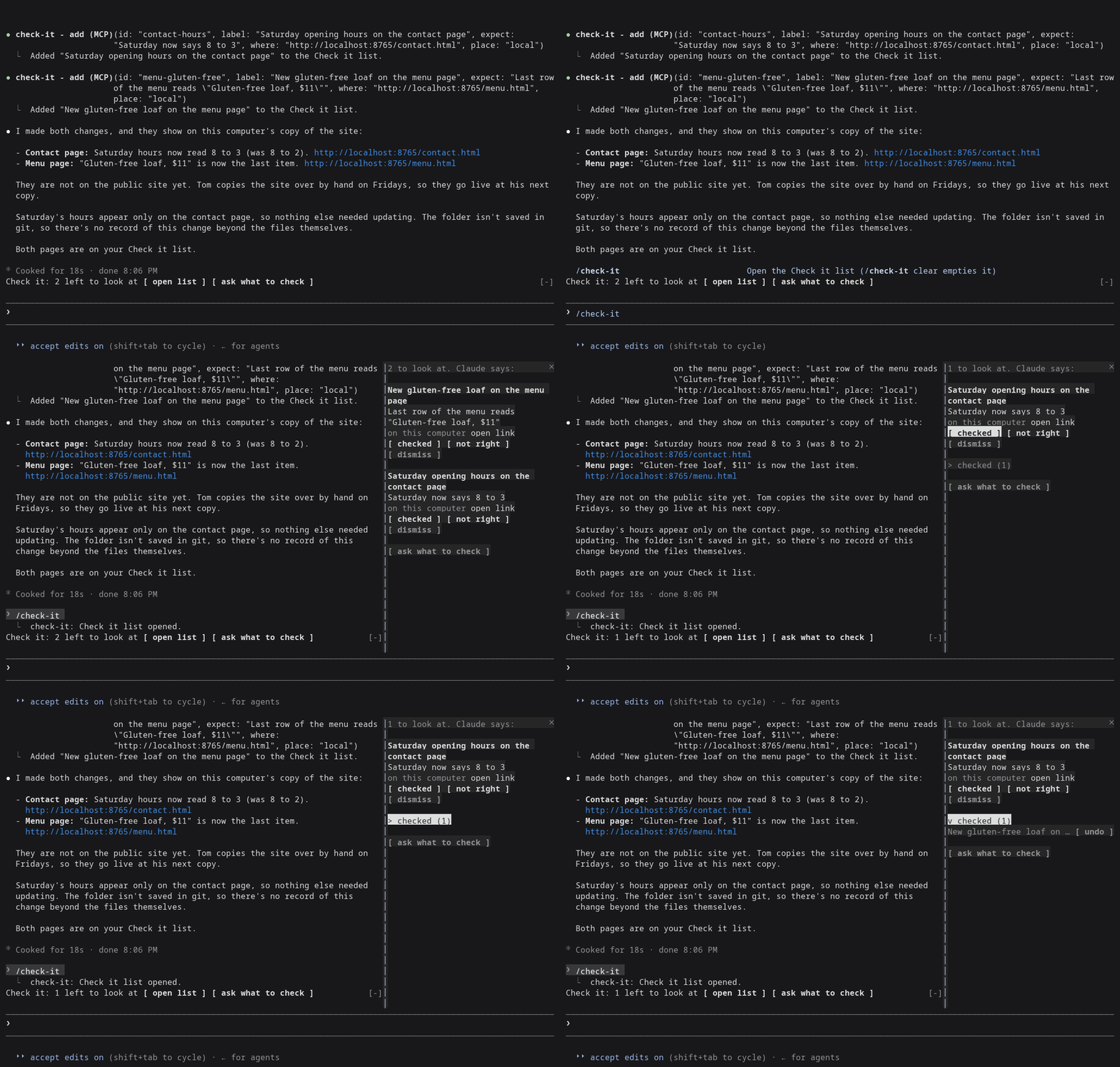
Claude Code 2.1.288, right after Claude changed the Saturday hours and the menu of a made-up bakery site from demo/.
Needs Claude Code 2.1.288 or later (claude --version shows yours).
claude plugin marketplace add davideiffert/check-it && claude plugin install check-it@check-it --config siteAddress=http://localhost:3000
Swap http://localhost:3000 for wherever your app or site runs right now,
on this computer or online. The command only installs Check it. It doesn't
start your app for you. Then start Claude Code as usual.
open list and ask what to check buttons. It stays hidden until the
first item arrives.open link opens the page in your browser.checked ticks it. Ticked items fold into one checked (N) row, where
you can undo a tick.not right puts Not right: <item> (<address>). at the end of your
prompt, after anything you already typed. Add a sentence and send it.
It never sends anything by itself.dismiss removes the item./check-it opens the list. /check-it clear empties it.ask what to check puts a request at the end of your prompt asking
Claude what you should look at. You decide whether to send it.Claude fills it. The plugin gives Claude one tool for adding an item and one short instruction: when a change alters what someone sees or does on a page, add one item per change, with the address where it shows right now. Changes nobody can see (tidying code, tests, settings) get no items. Something every page shares, like the footer, gets one item.
New items wait until Claude's turn ends, so nothing shows up while Claude is still halfway through the change. That's a delay, not a check: the list doesn't confirm the change exists. If you stop a turn, its items are dropped. Only the main conversation adds items. Helper agents Claude starts cannot.
If Claude can't name an address where a change shows (nothing is running, or it isn't built yet), it adds nothing and says so in its reply, naming what it needs.
The list is Claude's word for it. The tick is yours.
The list is kept per project and survives restarts. It holds 50 items, and the oldest ticked ones go first.
Measured on two demo sites, a plain one and one with a build step: 51 recorded sessions (31 and 20) using Claude Opus and Sonnet, plus 3 interactive ones.
127.0.0.1; since 0.1.2 that opens as
a link.Details are in docs/measurement-v0.md.
siteAddress
setting, the one setting worth filling in. Without it, and with nothing
running, Claude often has no address to give you and the list stays
empty. Set it with --config as above, or later in /config under
check-it./tui fullscreen the list
docks beside the conversation. On the normal screen it opens above the
prompt instead./theme.open link is a plain link, and
it only works for https: and http://localhost addresses. Other
addresses show as text.Almost nothing outside its own list. No network access, no model calls of
its own, no files. It runs one command, and only when you press open link in the terminal: your system's own opener (open on macOS,
xdg-open on Linux), with an http:// or https:// address the plugin
has already checked, to show the page in your browser. It adds one tool,
one short section of Claude's instructions, the line above the prompt, the
list and the /check-it command.
From the marketplace, as above. To try a local copy without installing:
git clone https://github.com/davideiffert/check-it
claude --plugin-dir ./check-it
Issues and pull requests are welcome. Before sending a change, run:
claude plugin validate .
claude plugin test .
For the type check, start Claude Code once with --plugin-dir . (it writes
the type declarations into .claude-plugin/types), then run
npx -p typescript@5 tsc -p ..
MIT. Made by David Eiffert.

キャッシュを考慮する /loop worker と CronCreate のバックグラウンド自動化。ruflo ファミリーの繰り返しタスクすべてに使う基盤プラグインです。

Claude Code mod としての claude-reflect。短いプロンプトごとにモデルチェックを行い、再利用できる修正(任意の言語)を見つけ、プロンプト上のバンドを 1 回押すだけで CLAUDE.md に保存します。


Claude Code 内の初期版 crit。ペインで会話、差分、ファイルにコメントし、レビューを Claude に送り、スレッドで Claude の返答を読めます。