
jamubc@jamubc
jamubc/toolbox/tree/main/plugins/channel
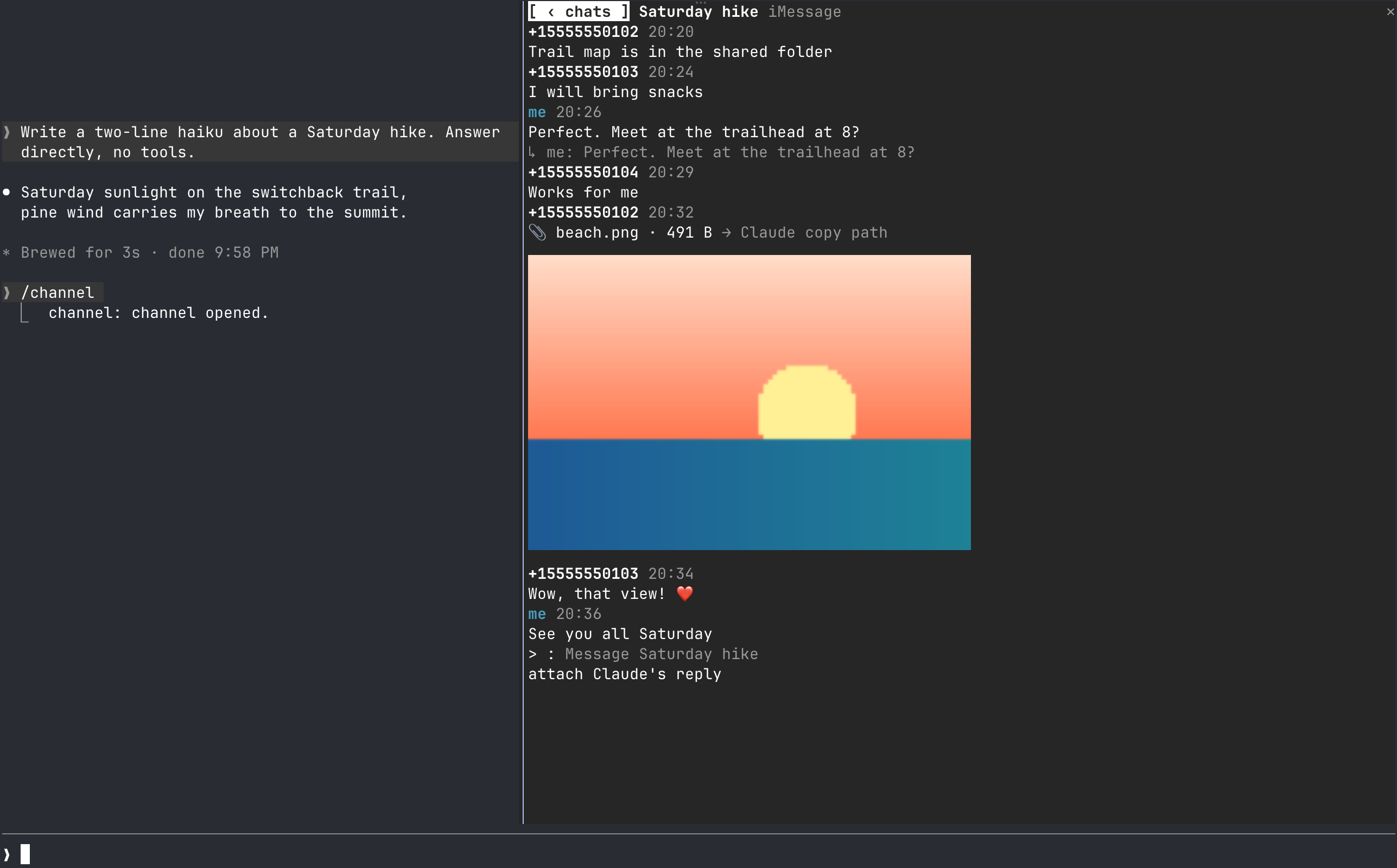
Claude Code の横のペインでチャットを読み、返信し、ファイルを添付し、ターミナルを離れず toast を受け取れます。iMessage 対応と、他サービスを追加できる provider framework を搭載。
jamubc/toolbox/tree/main/plugins/channel
Claude Code のセッション横にチャットペインをドッキングする plugin です。会話を読み、返信し、Claude が触れたファイルを添付し、画像をインラインでプレビューし、新着メッセージの静かな集約 toast を受け取れます。iMessage に対応(macOS 13+、読むには Full Disk Access、送信には osascript)し、ほかのサービスを追加できる契約ベースの provider architecture を備えます。/plugin marketplace add jamubc/toolbox の後に /plugin install channel@toolbox でインストールし、/channel でペインを開きます。
まず作者の README で marketplace とプラグイン名を確認してください。コマンドはリポジトリの構成によって変わる場合があります。
claude plugin marketplace add jamubc/toolbox
claude plugin install channel
Your favourite chat, directly in Claude Code. Read, reply, get notified and more, without leaving the terminal.
It can all be done, inside Claude Code
Add the marketplace:
/plugin marketplace add jamubc/toolbox
Install the plugin:
/plugin install channel@toolbox
| Command | What it does |
| --- | --- |
| /channel | Opens the chat pane: a tab per service, and your twenty most recent conversations in each. |
In the pane:
All tab shows every conversation together.1 to 9 open the first nine./config → How picture previews are drawn forces one, or turns previews off.Notifications stay quiet: only one of your Claude sessions toasts, several messages in one chat fold into one toast, and a chat toasts at most once every 10 seconds. Every session still shows the unread count in its status line.
| Connection | Platform | Setup | What it can do | | --- | --- | --- | --- | | iMessage | macOS 13 or later, terminal | Full Disk Access | Read and send text and files; show replies, tapbacks, edits, unsends and members |
Turn a service off in /config under channel.
sqlite3 -readonly on ~/Library/Messages/chat.db, which requires Full Disk Access for your terminal. The pane lists the steps and names your terminal app.osascript. On your first send, macOS asks you to let your terminal control Messages.A service can start only the programs and call only the hosts listed here. Anything else is refused in hooks/core/fence.ts.
| Service | Programs it starts | Hosts it calls |
| --- | --- | --- |
| iMessage | /usr/bin/sqlite3, /usr/bin/osascript | none |
The pane itself starts /usr/bin/open when you press a file, and /usr/bin/sips to make a picture's or a PDF's preview. Previews are at most twelve temporary files in your TMPDIR, each overwritten in turn. The cells of a preview are averaged from the pixels they cover and encoded once per size, so redrawing the pane costs nothing more.
hooks/core/contract.ts is what every service implements: a small required core, plus optional capabilities (attachments, threads, reactions, edits, read state, typing, members, search). The pane offers only what a service has.hooks/core/registry.ts lists the services. Adding one is a folder under hooks/providers/ and a line there.hooks/core/account.ts runs one service with its own loop and backoff; inbox.ts merges them; notify.ts decides what toasts; hub.ts ties them together.hooks/ui/ draws the pane: list.tsx the conversations, conversation.tsx one chat, picture.ts thumbnails as pixels or cells, format.ts labels, colors and days. hooks/register.tsx is wiring only.tests/kit/ has a scriptable fake service and the conformance checks every provider must pass.claude --plugin-dir plugins/channel # load it; edits hot-reload
claude plugin validate plugins/channel
claude plugin test plugins/channel
tsc -p plugins/channel # after one load writes .claude-plugin/types/

セッション中にあなたの対応を待っているもの、エージェントの質問、Claude が記録した問題、プルリクエストのチェックとレビューを集める Claude Code mod です。プロンプトの上と `/inbox` ペインに表示し、セッションの状態も示します。

質問やプランが回答を待っているとき、またはターンが終了・失敗したときにデスクトップ通知を送ります。

エージェントセッション間で同期するリマインダーをトランスクリプト横のペインに置き、同じアカウントを共有するCLI、Codexスキル、ターミナルUIを備えたClaude Codeプラグインです。