
theonly1me@theonly1me
theonly1me/claude-code-mods/tree/main/plugins/change-journal
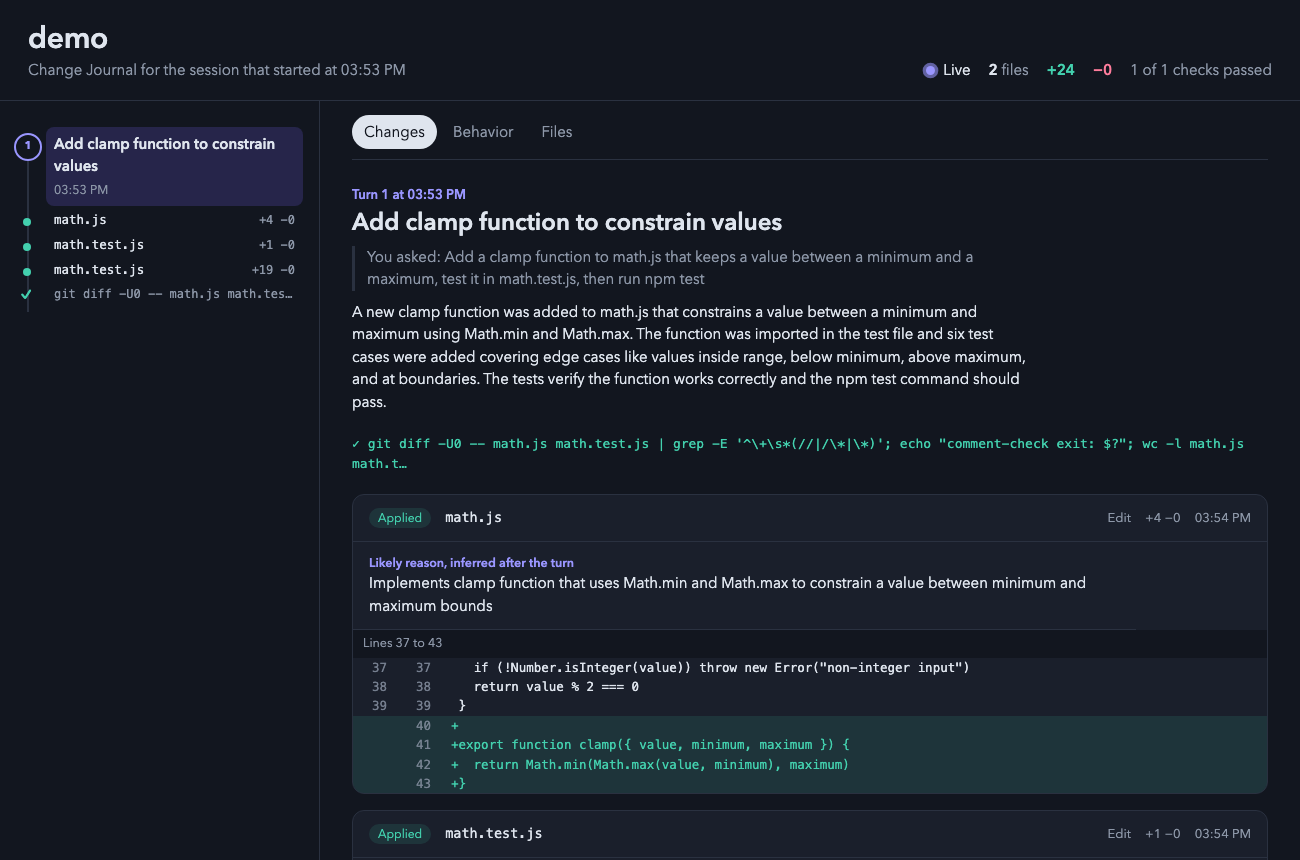
Claude Code プラグイン。Claude が行ったすべての変更を表示するライブ ローカル HTML ページを開きます。差分、編集の理由、実行した検査、および各ターンの前後の動作フローを表示します。
theonly1me/claude-code-mods/tree/main/plugins/change-journal
あなたのブラウザーのライブページで、Claude が作業中に行ったすべての変更を表示します:差分、各編集の理由、実行した検査、および各ターンの前後のコード動作。

claude plugin marketplace add theonly1me/claude-code-mods
claude plugin install change-journal@claude-code-mods
マーケットプレイスを一度登録します。インストール後、開いているセッションで /reload-plugins を実行します。Claude Code 2.1.289 以降が必要です。ビルドステップまたはランタイム依存関係はありません。
ページはセッションの最初の編集時にブラウザーで開き、1.5 秒ごとに自動更新します。サーバーは不要です。
ページは新しい変更が発生したときにそれをフォローします。何かを選択すると、「新しい変更をフォロー」を押すまでフォローが停止します。
Edit および Write の外で行われた変更(sed コマンド、フォーマッター、または独自の編集)は、各ターン後に外部変更として表示されます。テストコマンドは合格または失敗マークで表示されます。
✎ 3 files +40 −12 を表示します。/changes を入力して、ターミナルで最新 4 つのターンとその編集を表示します。ペインが開きキーが表示されます。o を押すとページが開きます。コマンド:
/changes:最新 4 つのターンとその編集を含むペインを開きます。/changes open:ブラウザーでページを開きます。/changes path:ページの場所を印刷します。
タイトルの下のヒント行には、現在機能するキーが常に表示されます。
| キー | 機能 |
| --- | --- |
| 1 ~ 9 | リストの下にその編集を表示:理由と最初に変更された行。もう一度数字を押すと非表示になります。 |
| o | ページを開きます。編集が表示されている場合は、そのターンが表示されます。 |
| c | ページパスをコピーします。 |
| x | ペインを閉じます。 |
| Tab、Enter | 次の行またはボタンに移動して押します。 |
| Esc | キーをプロンプトに戻します。ペインは開いたままです。 |
| ctrl+x tab | キーをペインに戻します。 |
ページで、レール上のリングまたはドットをクリックしてターンまたは編集にジャンプします。「新しい変更をフォロー」を押して最新の変更に戻ります。
/plugin で以下を変更します:
autoOpen(オン):セッションの最初の編集時にページを開きます。liveSummaries(オン):編集のあるターンごとに、ヘルパーモデルにタイトル、説明、動作フロー、不足している理由を要求します。これは追加のトークンを使用します。helperModel(claude-sonnet-5-5):これらの概要のモデル。helperEffort(medium):ヘルパーモデルがどの程度考えるか(low、medium、high)。ページとそのデータはマシン上の ~/.claude/change-journal/<project>/<session>/ に保存されます。秘密に見えるファイル(.env、キー、認証情報)は内容なしでリストされ、差分内のトークンは編集されます。概要が有効な場合、各差分の短い抜粋は設定された Claude プロバイダーに送信されます。
設定、プライバシー、更新、削除については、marketplace README を参照してください。
まず作者の README で marketplace とプラグイン名を確認してください。コマンドはリポジトリの構成によって変わる場合があります。
claude plugin marketplace add theonly1me/claude-code-mods
claude plugin install change-journal
A live page in your browser that shows every change Claude makes while it works: the diff, the reason for each edit, the checks it ran, and how the code behaved before and after each turn.
claude plugin marketplace add theonly1me/claude-code-mods
claude plugin install change-journal@claude-code-mods
Register the marketplace once. Run /reload-plugins in an open session after installing. Requires Claude Code 2.1.289 or later; no build step or runtime dependencies.
The page opens in your browser on the first edit of a session and updates itself every second and a half. It needs no server.
The page follows new changes as they happen. When you select something, it stops following until you press "Follow new changes".
Changes made outside Edit and Write (a sed command, a formatter, or your own edits) show up after each turn as outside changes. Test commands appear with a pass or fail mark.
✎ 3 files +40 −12./changes to see the latest turns in the terminal. The pane opens with the keys.o to open the page.Commands:
/changes: open the pane with the latest four turns and their edits./changes open: open the page in your browser./changes path: print where the page lives.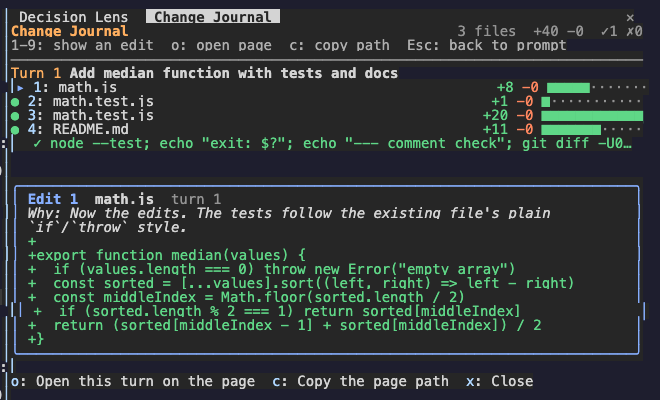
The hint row under the title always names the keys that work now.
| Key | What it does |
| --- | --- |
| 1 to 9 | Show that edit under the list: its reason and its first changed lines. Press the number again to hide it. |
| o | Open the page. With an edit shown, the page opens on that edit's turn. |
| c | Copy the page path. |
| x | Close the pane. |
| Tab, Enter | Move to the next row or button, and press it. |
| Esc | Give the keys back to the prompt. The pane stays open. |
| ctrl+x tab | Give the keys to the pane again. |
On the page, click a ring or a dot on the rail to jump to a turn or an edit. Press "Follow new changes" to go back to the newest change.
Change these in /plugin:
autoOpen (on): open the page on the first edit of a session.liveSummaries (on): after each turn with edits, ask the helper model for a title, an explanation, the behavior flows, and missing reasons. This uses extra tokens.helperModel (claude-sonnet-5-5): the model for those summaries.helperEffort (medium): how hard the helper model thinks (low, medium, or high).The page and its data stay on your machine in ~/.claude/change-journal/<project>/<session>/. Files that look like secrets (.env, keys, credentials) are listed without their content, and tokens in diffs are redacted. When summaries are on, a short excerpt of each diff goes to your configured Claude provider.
See the marketplace README for configuration, privacy, updates, and removal.

thimble 通常の Claude Code セッションで thimble の分析ガイダンスを使うための [mod](https://code.claude.com/docs/en/plugins/mods/overview) です。

クロード コード MOD は、作業ツリーのフィンガープリントを取得し、同じコードでどのテストが成功したか失敗したかを記憶するため、モデルは作業コードを変更する代わりに不安定なテストを再実行します。

ツール呼び出しをブラックボックスのように記録する Claude Code mod。/blackbox でエラーや拒否の前に直近の操作を再生し、ログ内の token とパスワードをマスクします。