
Ahmad8864@Ahmad8864
Ahmad8864/cc-side
Ahmad8864/cc-side
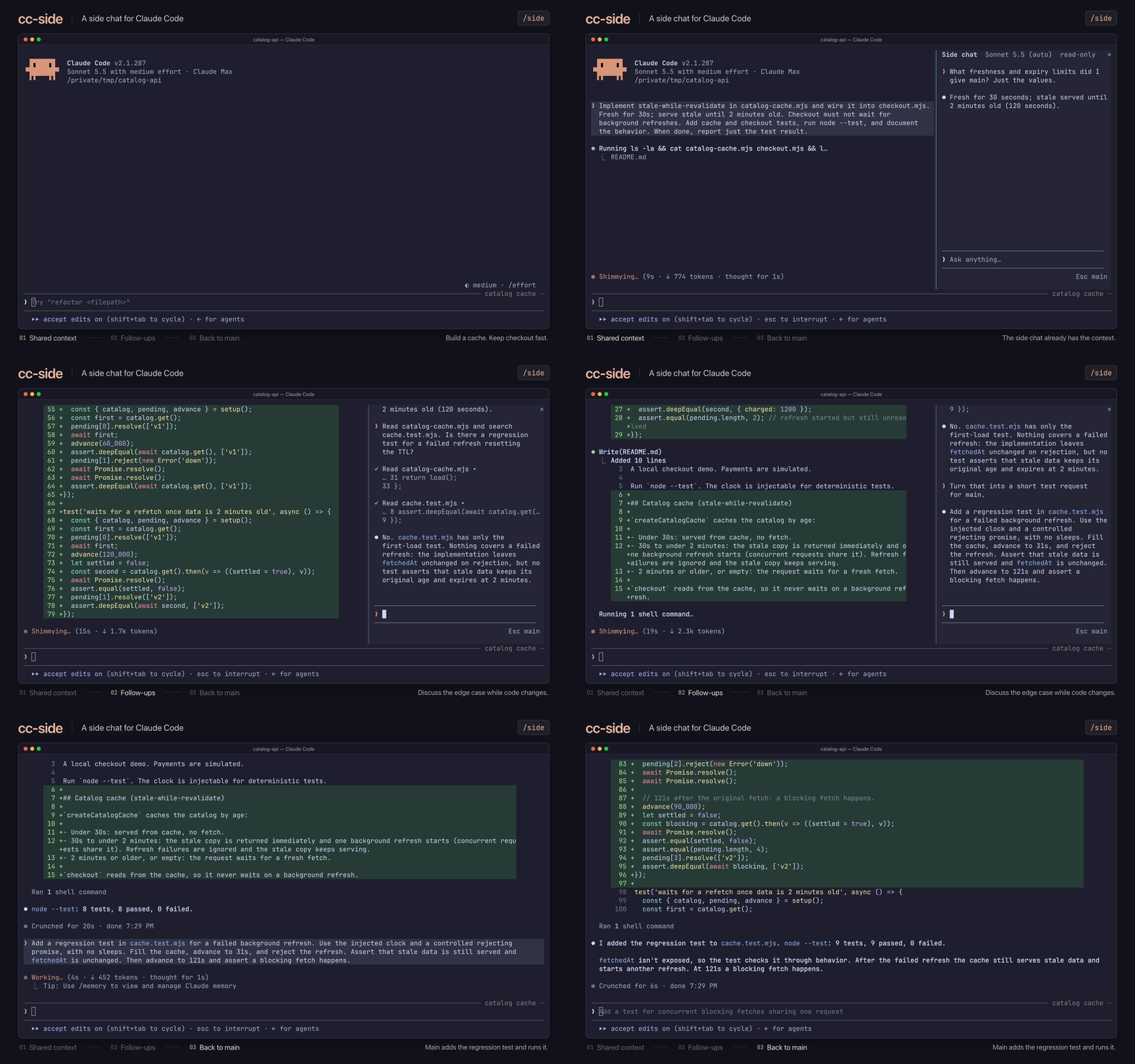
/side を実行すると、メインの横に2つ目の会話が開き、現在のメインチャットのコンテキストからフォークされます。サイドチャットはメインチャットの知識を共有し、読み取り専用で始まり、更新したりメインチャットへ挿入したりできます。モデルと effort の変更、ファイル メンション、ツール呼び出しの確認に対応します。
まず作者の README で marketplace とプラグイン名を確認してください。コマンドはリポジトリの構成によって変わる場合があります。
claude plugin marketplace add Ahmad8864/cc-side
claude plugin install cc-side
A side chat for Claude Code. Run /side to open a second conversation next to your
main one. It knows everything your main chat knows, so you can ask a quick question,
dig into some code, or try an idea while Claude keeps working, without any of it
landing in your main conversation. Closing the side chat throws it away.
Works on macOS, Linux, and Windows. You'll need Claude Code 2.1.287 or later, Node.js 18 or later (or Bun), and a terminal window at least 110 characters wide.
Install the plugin:
claude plugin marketplace add Ahmad8864/cc-side
claude plugin install cc-side@cc-side
In Claude Code, run /tui fullscreen to switch to the fullscreen view. You only need
to do this once.
Run /side to open the side chat, or /side <question> to open it and ask right away.
| Action | What happens |
| ------------------- | ------------------------------------------------------------------ |
| Click the input box | Start typing. Enter sends; Shift+Enter starts a new line |
| Type / | See commands. Claude Code's own commands and your skills work too |
| Type @ | Mention a file or folder, and press Tab to pick it (git projects) |
| Press ↑ or ↓ | Move through suggestions, or bring back a message you sent earlier |
| Press Esc | Go back to the main chat |
| Click a tool call | See its full details |
| Command | What it does |
| ----------------------- | ------------------------------------------------------------------------------------------- |
| /model, /effort | Change the model or effort for the side chat only |
| /edit on, /edit off | Let Claude edit files, or stop it. Side chats start read-only and remember your last choice |
| /refresh | Catch up with the main chat without losing your side conversation |
| /insert | Put the last reply into the main chat's input box |
| /copy | Copy the last reply |
| /stop | Stop Claude mid-reply (or click Stop) |
| /close | Close the side chat and throw it away (or click ×) |
/refresh catches up. After a refresh, Claude remembers your side
conversation but not the files or output it looked at earlier.@ aren't listed under your message as they are in the
main chat, though Claude still sees them./side <question> doesn't wait if the side chat is busy; your question goes back
to your input box.Want to help? See CONTRIBUTING.md. MIT licensed; bundled components keep their own licenses. cc-side is an unofficial project, not affiliated with Anthropic.

セッションを skill として扱うブラウザー自動化。Playwright + RVF cognitive containers + ruvector 軌跡 + AgentDB セレクターメモリー + AIDefence PII/インジェクションゲートを組み合わせます。mod(ADR-445 パターン)として、締め付け専用のツールガード、ローカルのスラッシュコマンド、コンソールが表示するステータスファイルを提供します。

Claude に register_assumption ツールを与え、現在のターンの仮定、判断、検討したが実行しなかった項目をプロンプト上部に表示します。

hermitd 用の test wrapper mod です。hermitd は chat channel、routine、heartbeat、learning loop を備えた常時稼働の Claude Code agent plugin です。