
jamubc@jamubc
jamubc/toolbox/tree/main/plugins/browse
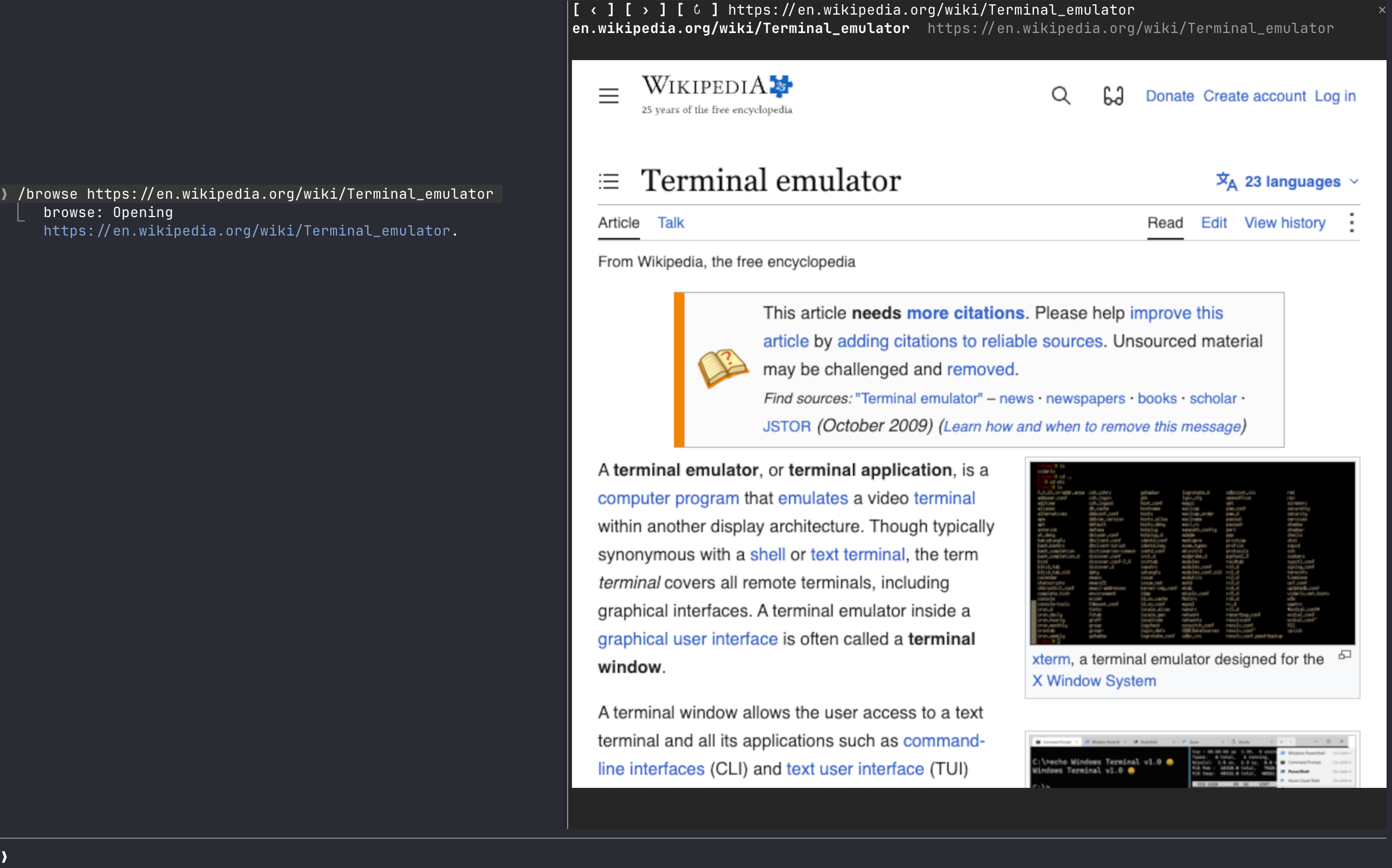
DevTools プロトコルで駆動する、プロンプト横のペイン内 Web ブラウザー /browse を追加する Claude Code プラグインです。
jamubc/toolbox/tree/main/plugins/browse
browse は jamubc/toolbox marketplace 由来の Claude Code plugin で、prompt の横の pane に Web browser を開きます。/plugin marketplace add jamubc/toolbox の後に /plugin install browse@toolbox で install します。/browse で start page、/browse <address or words> で移動または DuckDuckGo 検索、/browse close で停止します。実ピクセル描画は kitty graphics protocol(kitty または Ghostty)を使い、他の terminal では色付き half-block にフォールバックします。Claude desktop app、VS Code extension、mobile には何も表示しません。Chrome/Chromium/Brave/Edge と PATH 上の Node.js 18+ が必要です。macOS(テスト済み)と Linux(未テスト)をサポートし、Windows にはまだ対応せず、専用の Chrome profile を ~/.cache/claude-browse/chrome-profile に保持します。
まず作者の README で marketplace とプラグイン名を確認してください。コマンドはリポジトリの構成によって変わる場合があります。
claude plugin marketplace add jamubc/toolbox
claude plugin install browse
A Claude Code web browser.
Add the marketplace:
/plugin marketplace add jamubc/toolbox
Install the plugin:
/plugin install browse@toolbox
| Command | What it does |
| --- | --- |
| /browse | Opens the browser on a start page: type an address or a search and press Enter, or pick YouTube, DuckDuckGo, Wikipedia, Hacker News or GitHub. |
| /browse <address or words> | Opens the address, or searches DuckDuckGo. |
| /browse close, or the pane's ✕ | Closes the pane and stops the browser and its sound. |
| The address bar | Type an address or words and press Enter. It has the keys when the start page opens. |
| Click the page | Clicks there. Your keys then go to the page; Esc gives them back to the prompt. |
| Mouse wheel over the page | Scrolls the page. |
| /config → How the page is drawn | auto, always real pixels (kitty or Ghostty only) or always colored blocks (any terminal). |
| Where you run Claude Code | Picture | Sound | | --- | --- | --- | | kitty, Ghostty | Real pixels (kitty graphics protocol). Untested so far. | Yes | | Any other terminal: Terminal.app, iTerm2, Zed, VS Code's terminal, WezTerm, tmux, or over ssh | Colored half-blocks, two pixels per character. Video is recognizable but chunky, and small text cannot be read. | Yes, on the machine running Claude Code | | Claude desktop app, VS Code extension, mobile | Nothing. The pane says the browser only draws in the terminal, and no browser starts. | No |
| System | Status | | --- | --- | | macOS | Tested: YouTube with sound, clicks, keys, the wheel, closing. | | Linux | Should work; untested. Chrome is looked up on your PATH. | | Windows | Not supported yet. The pane says so. |
/config → Browser to draw in and Node.js 18+ to run it./config → How the page is drawn back to auto or colored blocks./browse says so.browser/browser.mjs runs Chrome headless and drives it over the DevTools protocol, with no dependencies.
hooks/register.tsx draws the pane, answers /browse, and forwards the wheel.hooks/pointer.tsx lies over the picture and passes on clicks and keys./clear and /compact leave the page up: /clear starts a new session in the same process, so the pane keeps what it was showing and writes it into the new one./browse <address> shows in the conversation as the command's reply, so Claude can read it. Pages, frames and what you type into the page stay between the pane and the local Chrome.~/.cache/claude-browse/chrome-profile: cookies and logins persist there between sessions, apart from your everyday Chrome profile. Delete that folder to forget them.
neural-trader(v2.7+)を基盤にしたニューラル取引戦略です。自己学習する LSTM/Transformer/N-BEATS モデル、Rust/NAPI バックテスト、112+ の MCP ツール、スウォーム協調、ポートフォリオ最適化を備えます。

Claude Code 用 Repowise プラグイン。Graph、Git、Docs、Decisions、Code Health の 5 層のコードインテリジェンスを提供し、MCP ツール、slash commands、自動 skills で Claude にアーキテクチャ、所有者、ホットスポット、欠陥リスクを理解させます。spinner ヒント、margin notes、変更レビュー、/lens パネルを備えた Claude Code mod の Lens も含みます。

Claude Code 向けの Power BI / Microsoft Fabric プラグインです。fabric-cli(fab)スキル、移行コマンド、fab に従ってワークスペースと項目をツリー表示する /fabric-pane mod を提供します。
