
aqaurius6666@aqaurius6666
aqaurius6666/claude-blast-radius
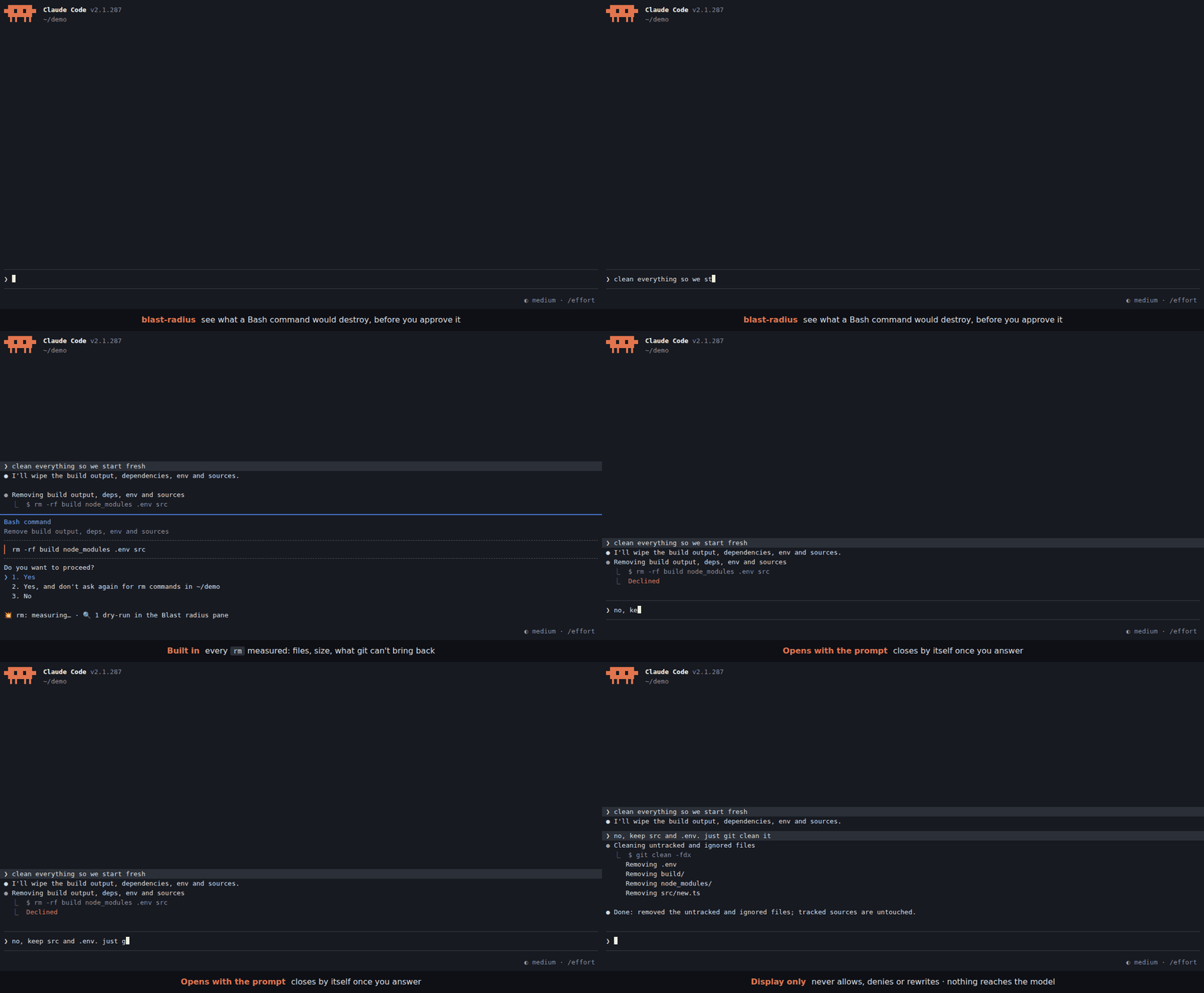
破壊的な Bash コマンドが権限を求めるときに影響範囲をプレビューする Claude Code mod です。rm の対象(ファイル、サイズ、git で復元できないもの)を測定し、ユーザー定義の正規表現 → dry-run ルールをダイアログ下の1行とサイドペインに表示します。表示だけを行い、権限の判断は変更しません。
aqaurius6666/claude-blast-radius
Claude Code mod です。Bash コマンドが権限を求める直前に、回答する前にそのコマンドが何を破壊するかを表示します。
rm について、ファイル、サイズ、git で取り戻せない量を測定します。git clean -fdx → git clean -n -fdx)。ダイアログの下に1行を表示します。詳細(パスごとの情報と dry-run の全出力)は Blast radius サイドペインに送られ、プロンプトと一緒に開いて回答すると閉じます。モデルのコンテキストには何も届かず、権限の判断も変わりません。
この mod は権限の判断をそのまま通します。呼び出しを許可、拒否、書き換えすることはなく、何も表示されないから安全という意味でもありません。パーサーは find -delete、bash -c、エイリアス、関数、heredoc、スクリプトを見落とすことがあるためです。
まず作者の README で marketplace とプラグイン名を確認してください。コマンドはリポジトリの構成によって変わる場合があります。
claude plugin marketplace add aqaurius6666/claude-blast-radius
claude plugin install blast-radius
A Claude Code mod. When a Bash command is about to ask for permission, it shows what the command would destroy, before you answer.
rm is measured: files, size, and how much git can't bring back.git clean -fdx → git clean -n -fdx).One line goes under the dialog. Details (per path, full dry-run output) go to the Blast radius side pane, which opens with the prompt and closes once you answer it. Nothing reaches the model's context, and the permission decision is never changed.
1. Turn on function hooks. The mod is built on them. Add this to your shell rc (~/.zshrc, ~/.bashrc) and open a new terminal:
export CLAUDE_CODE_ENABLE_FUNCTION_HOOKS=1
# inside tmux, herdr or another multiplexer, also:
export CLAUDE_CODE_NO_FLICKER=1
Without CLAUDE_CODE_NO_FLICKER=1, a multiplexer gets the main-screen layout, where the permission dialog draws over the pane.
2. Install.
claude plugin marketplace add aqaurius6666/claude-blast-radius
claude plugin install blast-radius@blast-radius
3. Start Claude Code (or run /reload-plugins in a session already open), and check it loaded:
/blast-radius
The Blast radius pane opens on the right with Nothing yet: opens when a permission prompt has an rm or matches a rule. That's it: you are set up. From now on the pane opens and closes by itself; this one, opened by hand, stays until you close it.
4. See it work. In a throwaway directory, ask Claude to delete something:
mkdir -p /tmp/br-try/build && cd /tmp/br-try && touch build/a.js build/b.js && claude
> delete the build folder
When the permission dialog opens, a line appears under it:
💥 rm -r: ⚠ 2 not in git · 2 files · 4 KB
No line? The mod only speaks when Claude Code asks. If an allow rule or auto mode approves
rmwithout asking, there is no dialog to annotate. To always be asked forrm, add to~/.claude/settings.json:{ "permissions": { "ask": ["Bash(rm *)"] } }Still nothing? See Troubleshooting.
💥 rm -r: ⚠ 1,117 not in git (1,100 gitignored) · 1,204 files · 48 MB
💥 rm -r: ⛔ deletes $HOME · ⚠ 312,004 not in git · ≥240,118 files · ≥12 GB
💥 rm: all in git · 2 files · 4 KB
Worst news first:
| Part | Meaning |
| --- | --- |
| ⛔ deletes /, $HOME, the project, .git history | the target is (or contains) one of these |
| ⚠ N not in git | modified, untracked or gitignored files, or files outside any repo: gone for good |
| (M gitignored) | the part of N that is gitignored: build output, but also .env files |
| all in git | everything is committed or staged: git checkout brings it back |
| outside project | a target outside the session's working directory |
| ≥ | a probe hit its 3 s limit; the real number is bigger |
| 🔍 N dry-runs | your rules matched; their output is in the pane |
| details: /blast-radius | the pane could not be drawn (narrow terminal): run it to see details |
rm or matches a rule, on a terminal 144+ columns wide (110 once you have opened it yourself with /blast-radius). Narrower, the line ends in details: /blast-radius./blast-radius opens it and shows the last previewed command. Opened this way, it stays until you close it./blast-radius off closes it and stops it opening by itself (kept across sessions). The line under the dialog stays. /blast-radius on undoes it.Rules live in any settings.json (user ~/.claude/settings.json, project .claude/settings.json or local .claude/settings.local.json) under pluginConfigs.blast-radius.options. List rule names in rules, then give each a .match and a .preview:
{
  "pluginConfigs": {
    "blast-radius": {
      "options": {
        "rules": ["kdel", "tfd", "gclean"],
        "kdel.match": "^kubectl delete (.+)$",
        "kdel.preview": "kubectl delete $1 --dry-run=server -o name",
        "tfd.match": "^terraform destroy",
        "tfd.preview": "terraform plan -destroy -no-color",
        "gclean.match": "^git clean (.+)$",
        "gclean.preview": "git clean -n $1"
      }
    }
  }
}
Settings are read on every prompt: edits apply without a reload. A broken rule shows as ⚠ config: … at the top of the pane.
match is a JavaScript regex, tested against each command of a chain or pipe on its own: in cd app && kubectl delete pod a | tee log it sees cd app, kubectl delete pod a and tee log. VAR=x and sudo prefixes are dropped first.preview fills $0-$9 from the match, then splits into words the way the shell would (quotes kept). It runs in the directory a cd earlier in the chain left, 10 s at most.Ready-made rules, each covered by a test, are in examples/rules.json. Copy the ones you want:
| Command | Preview |
| --- | --- |
| rm -rf a b | ls -la a b |
| kubectl delete … | kubectl delete … --dry-run=server -o name |
| kubectl apply … | kubectl diff … |
| kubectl drain NODE | pods on NODE |
| helm uninstall REL … | helm get manifest REL … |
| terraform destroy / apply | terraform plan [-destroy] |
| git clean … | git clean -n … |
| git reset --hard | git diff --stat HEAD |
| git push -f | upstream commits the push drops (HEAD..@{u}, as of the last fetch) |
| git branch -D B | commits of B on no remote |
| git stash drop / clear | git stash list |
| find … -delete | find … -print |
| rsync … --delete … | rsync --dry-run --itemize-changes … |
| aws s3 rm / mv / sync | same with --dryrun |
| docker … prune | docker system df |
⚠ A preview runs without asking, every time its rule matches a prompt. Make it read-only. The mod refuses a preview when, after filling in, it would chain commands (
;|&), still holds$VARor$(..)(so a captured$(curl ..)never runs), or starts with a shell or wrapper (sh,bash,env,sudo,xargs,python, ...). It runs by argv, never through a shell. It cannot know whether your program writes.
The mod passes the permission decision through untouched. It never allows, denies or rewrites a call.
No line does not mean safe. The parser reads the command like a human skimming it. It misses find -delete, bash -c, aliases, functions, heredocs and scripts. $VAR, $(..) and xargs rm targets are reported as unresolved and never expanded, because expanding them would run them.
| Symptom | Fix |
| --- | --- |
| /blast-radius is an unknown command | Function hooks are off: echo $CLAUDE_CODE_ENABLE_FUNCTION_HOOKS must print 1 in the shell that starts claude. Then check claude plugin list shows blast-radius@blast-radius as enabled. Restart Claude Code after either fix. |
| No line under the dialog | The command did not ask (allowed by a rule or auto mode): add Bash(rm *) to permissions.ask, see step 4. For your own rules, check the regex against the single command, not the whole chain. |
| Line ends in details: /blast-radius | The terminal is under 144 columns: widen it or run /blast-radius. |
| Dialog drawn over the pane | You are in a multiplexer: export CLAUDE_CODE_NO_FLICKER=1 and restart. |
| Pane never opens by itself | You ran /blast-radius off once: run /blast-radius on. |
| ⚠ config: … in the pane | A rule is missing .match / .preview or its regex does not compile. |
Update or remove:
claude plugin update blast-radius@blast-radius     # restart to apply
claude plugin uninstall blast-radius@blast-radius
sequenceDiagram
  participant E as Engine
  participant M as blast-radius
  participant H as Host (du, find, git)
  E->>M: tool.check (Bash)
  M->>E: next(e)
  E-->>M: verdict
  alt ask + command has rm
    M-->>E: verdict (unchanged, dialog opens)
    M->>E: ui.notice "measuring…"
    M->>H: stat / du -sk / find -type f / git status, ls-files
    M->>E: ui.notice "💥 rm: …"
  else allow / deny / no rm
    M-->>E: verdict
  end
cd X && rm Y, quotes, escapes, sudo, redirects, one-level globs.Run from a checkout for one session:
CLAUDE_CODE_ENABLE_FUNCTION_HOOKS=1 claude --plugin-dir /path/to/claude-blast-radius
Checks:
bun test                      # tests/*.spec.ts: parser, probes, rules
claude plugin test .          # tests/*.test.ts, against the engine
bun x tsc -p .                # types
claude plugin validate .      # manifests
Types come from /plugin-types into .claude/types/ (git-ignored, regenerate per Claude Code version).
Layout: hooks/parse.ts (command → chain/pipe segments, rm targets), hooks/probe.ts (targets → impact, host injected), hooks/rules.ts (settings → rules → preview argv), hooks/format.ts (impact → line), hooks/register.tsx (the hook and the pane), types/index.d.ts (pane state).

ruflo 向けの AgentBBS クロスホスト・エージェント連合(ADR-164)です。フェーズ 1 ではルーム調整を提供します:federation_bbs_register / federation_bbs_publish / federation_bbs_watch / federation_bbs_human_join。フェーズ 2(v3.40.0)では署名付きクロスホスト連合を追加します:federation_bbs_identity(永続的な Ed25519 ノード ID)、federation_bbs_peer_add(nodeId + 公開鍵でピアを固定)、federation_bbs_peers(監査/固定解除)、federation_bbs_serve(読み取り専用のプルエンドポイント)、federation_bbs_sync(固定したピアから取得し、検証に通った内容をユニオンマージ)。マージされたすべてのエンベロープは固定鍵に対して Ed25519 検証されます。署名なし、帰属不明、サイズ超過、またはホップ数超過のエンベロープは破棄され、件数が記録されます。転送は HTTP プルで、どのネットワーク(Tailscale、LAN、VPN、ループバック)でも動作し、tailnet は必要ありません。作業の所有権は claim メッセージ(ClaimIssued/Released/Handoff/Ack)で調整します。agentbbs は optionalDependencies に含まれ、パッケージがない場合はすべてのハンドラーが {degraded:true} に穏やかにフォールバックします(ADR-150 パターン)。mod(ADR-445 パターン)として、制限を強めるだけのツールガード、ローカルのスラッシュコマンド、コンソールが表示するステータスファイルを備えています。

pii-guard Mod(Claude Mods フロントエンド)

危険な Bash コマンド(rm -r、強制 push、マイグレーション)を保留し、実行前に削除内容を表示し、60 秒応答がなければキャンセルする Claude Code mod です。
