
jamubc@jamubc
jamubc/toolbox/tree/main/plugins/atlas
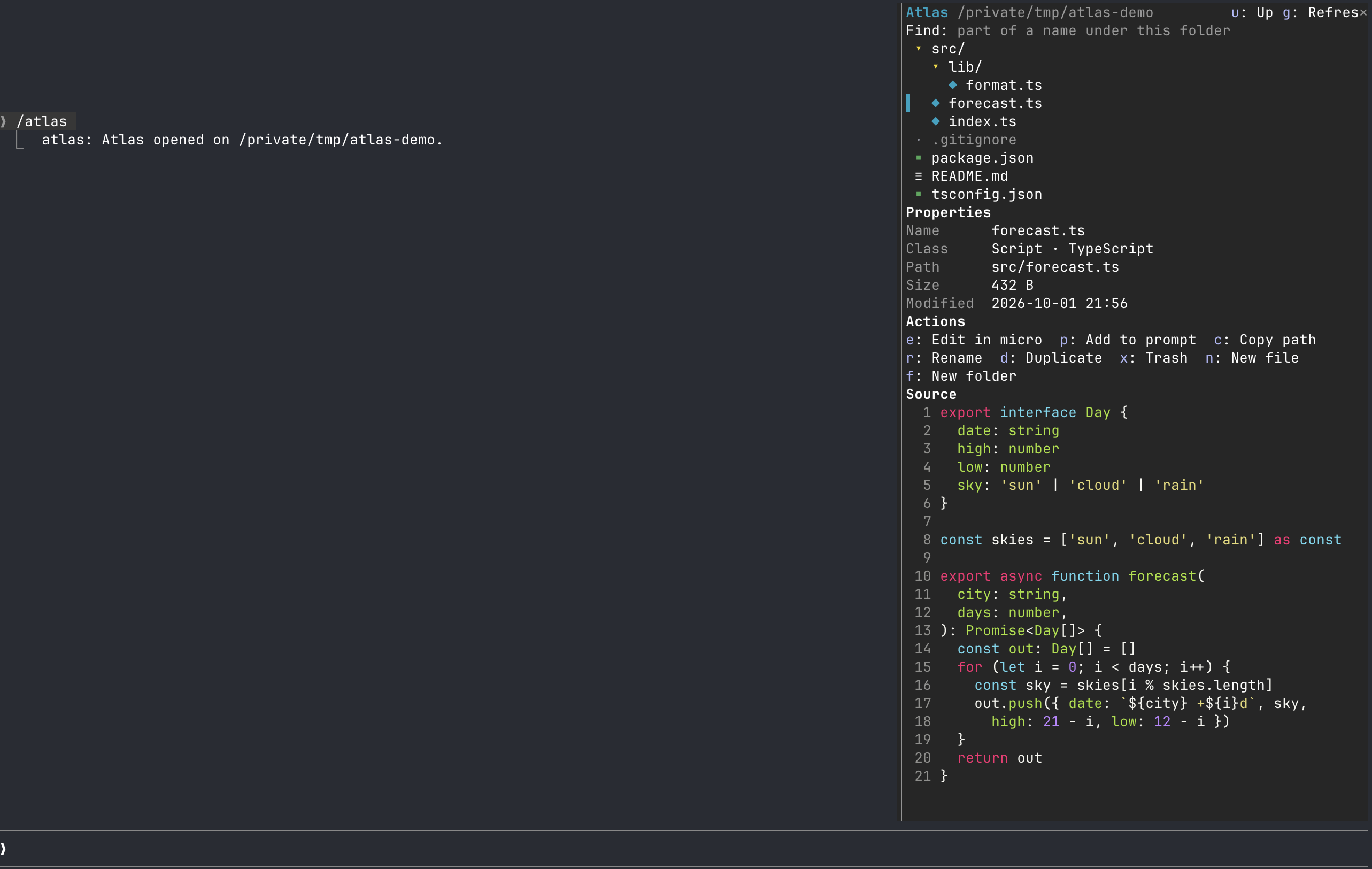
Claude Code の横のペインに表示するファイルエクスプローラーです。ツリーを参照し、プロパティを探し、Claude Code を離れずに変更できます。
jamubc/toolbox/tree/main/plugins/atlas
/atlas を追加します。Claude Code の横のペインにファイルエクスプローラーを表示し、git の印、名前またはテキストによる検索、micro によるファイル編集に対応します。
まず作者の README で marketplace とプラグイン名を確認してください。コマンドはリポジトリの構成によって変わる場合があります。
claude plugin marketplace add jamubc/toolbox
claude plugin install atlas
A file explorer in a pane beside Claude Code. Browse a tree explorer, find properties, and modify without leaving Claude Code.
Add the marketplace:
/plugin marketplace add jamubc/toolbox
Install the plugin:
/plugin install atlas@toolbox
| Command | function |
| --- | --- |
| /atlas | Opens the explorer where you left it last time in this project, or on the folder Claude Code started in. |
| /atlas <folder> | Opens the explorer there. |
| /atlas <file> | Shows the file in the tree and opens it in micro. |
| The trail | The path at the top is a trail of folders: click one to go back up to it. |
| Click a folder | Opens or closes it. |
| Click a file | Shows its Properties and Source: code with line numbers, Markdown rendered, a PNG as a picture in kitty and Ghostty. |
| Git marks | Files git sees as changed, added, untracked, deleted or renamed carry M, A, ?, D, R in color; a folder holding one carries •. The header counts them. |
| Find | Type part of a name and press Enter; text searches inside files instead (ripgrep, else grep) and a hit opens the file at that line. |
| Key | Action |
| e | Edit in micro |
| p | Add the file to your prompt as @path |
| c | Copy the path |
| a | Open with the system's own app (open, xdg-open) |
| r / d | Rename / duplicate |
| x | Move to the Trash, after you confirm |
| n / f | New file / new folder, in the selected folder |
| o | Open the selected folder as the root |
| u / g | Go up a folder / refresh |
| h / z | Show or hide dotfiles (kept between sessions) / collapse every folder |
While the pane shows, the folders on screen and git are read again every few seconds, so what Claude writes appears by itself. The root and the open folders are remembered per project.
micro runs for real inside the pane: your own micro settings, colors and plugins.
/config → Editor for files runs another terminal editor instead: nano and vim work too.| Where | Explorer | Editor | | --- | --- | --- | | Claude Code in any terminal | Yes | Yes | | Claude desktop app, VS Code extension | Yes | No. | | Mobile | Yes, without Find or naming fields | No |
| System | Status |
| --- | --- |
| macOS | Tested: browsing, Find, rename, new, duplicate, Trash, editing in micro. |
| Linux | Should work; untested. Trash needs gio or trash-cli; opening with an app needs xdg-open. |
| Windows | Not supported. Editing says so, and paths assume /. |
/usr/bin/python3 works) and micro, or the editor you set. If one is missing, the pane says which and how to fix it.? in the editor; the file itself is untouched.trash, or gio trash or trash-put on Linux, after a confirmation. If none exists, nothing is deleted./ or be .../clear starts a new session in the same process, so atlas keeps what it was showing and writes it into the new one.hooks/register.tsx draws the pane, answers /atlas, and runs the actions.hooks/files.ts holds the path, file class, tree, git status and search-output helpers.editor/term.py runs the editor in a pseudo-terminal, keeps its screen with a small terminal emulator, and streams it to the pane. Keys and clicks come back over a Unix socket in a private temp folder.hooks/terminal.tsx lies over the editor's picture and passes on keys, clicks and drags./atlas, whose reply names the folder.git status and the search run only under the folder shown.
neural-trader(v2.7+)を基盤にしたニューラル取引戦略です。自己学習する LSTM/Transformer/N-BEATS モデル、Rust/NAPI バックテスト、112+ の MCP ツール、スウォーム協調、ポートフォリオ最適化を備えます。

Claude Code 用 Repowise プラグイン。Graph、Git、Docs、Decisions、Code Health の 5 層のコードインテリジェンスを提供し、MCP ツール、slash commands、自動 skills で Claude にアーキテクチャ、所有者、ホットスポット、欠陥リスクを理解させます。spinner ヒント、margin notes、変更レビュー、/lens パネルを備えた Claude Code mod の Lens も含みます。

Claude Code 向けの Power BI / Microsoft Fabric プラグインです。fabric-cli(fab)スキル、移行コマンド、fab に従ってワークスペースと項目をツリー表示する /fabric-pane mod を提供します。
